Key Mapper APK
Make shortcuts for ANYTHING! Remap volume, power, keyboard, or floating buttons!
Descargar APK v4.7.1-foss · 14,5 MB- Versión4.7.1-foss
- Tamaño14,5 MB
- RequiereAndroid 8.0
- Actualizada23/11/2026
- LicenciaGPL-3.0-only
- PrecioGratis
Acerca de Key Mapper
Descripción del desarrollador (en inglés).
Make custom macros on your keyboard or gamepad, make on-screen buttons in any app, and unlock new functionality from your volume buttons!
Key Mapper supports a huge variety of buttons and keys*:
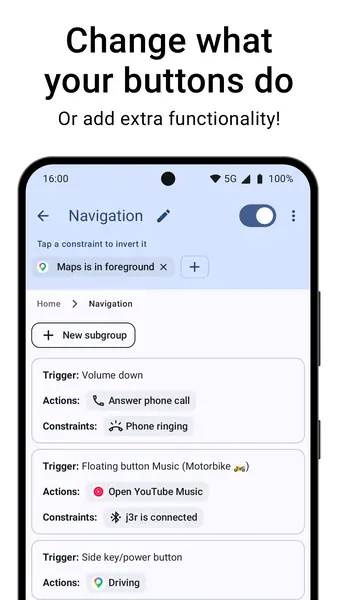
- ALL your phone buttons (volume AND side key)
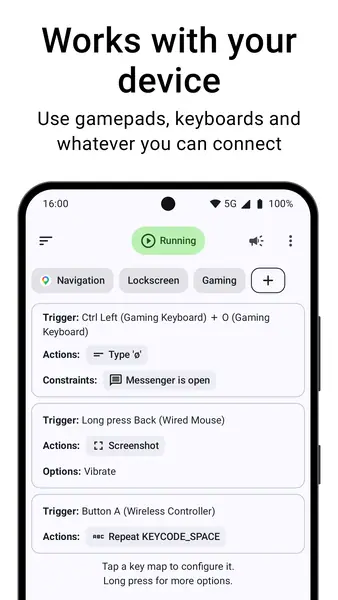
- Game controllers (D-pad, ABXY, and most others)
- Keyboards
- Headsets and headphones
- Fingerprint sensor
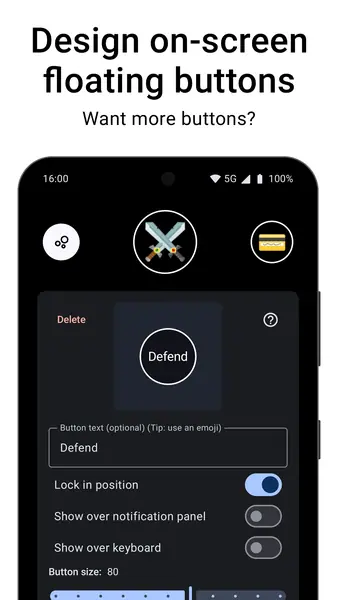
Not enough keys? Design your own on-screen button layouts and remap those just like real keys!
What shortcuts can I make? --------------------------
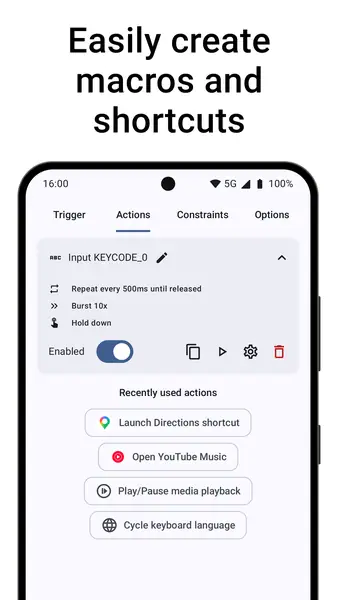
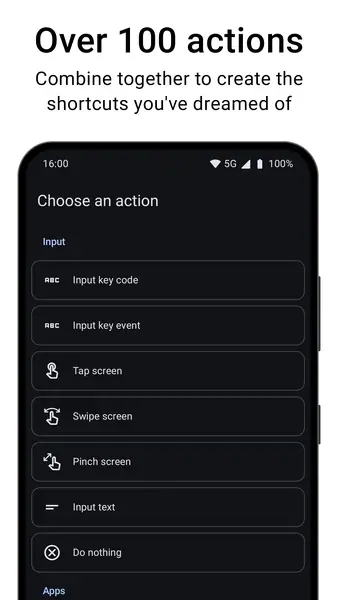
With over 100 individual actions, the sky is the limit. Build complex macros with screen taps and gestures, keyboard inputs, open apps, control media, and even send intents directly to other apps.
How much control do I have? ---------------------------
TRIGGERS: You decide how to trigger a key map. Long press, double press, press as many times as you like! Combine keys on different devices, and even include your on-screen buttons.
ACTIONS: Design specific macros for what you want to do. Combine over 100 actions, and choose the delay between each one. Set repeating actions to automate and speed up slow tasks.
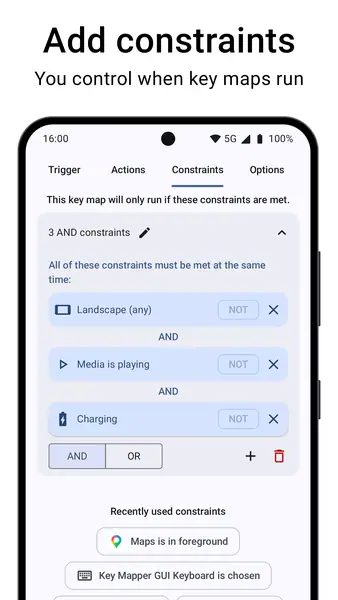
CONSTRAINTS: You choose when key maps should run and when they shouldn't. Only need it in one specific app? Or when media is playing? On your lockscreen? Constrain your key maps for maximum control.
- Most devices are already supported, with new devices being added over time. Let us know if it's not working for you and we can prioritize your device.
Not currently supported:
- Mouse buttons
- Joysticks and triggers (LT,RT) on gamepads
Security and accessibility services ---------------------------
This app includes our Key Mapper Accessibility service that uses the Android Accessibility API to detect the app in focus and adapt key presses to user-defined key maps. It is also used to draw assistive Floating Button overlays on top of other apps.
By accepting to run the accessibility service, the app will monitor key strokes while you're using your device. It will also emulate swipes and pinches if you are using those actions in the app.
It will NOT collect any user data or connect to the internet to send any data anywhere.
Our accessibility service is only triggered by the user when pressing a physical key on their device. It can be turned off any time by the user in the system accessibility settings.
Come say hi in our Discord community! keymapper.app/discord
See the code for yourself! (Open source) github.com/keymapperorg/KeyMapper
Read the documentation: keymapper.app
Información del archivo APK
| Nombre del paquete | io.github.sds100.keymapper |
|---|---|
| Versión | 4.7.1-foss (código 295) |
| Android mínimo | Android 8.0 · diseñada para API 37 |
| Arquitecturas | arm64-v8a, armeabi-v7a, x86, x86_64 |
| SHA-256 | a3b99633082a1efe789cbecbc8797c47df8ff0856972769bb0eea5bce67c5115 |
| Firma | f4d753302710c9a7a40885c891aebdb1a0f275122fdcdb7c2f45a202b213f373 |
| Licencia | GPL-3.0-only — licencia libre copyleft: el código es público y las versiones modificadas deben seguir siendo libres |
| Código fuente | github.com/keymapperorg/KeyMapper |
| Sitio oficial | keymapper.app |
Permisos solicitados
- Acceso a todos los archivos sensible
- Huella dactilar
- Mostrar notificaciones
- Iniciarse al arrancar
- Ver las apps instaladas sensible
- Ubicación precisa (GPS) sensible
- Bluetooth
- Conectar por Bluetooth
- Ver el estado del Wi-Fi
- Cambiar el Wi-Fi
- Ver el estado de la red
- Acceso a Internet
- Cámara sensible
- Vibrar
- Estado del teléfono sensible
- Leer el almacenamiento
- Hacer llamadas sensible
- Enviar SMS sensible
- Escribir en el almacenamiento
11 permiso(s) técnico(s) más
READ_LOGS WRITE_SECURE_SETTINGS ANSWER_PHONE_CALLS BLUETOOTH_ADMIN ACCESS_LOCAL_NETWORK EXPAND_STATUS_BAR ACCESS_NOTIFICATION_POLICY REQUEST_IGNORE_BATTERY_OPTIMIZATIONS REORDER_TASKS WRITE_SETTINGS MODIFY_AUDIO_SETTINGS
Versiones anteriores
- Key Mapper 4.7.1-foss23 de noviembre de 2026 · 14,5 MB
- Key Mapper 4.7.0-foss13 de noviembre de 2026 · 14,4 MB
- Key Mapper 4.6.2-foss27 de octubre de 2026 · 14,4 MB
Cómo instalar Key Mapper APK
- Pulsa Descargar APK arriba y abre el archivo cuando termine la descarga.
- Si Android lo pide, permite que tu navegador instale apps desconocidas.
- Pulsa Instalar. Key Mapper aparecerá junto a tus otras apps.
→ Cómo instalar un archivo APK en Android (paso a paso)
→ «La aplicación no está instalada»: causas y soluciones
Preguntas frecuentes
¿Key Mapper es gratis?
Sí. Key Mapper se distribuye con licencia GPL-3.0-only: gratis, sin suscripción y con el código fuente público.
¿Es seguro este archivo APK?
El archivo es el que compila y publica el repositorio F-Droid a partir del código fuente público. Su huella SHA-256 aparece arriba para que puedas compararla tras la descarga. ¿Un APK es peligroso? Cómo verificar un archivo antes de instalarlo
¿Funciona Key Mapper en mi teléfono?
Necesitas como mínimo Android 8.0. La app también funciona sin los servicios de Google, así que funciona en los teléfonos Huawei recientes.