
Chinese Converter APK
Converts between Simplified and Traditional with regional variants support!
Scarica l'APK v3.1.0 · 7,0 MB- Versione3.1.0
- Dimensione7,0 MB
- RichiedeAndroid 6.0
- Aggiornata12/03/2025
- LicenzaGPL-3.0-or-later
- PrezzoGratis
Informazioni su Chinese Converter
Descrizione fornita dallo sviluppatore (in inglese).
No ads! Supports conversion directly in-app automatically! Open source!
My second app project! Hope you will like it!
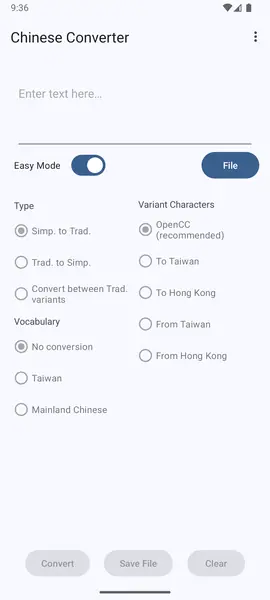
Makes use of the OpenCC database, which eliminates Simplified to Traditional conversion problems like 「后門」 or 「頭發」. It supports regional variant characters standards of Hong Kong and Taiwan, as well as word use preferences of mainland China and Taiwan.
Features:
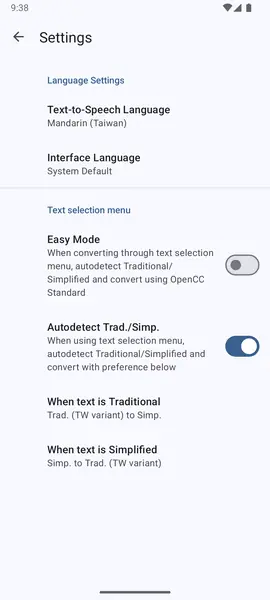
- Easy Mode automatically detects Traditional/Simplified Chinese and convert to the other
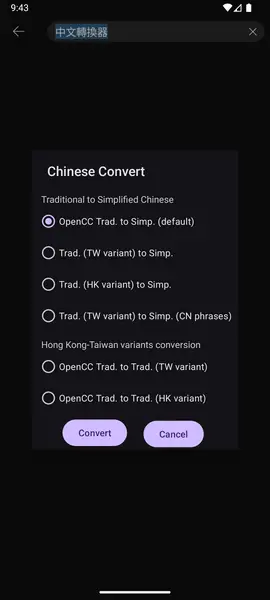
- Supports conversion in-place in input boxes of other apps
- 10 conversion schemes (see the list below)
- Text-to-Speech Feature
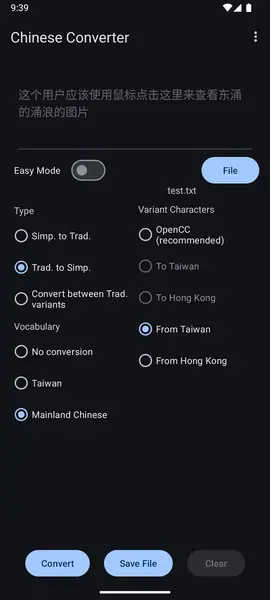
- Converting from File
- Follows latest Material 3 guidelines
- Supports night mode
- No ads and no tracking (app does not have internet or storage access)
Conversion Schemes: (OpenCC standard recommended unless there is a special need) Simplified to Traditional
- Simplified to OpenCC Traditional (recommended)
- Simplified to Traditional (TW variant)
- Simplified to Traditional (HK variant)
- Simplified to Traditional (TW variant and phrases)
Traditional to Simplified
- OpenCC Traditional to Simplified (recommended)
- Traditional (TW variant) to Simplified
- Traditional (HK variant) to Simplified
- Traditional (TW variant) to Simplified (CN phrases)
HK-Taiwan variant characters conversion
- OpenCC Traditional to Traditional (TW variant)
- OpenCC Traditional to Traditional (HK variant)
Weird issues? Send an email to [email protected] and I will fix it as soon as possible! Or send me a pull request :)
This is an open source project. The source code is released under GPL version 3 or later. Source code: https://github.com/fei0316/OpenCC-android-app/
Novità della versione 3.1.0
Text-to-Speech, text file conversion, text preprocessing, and interface experience updates.
Informazioni sul file APK
| Nome del pacchetto | com.iatfei.tsconverter |
|---|---|
| Versione | 3.1.0 (codice 18) |
| Android minimo | Android 6.0 · pensata per Android 15 |
| Architetture | arm64-v8a, armeabi-v7a, x86, x86_64 |
| SHA-256 | 0c26fb5e2b4cdabcbbe45ee90647401a159ab9ef9a4fd86d4d813c40a55449ef |
| Firma | 528e150d891a19e5bb49de930ba62c3d697684fcf8bd04113bff70a530b0a88f |
| Licenza | GPL-3.0-or-later — licenza libera copyleft: il codice è pubblico e le versioni modificate devono restare libere |
| Codice sorgente | github.com/fei0316/OpenCC-android-app |
Autorizzazioni richieste
Nessuna autorizzazione particolare.
Versioni precedenti
- Chinese Converter 3.1.012 marzo 2025 · 7,0 MB
- Chinese Converter 3.0.21 marzo 2025 · 6,8 MB
Come installare Chinese Converter APK
- Tocca Scarica l'APK qui sopra, poi apri il file al termine del download.
- Se Android lo chiede, consenti al browser di installare app sconosciute.
- Tocca Installa. Chinese Converter comparirà insieme alle altre app.
→ Come installare un file APK su Android (passo passo)
→ «App non installata»: cause e soluzioni
Domande frequenti
Chinese Converter è gratis?
Sì. Chinese Converter è distribuita con licenza GPL-3.0-or-later: gratuita, senza abbonamento e con codice sorgente pubblico.
Questo file APK è sicuro?
Il file è quello compilato e pubblicato dal repository F-Droid a partire dal codice sorgente pubblico. L'impronta SHA-256 è indicata qui sopra: puoi confrontarla dopo il download. Un APK è pericoloso? Come verificare un file prima di installarlo
Chinese Converter funziona sul mio telefono?
Serve almeno Android 6.0. L'app funziona anche senza i servizi Google, quindi anche sui telefoni Huawei recenti.





