
Chinese Converter APK
Converts between Simplified and Traditional with regional variants support!
Baixar APK v3.1.0 · 7,0 MB- Versão3.1.0
- Tamanho7,0 MB
- RequerAndroid 6.0
- Atualizado12/03/2025
- LicençaGPL-3.0-or-later
- PreçoGrátis
Sobre o Chinese Converter
Descrição fornecida pelo desenvolvedor (em inglês).
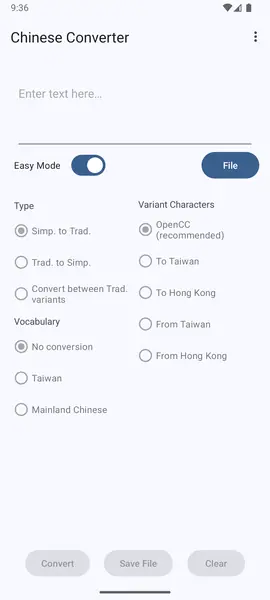
No ads! Supports conversion directly in-app automatically! Open source!
My second app project! Hope you will like it!
Makes use of the OpenCC database, which eliminates Simplified to Traditional conversion problems like 「后門」 or 「頭發」. It supports regional variant characters standards of Hong Kong and Taiwan, as well as word use preferences of mainland China and Taiwan.
Features:
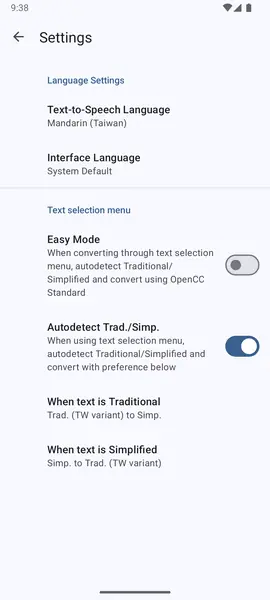
- Easy Mode automatically detects Traditional/Simplified Chinese and convert to the other
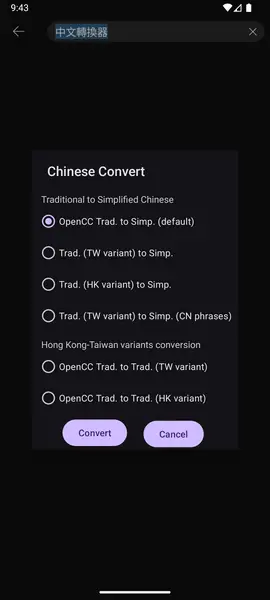
- Supports conversion in-place in input boxes of other apps
- 10 conversion schemes (see the list below)
- Text-to-Speech Feature
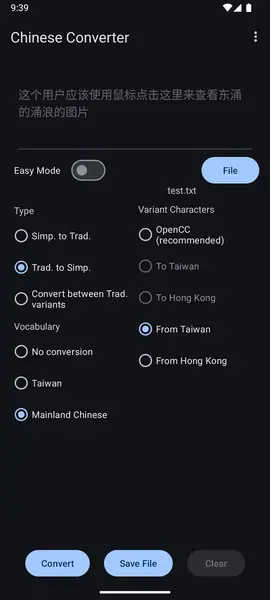
- Converting from File
- Follows latest Material 3 guidelines
- Supports night mode
- No ads and no tracking (app does not have internet or storage access)
Conversion Schemes: (OpenCC standard recommended unless there is a special need) Simplified to Traditional
- Simplified to OpenCC Traditional (recommended)
- Simplified to Traditional (TW variant)
- Simplified to Traditional (HK variant)
- Simplified to Traditional (TW variant and phrases)
Traditional to Simplified
- OpenCC Traditional to Simplified (recommended)
- Traditional (TW variant) to Simplified
- Traditional (HK variant) to Simplified
- Traditional (TW variant) to Simplified (CN phrases)
HK-Taiwan variant characters conversion
- OpenCC Traditional to Traditional (TW variant)
- OpenCC Traditional to Traditional (HK variant)
Weird issues? Send an email to [email protected] and I will fix it as soon as possible! Or send me a pull request :)
This is an open source project. The source code is released under GPL version 3 or later. Source code: https://github.com/fei0316/OpenCC-android-app/
Novidades da versão 3.1.0
Text-to-Speech, text file conversion, text preprocessing, and interface experience updates.
Informações do arquivo APK
| Nome do pacote | com.iatfei.tsconverter |
|---|---|
| Versão | 3.1.0 (código 18) |
| Android mínimo | Android 6.0 · feito para Android 15 |
| Arquiteturas | arm64-v8a, armeabi-v7a, x86, x86_64 |
| SHA-256 | 0c26fb5e2b4cdabcbbe45ee90647401a159ab9ef9a4fd86d4d813c40a55449ef |
| Assinatura | 528e150d891a19e5bb49de930ba62c3d697684fcf8bd04113bff70a530b0a88f |
| Licença | GPL-3.0-or-later — licença livre copyleft: o código é público e versões modificadas devem continuar livres |
| Código-fonte | github.com/fei0316/OpenCC-android-app |
Permissões solicitadas
Nenhuma permissão especial.
Versões anteriores
- Chinese Converter 3.1.012 de março de 2025 · 7,0 MB
- Chinese Converter 3.0.21 de março de 2025 · 6,8 MB
Como instalar o Chinese Converter APK
- Toque em Baixar APK acima e abra o arquivo quando o download terminar.
- Se o Android pedir, permita que o navegador instale apps desconhecidos.
- Toque em Instalar. O Chinese Converter aparecerá junto aos seus outros apps.
→ Como instalar um arquivo APK no Android (passo a passo)
→ "App não instalado": causas e soluções
Perguntas frequentes
O Chinese Converter é grátis?
Sim. O Chinese Converter é distribuído sob a licença GPL-3.0-or-later: grátis, sem assinatura e com código-fonte público.
Este arquivo APK é seguro?
O arquivo é o compilado e publicado pelo repositório F-Droid a partir do código-fonte público. A impressão digital SHA-256 aparece acima para você comparar depois do download. APK é perigoso? Como verificar um arquivo antes de instalar
O Chinese Converter funciona no meu celular?
É preciso ter pelo menos Android 6.0. O app também funciona sem os serviços do Google, inclusive em celulares Huawei recentes.