
DNS Toggle APK
Easily toggle and automate Private DNS through the Quick Settings panel.
Scarica l'APK v3.1.0 · 2,1 MB- Versione3.1.0
- Dimensione2,1 MB
- RichiedeAndroid 9
- Aggiornata11/11/2026
- LicenzaMIT
- PrezzoGratis
Informazioni su DNS Toggle
Descrizione fornita dallo sviluppatore (in inglese).
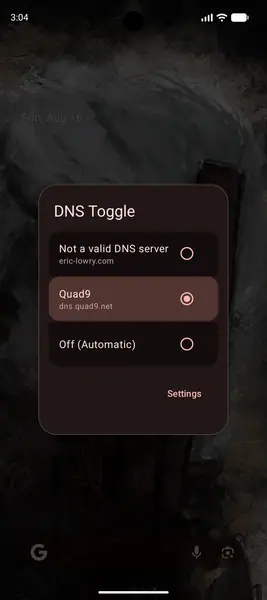
DNS Toggle is a small Android app that allows you to easily toggle and automate your phone's Private DNS through the Quick Settings panel.
IMPORTANT: To modify Private DNS system settings, this app requires the WRITE_SECURE_SETTINGS permission. You must either have a rooted device, use Shizuku, or manually grant it via ADB:  adb shell pm grant com.ericlowry.dnstoggle android.permission.WRITE_SECURE_SETTINGS
Features
- Quick Settings Tile: Toggle Private DNS on/off directly from the Quick Settings panel.
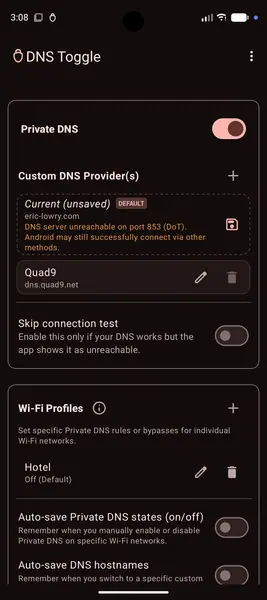
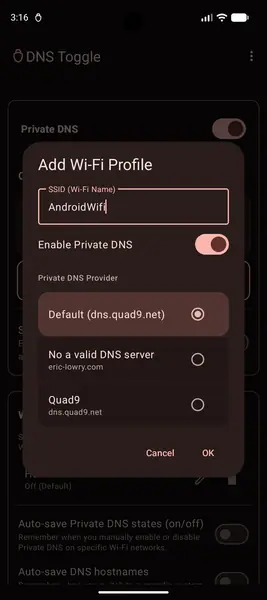
- Custom DNS Providers: Define one or more preferred hostnames (e.g., dns.nextdns.io) and seamlessly switch between them.
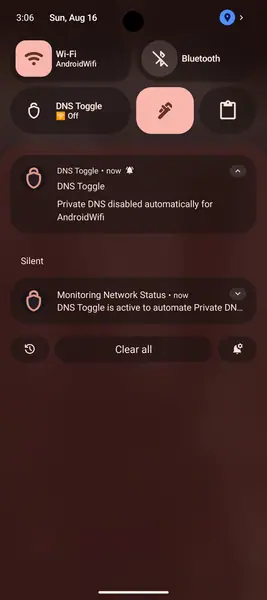
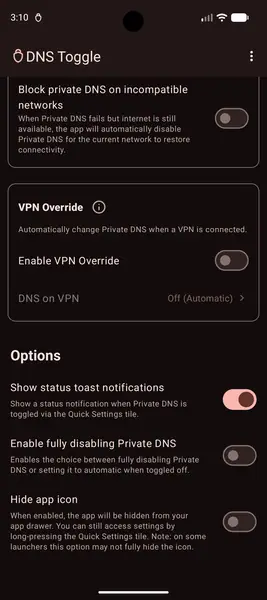
- Wi-Fi Filtering: Automatically disable Private DNS when connected to specific Wi-Fi networks.
- Automatic Blocking: Automatically blacklists the current Wi-Fi SSID when Private DNS causes connectivity issues.
- VPN Override: Automatically enforce a specific DNS hostname or disable Private DNS entirely whenever a VPN is active on your device.
- Backup & Restore: Export and import your configuration via password-encrypted files.
- Dynamic Tile Labeling: Rename the Quick Settings tile.
- Hide App Icon: Keep your home screen clean while maintaining access via the Quick Settings tile.
Privacy & Permissions
- No tracking, no ads, and no data collection.
- Location permissions are optional, and only used to identify Wi-Fi network names for the SSID Filter feature. They are never used to track your physical location.
Novità della versione 3.1.0
- Added backup encryption system in case of broken or unavailable Android Keystore
Informazioni sul file APK
| Nome del pacchetto | com.ericlowry.dnstoggle |
|---|---|
| Versione | 3.1.0 (codice 37) |
| Android minimo | Android 9 · pensata per API 37 |
| Architetture | Tutte (universale) |
| SHA-256 | 76e672e0b16cce3f7fd492be8a2bbcd88006ba588956fd15d3a186bb596817fb |
| Firma | a2fc0ad31958329b9df09fcab9e618ff67f23bee0b46267c632ac97f9600f283 |
| Licenza | MIT — licenza libera permissiva: il codice sorgente è pubblico e riutilizzabile |
| Codice sorgente | github.com/ELowry/DNSToggle |
| Sito ufficiale | github.com/ELowry/DNSToggle |
Autorizzazioni richieste
- Accesso a Internet
- Vedere lo stato del Wi-Fi
- Vedere lo stato della rete
- Posizione precisa (GPS) sensibile
- Posizione approssimativa sensibile
- Posizione in background sensibile
- Mostrare notifiche
- Funzionare in background
- Avviarsi all'accensione
- Impronta / biometria
- Impronta digitale
Altre 3 autorizzazioni tecniche
WRITE_SECURE_SETTINGS NEARBY_WIFI_DEVICES REQUEST_IGNORE_BATTERY_OPTIMIZATIONS
Versioni precedenti
- DNS Toggle 3.1.011 novembre 2026 · 2,1 MB
- DNS Toggle 3.0.84 novembre 2026 · 2,1 MB
- DNS Toggle 3.0.71 novembre 2026 · 2,1 MB
Come installare DNS Toggle APK
- Tocca Scarica l'APK qui sopra, poi apri il file al termine del download.
- Se Android lo chiede, consenti al browser di installare app sconosciute.
- Tocca Installa. DNS Toggle comparirà insieme alle altre app.
→ Come installare un file APK su Android (passo passo)
→ «App non installata»: cause e soluzioni
Domande frequenti
DNS Toggle è gratis?
Sì. DNS Toggle è distribuita con licenza MIT: gratuita, senza abbonamento e con codice sorgente pubblico.
Questo file APK è sicuro?
Il file è quello compilato e pubblicato dal repository F-Droid a partire dal codice sorgente pubblico. L'impronta SHA-256 è indicata qui sopra: puoi confrontarla dopo il download. Un APK è pericoloso? Come verificare un file prima di installarlo
DNS Toggle funziona sul mio telefono?
Serve almeno Android 9. L'app funziona anche senza i servizi Google, quindi anche sui telefoni Huawei recenti.





