Haven SSH Client APK
SSH terminal, Wayland desktop, VNC/RDP, cloud storage & SFTP for Android
Scarica l'APK v5.94.57 · 191,7 MB- Versione5.94.57
- Dimensione191,7 MB
- RichiedeAndroid 8.0
- Aggiornata23/11/2026
- LicenzaGPL-3.0-only
- PrezzoGratis

Informazioni su Haven SSH Client
Descrizione fornita dallo sviluppatore (in inglese).
Haven is an open-source SSH, VNC, RDP, and SFTP client for Android with a native Wayland desktop and cloud storage.
Terminal:
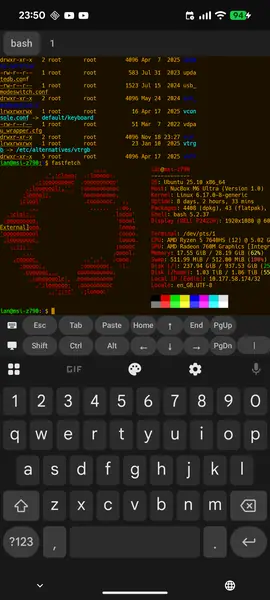
- Full VT100/xterm emulator with Unicode, multiple tabs, and 6 color schemes
- Session persistence via tmux, zellij, screen, or byobu
- Mouse mode for TUI apps (vim, htop, mc)
- Configurable keyboard toolbar with Esc, Ctrl, Alt, arrows, function keys, and custom macros
- Text selection with word expansion, copy, and clickable URL detection
- Voice input and autocomplete mode
- Mosh and Eternal Terminal for roaming and persistent connections
Native Wayland Desktop:
- GPU-accelerated labwc compositor running directly on your device
- Waybar panel, fuzzel app launcher, thunar file manager, mousepad editor
- Starter Pack addon with Firefox, calculator, image viewer
- XWayland for X11 app compatibility
- Multi-desktop management — run multiple desktops simultaneously
- No root required (PRoot with Alpine Linux)
VNC Remote Desktop:
- VNC viewer with pinch-to-zoom, pan, and fullscreen mode
- SSH tunnel support for encrypted connections
- Touch-to-click with drag gesture support
RDP Remote Desktop:
- Connect to Windows Remote Desktop, xrdp, and GNOME Remote Desktop
- Pinch-to-zoom, keyboard with scancode mapping
- SSH tunnel with auto-connect through saved profiles
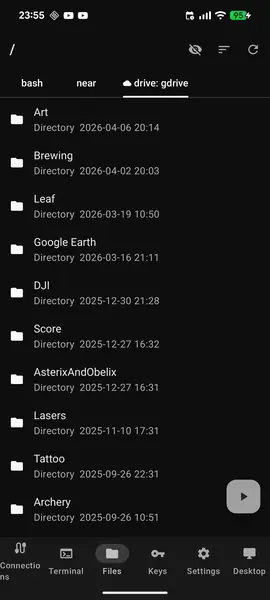
Cloud Storage:
- 60+ providers via rclone — Google Drive, Dropbox, OneDrive, S3, and more
- OAuth authentication with browser flow
- Folder sync with filters, bandwidth limits, and dry-run preview
- Media streaming to VLC via local HTTP server
- DLNA server for smart TVs and Chromecast
File Transfer:
- SFTP browser with upload, download, rename, delete, and folder transfer
- SMB/Windows file share browsing with optional SSH tunnel
- Cross-filesystem copy between any backends
On-device Linux:
- PRoot userland: Alpine, Debian, Arch, or Void side-by-side, each with its native package manager
- Linux Guest (UML): a whole Linux kernel booted as an app process on any arm64 device — real /proc, real block devices, its own network stack, for when syscall emulation isn't enough
- USB card rescue: a failing SD card's raw device reaches a Linux guest in seconds, ready for ddrescue
Networking:
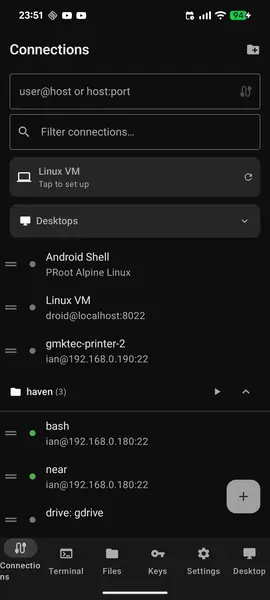
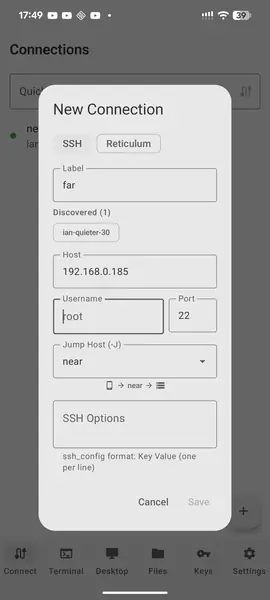
- SSH with auto-reconnect, port forwarding, and ProxyJump multi-hop
- Tailscale peer auto-discovery
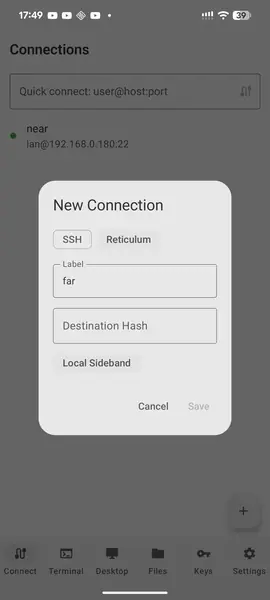
- Reticulum mesh network support via rnsh
- Network discovery for SSH hosts on local network
Security:
- SSH key generation (Ed25519, RSA, ECDSA) with encrypted storage
- FIDO2 hardware key support (ed25519-sk, ecdsa-sk) via NFC or USB
- Biometric app lock with configurable timeout
- Connection audit log
- No ads, no tracking, no data collection
Haven is free and open source (AGPLv3).
Novità della versione 5.94.57
Add a global default address family that new SSH connections inherit (Settings → Default address family), including IPv6-preferred / IPv4-preferred modes that fall back to the other family when the preferred one is unreachable. Existing connections keep their own setting.
Informazioni sul file APK
| Nome del pacchetto | sh.haven.app |
|---|---|
| Versione | 5.94.57 (codice 9821) |
| Android minimo | Android 8.0 · pensata per Android 15 |
| Architetture | arm64-v8a |
| SHA-256 | 5a68919aa8b1759d9f693116a9748790092f44d520df3efbed266bdb2635a1af |
| Firma | ea05a89431961b8ac53c36725452673c2be1c2d7b6e48771617b974e6092b332 |
| Licenza | GPL-3.0-only — licenza libera copyleft: il codice è pubblico e le versioni modificate devono restare libere |
| Codice sorgente | github.com/GlassOnTin/Haven |
Autorizzazioni richieste
- Accesso a Internet
- Vedere lo stato della rete
- Funzionare in background
- Impronta / biometria
- Mostrare notifiche
- Impedire lo standby
- NFC
- Installare altre app sensibile
- Leggere l'archivio
- Accesso a tutti i file sensibile
- Posizione approssimativa sensibile
- Posizione precisa (GPS) sensibile
- Fotocamera sensibile
- Connettersi via Bluetooth
- Bluetooth
- Cercare dispositivi Bluetooth
- Impronta digitale
- Avviarsi all'accensione
Altre 3 autorizzazioni tecniche
REQUEST_IGNORE_BATTERY_OPTIMIZATIONS CHANGE_WIFI_MULTICAST_STATE BLUETOOTH_ADMIN
Versioni precedenti
- Haven SSH Client 5.94.5723 novembre 2026 · 191,7 MB
- Haven SSH Client 5.94.5220 novembre 2026 · 191,6 MB
- Haven SSH Client 5.94.4217 novembre 2026 · 191,3 MB
Come installare Haven SSH Client APK
- Tocca Scarica l'APK qui sopra, poi apri il file al termine del download.
- Se Android lo chiede, consenti al browser di installare app sconosciute.
- Tocca Installa. Haven SSH Client comparirà insieme alle altre app.
→ Come installare un file APK su Android (passo passo)
→ «App non installata»: cause e soluzioni
Domande frequenti
Haven SSH Client è gratis?
Sì. Haven SSH Client è distribuita con licenza GPL-3.0-only: gratuita, senza abbonamento e con codice sorgente pubblico.
Questo file APK è sicuro?
Il file è quello compilato e pubblicato dal repository F-Droid a partire dal codice sorgente pubblico. L'impronta SHA-256 è indicata qui sopra: puoi confrontarla dopo il download. Un APK è pericoloso? Come verificare un file prima di installarlo
Haven SSH Client funziona sul mio telefono?
Serve almeno Android 8.0. L'app funziona anche senza i servizi Google, quindi anche sui telefoni Huawei recenti.