Haven SSH Client APK
SSH terminal, Wayland desktop, VNC/RDP, cloud storage & SFTP for Android
Download APK v5.94.57 · 191.7 MB- Version5.94.57
- Size191.7 MB
- RequiresAndroid 8.0
- Updated11/23/2026
- LicenceGPL-3.0-only
- PriceFree

About Haven SSH Client
Haven is an open-source SSH, VNC, RDP, and SFTP client for Android with a native Wayland desktop and cloud storage.
Terminal:
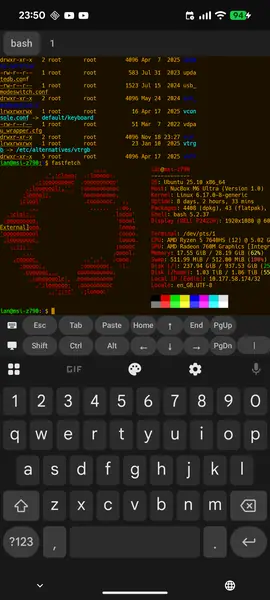
- Full VT100/xterm emulator with Unicode, multiple tabs, and 6 color schemes
- Session persistence via tmux, zellij, screen, or byobu
- Mouse mode for TUI apps (vim, htop, mc)
- Configurable keyboard toolbar with Esc, Ctrl, Alt, arrows, function keys, and custom macros
- Text selection with word expansion, copy, and clickable URL detection
- Voice input and autocomplete mode
- Mosh and Eternal Terminal for roaming and persistent connections
Native Wayland Desktop:
- GPU-accelerated labwc compositor running directly on your device
- Waybar panel, fuzzel app launcher, thunar file manager, mousepad editor
- Starter Pack addon with Firefox, calculator, image viewer
- XWayland for X11 app compatibility
- Multi-desktop management — run multiple desktops simultaneously
- No root required (PRoot with Alpine Linux)
VNC Remote Desktop:
- VNC viewer with pinch-to-zoom, pan, and fullscreen mode
- SSH tunnel support for encrypted connections
- Touch-to-click with drag gesture support
RDP Remote Desktop:
- Connect to Windows Remote Desktop, xrdp, and GNOME Remote Desktop
- Pinch-to-zoom, keyboard with scancode mapping
- SSH tunnel with auto-connect through saved profiles
Cloud Storage:
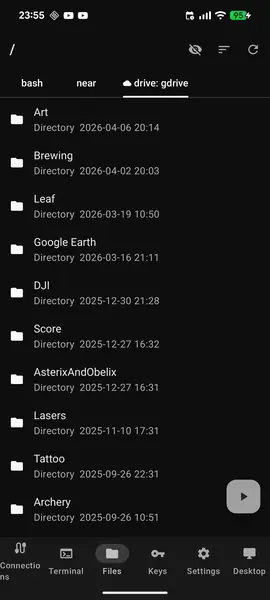
- 60+ providers via rclone — Google Drive, Dropbox, OneDrive, S3, and more
- OAuth authentication with browser flow
- Folder sync with filters, bandwidth limits, and dry-run preview
- Media streaming to VLC via local HTTP server
- DLNA server for smart TVs and Chromecast
File Transfer:
- SFTP browser with upload, download, rename, delete, and folder transfer
- SMB/Windows file share browsing with optional SSH tunnel
- Cross-filesystem copy between any backends
On-device Linux:
- PRoot userland: Alpine, Debian, Arch, or Void side-by-side, each with its native package manager
- Linux Guest (UML): a whole Linux kernel booted as an app process on any arm64 device — real /proc, real block devices, its own network stack, for when syscall emulation isn't enough
- USB card rescue: a failing SD card's raw device reaches a Linux guest in seconds, ready for ddrescue
Networking:
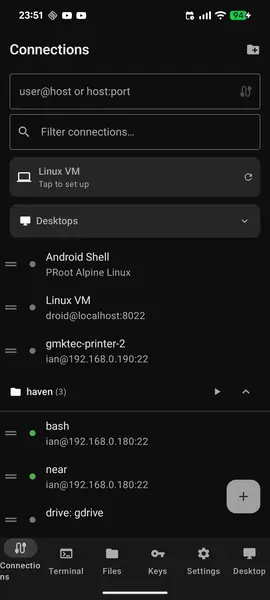
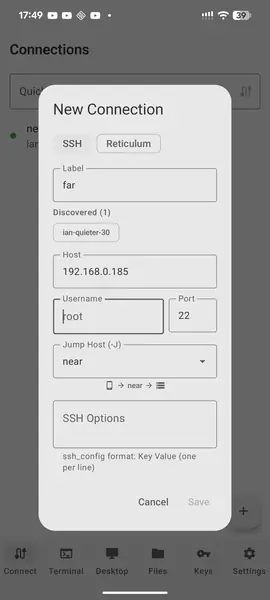
- SSH with auto-reconnect, port forwarding, and ProxyJump multi-hop
- Tailscale peer auto-discovery
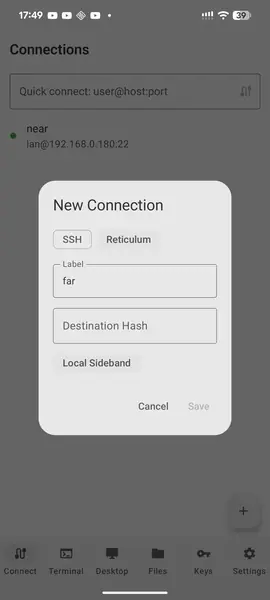
- Reticulum mesh network support via rnsh
- Network discovery for SSH hosts on local network
Security:
- SSH key generation (Ed25519, RSA, ECDSA) with encrypted storage
- FIDO2 hardware key support (ed25519-sk, ecdsa-sk) via NFC or USB
- Biometric app lock with configurable timeout
- Connection audit log
- No ads, no tracking, no data collection
Haven is free and open source (AGPLv3).
What's new in version 5.94.57
Add a global default address family that new SSH connections inherit (Settings → Default address family), including IPv6-preferred / IPv4-preferred modes that fall back to the other family when the preferred one is unreachable. Existing connections keep their own setting.
APK file information
| Package name | sh.haven.app |
|---|---|
| Version | 5.94.57 (code 9821) |
| Minimum Android | Android 8.0 · targets Android 15 |
| Architectures | arm64-v8a |
| SHA-256 | 5a68919aa8b1759d9f693116a9748790092f44d520df3efbed266bdb2635a1af |
| Signature | ea05a89431961b8ac53c36725452673c2be1c2d7b6e48771617b974e6092b332 |
| Licence | GPL-3.0-only — copyleft free licence: the code is public and modified versions must stay free |
| Source code | github.com/GlassOnTin/Haven |
Permissions
- Internet access
- View network status
- Run in the background
- Fingerprint / biometrics
- Show notifications
- Keep the device awake
- NFC
- Install other apps sensitive
- Read storage
- Access all files sensitive
- Approximate location sensitive
- Precise location (GPS) sensitive
- Camera sensitive
- Connect via Bluetooth
- Bluetooth
- Scan for Bluetooth devices
- Fingerprint
- Start at boot
3 other technical permission(s)
REQUEST_IGNORE_BATTERY_OPTIMIZATIONS CHANGE_WIFI_MULTICAST_STATE BLUETOOTH_ADMIN
Older versions
- Haven SSH Client 5.94.57November 23, 2026 · 191.7 MB
- Haven SSH Client 5.94.52November 20, 2026 · 191.6 MB
- Haven SSH Client 5.94.42November 17, 2026 · 191.3 MB
How to install Haven SSH Client APK
- Tap Download APK above, then open the file once the download has finished.
- If Android asks, allow your browser to install unknown apps.
- Tap Install. Haven SSH Client then appears with your other apps.
Having trouble? Read our guides how to install an APK on Android and "App not installed": how to fix it.
Frequently asked questions
Is Haven SSH Client free?
Yes. Haven SSH Client is distributed under the GPL-3.0-only licence: free, no subscription, and its source code is public.
Is this APK file safe?
The file is the one built and published by the F-Droid repository from the public source code. Its SHA-256 fingerprint is shown above, so you can compare it after downloading. How to check an APK.
Will Haven SSH Client work on my phone?
You need at least Android 8.0. The app also works without Google services, so it runs on recent Huawei phones too.