
HTTP Request Shortcuts APK
Submit HTTP Requests from Shortcuts on your Home Screen
Scarica l'APK v4.10.0 · 22,3 MB- Versione4.10.0
- Dimensione22,3 MB
- RichiedeAndroid 8.0
- Aggiornata17/11/2026
- LicenzaMIT
- PrezzoGratis
Informazioni su HTTP Request Shortcuts
Descrizione fornita dallo sviluppatore (in inglese).
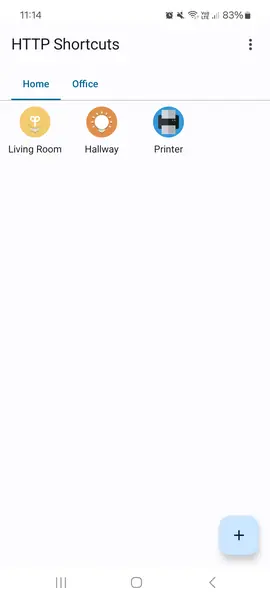
Place shortcuts or widgets on your home screen to submit HTTP requests to all your favorite RESTful APIs, webservices and other URL resources. Great for home automation projects!
- HTTP and HTTPS
- GET, POST, PUT, DELETE, PATCH, HEAD, OPTIONS and TRACE
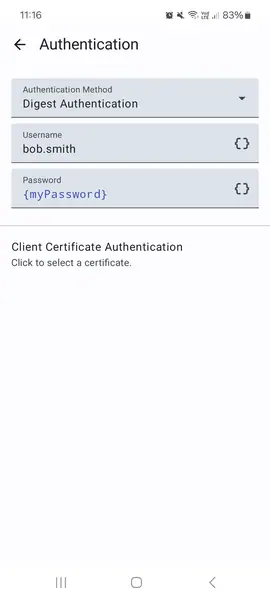
- Basic Authentication, Digest Authentication, Bearer Authentication & Client Certificate Authentication
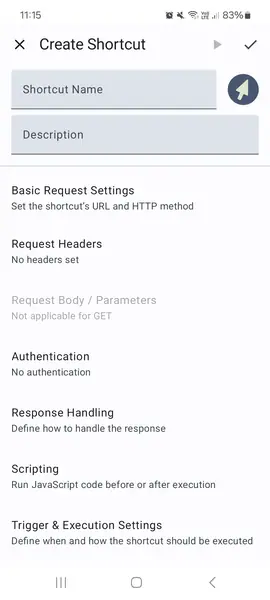
- Custom request headers
- Custom request body (text only)
- Upload files as form-data or request body
- Support for HTTP proxies
- Support for self-signed certificates
- Built-in icons, support for custom icons or using a site's favicon
- Display response as a toast, window or dialog, or run silently
- Grouping into categories through tabs
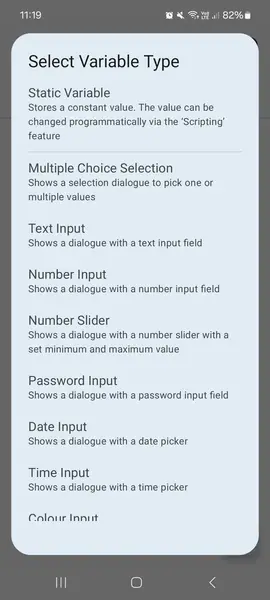
- Value injection through variables (e.g., text, numbers, passwords, selections, colors, dates, …)
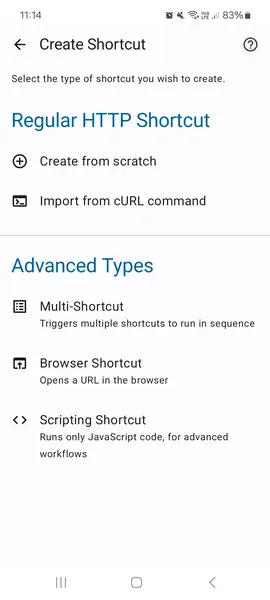
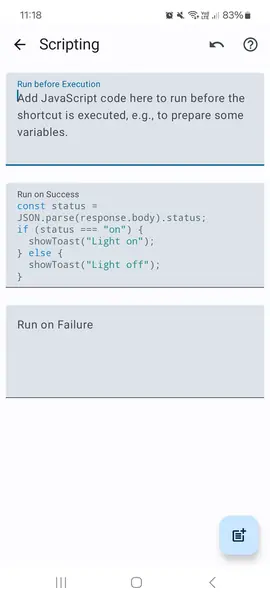
- Run arbitrary JavaScript before & after execution, including special actions, such as (but not limited to):
- show dialogs
- show toasts
- prompt for user input (e.g. asking for dates, passwords, text, ...)
- parse JSON or XML responses
- compute HMAC
- store values into global variables for later use
- vibrate
- play notification sounds
- send TCP or UDP packets
- send MQTT messages to a broker
- wake-on-lan
- send Android intents
- trigger Tasker tasks
- read QR code (via 3rd party app)
- read current physical location
- Import & Export in JSON or cURL format
- 3rd party integration (e.g. Tasker)
- Dark Mode support
Some ideas what to use HTTP shortcuts for:
- Execute a script on your web server
- Control your home automation system and IoT devices
- Interact with your RaspberryPi and Arduino tinkering projects
- Automate workflows
- Download files
Find it on GitHub: https://github.com/Waboodoo/HTTP-Shortcuts. Or visit the official website for documentation: https://http-shortcuts.rmy.ch
Informazioni sul file APK
| Nome del pacchetto | ch.rmy.android.http_shortcuts |
|---|---|
| Versione | 4.10.0 (codice 1104100001) |
| Android minimo | Android 8.0 · pensata per API 37 |
| Architetture | arm64-v8a, armeabi-v7a, x86, x86_64 |
| SHA-256 | c83c7b2cb416ebe2f1dafab4c18531d9ea42b98eaa204d10ed21cef90ba975a4 |
| Firma | b6de3c054f09813fd6c033bccfd64aabfbc63680a7ebbcac64e9ae14e5547a5f |
| Licenza | MIT — licenza libera permissiva: il codice sorgente è pubblico e riutilizzabile |
| Codice sorgente | github.com/Waboodoo/HTTP-Shortcuts |
| Sito ufficiale | http-shortcuts.rmy.ch |
Autorizzazioni richieste
- Accesso a Internet
- Vedere lo stato del Wi-Fi
- Vedere lo stato della rete
- Modificare il Wi-Fi
- Vibrare
- Mostrare sopra altre app sensibile
- Funzionare in background
- Mostrare notifiche
- Posizione approssimativa sensibile
- Posizione precisa (GPS) sensibile
- Impedire lo standby
- Avviarsi all'accensione
- Impronta / biometria
- Impronta digitale
Altre 3 autorizzazioni tecniche
ACCESS_LOCAL_NETWORK CHANGE_NETWORK_STATE REQUEST_IGNORE_BATTERY_OPTIMIZATIONS
Versioni precedenti
- HTTP Request Shortcuts 4.10.017 novembre 2026 · 22,3 MB
- HTTP Request Shortcuts 4.9.022 ottobre 2026 · 22,1 MB
- HTTP Request Shortcuts 4.8.212 ottobre 2026 · 22,0 MB
Come installare HTTP Request Shortcuts APK
- Tocca Scarica l'APK qui sopra, poi apri il file al termine del download.
- Se Android lo chiede, consenti al browser di installare app sconosciute.
- Tocca Installa. HTTP Request Shortcuts comparirà insieme alle altre app.
→ Come installare un file APK su Android (passo passo)
→ «App non installata»: cause e soluzioni
Domande frequenti
HTTP Request Shortcuts è gratis?
Sì. HTTP Request Shortcuts è distribuita con licenza MIT: gratuita, senza abbonamento e con codice sorgente pubblico.
Questo file APK è sicuro?
Il file è quello compilato e pubblicato dal repository F-Droid a partire dal codice sorgente pubblico. L'impronta SHA-256 è indicata qui sopra: puoi confrontarla dopo il download. Un APK è pericoloso? Come verificare un file prima di installarlo
HTTP Request Shortcuts funziona sul mio telefono?
Serve almeno Android 8.0. L'app funziona anche senza i servizi Google, quindi anche sui telefoni Huawei recenti.





