LensCast APK
Turn your phone into a networked camera: web, MJPEG and RTSP streaming
Scarica l'APK v0.2.2 · 56,9 MB- Versione0.2.2
- Dimensione56,9 MB
- RichiedeAndroid 6.0
- Aggiornata23/11/2026
- LicenzaGPL-3.0-or-later
- PrezzoGratis
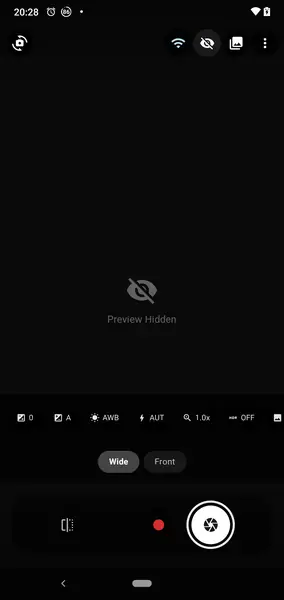
Informazioni su LensCast
Descrizione fornita dallo sviluppatore (in inglese).
LensCast turns your Android device into a networked camera station with professional controls, remote web access, interval photography, and scheduled recording.
Camera
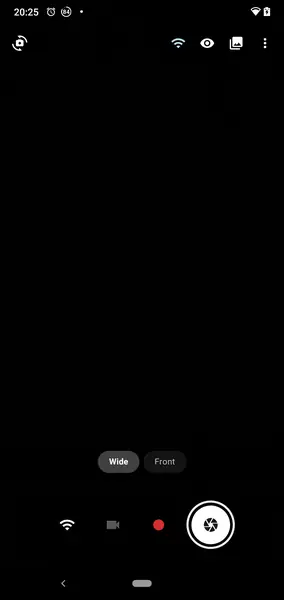
- Live preview with a professional quick settings bar
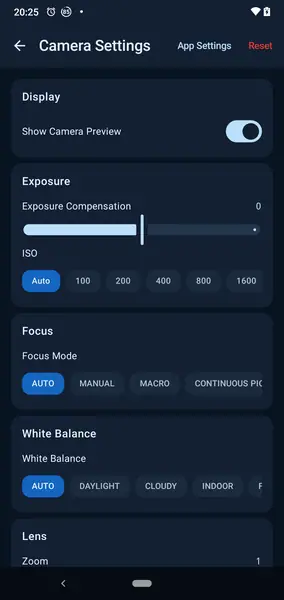
- Manual controls: exposure compensation, ISO, white balance, focus mode, zoom
- Multi-lens support (ultra-wide, wide, telephoto) with runtime lens switching
- HDR, image stabilization, resolution up to 4K, frame rate 15–60 fps
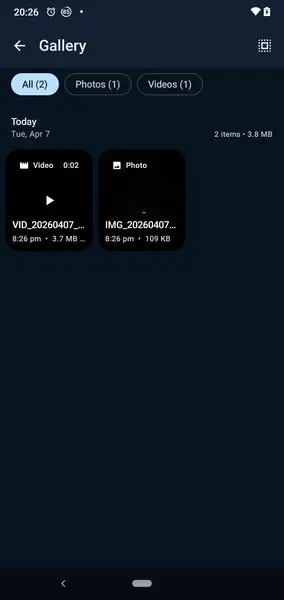
- Photo capture and video recording
- Night vision / IR mode, scene modes, manual focus distance, color temperature
Live streaming
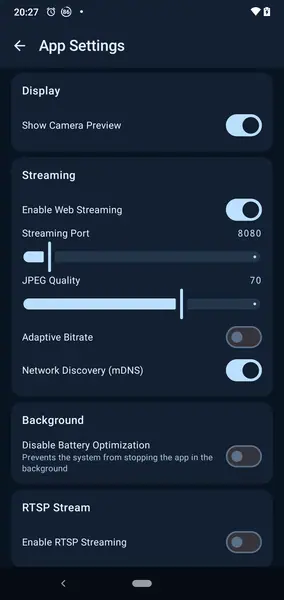
- Real-time MJPEG video streaming to any web browser on the same network
- Low-latency in-browser playback (WebCodecs over WebSocket) with automatic fallback to MJPEG and HLS
- RTSP streaming with AAC audio and H.264/H.265 video at 480p/720p/1080p for VLC, OBS, and NVRs
- ONVIF Profile S device service (off by default) so NVRs such as Home Assistant can discover the camera
- HTTPS mode with a self-signed on-device certificate
Web dashboard
- Watch the live stream, browse and download photos and recordings
- Full remote control of camera and stream settings
- Optional password authentication
Automation
- Object detection gate (optional): the open-source EfficientDet-Lite0 model — Apache-2.0, downloaded on demand with a pinned SHA-256 from TensorFlow's official hosting — triggers MQTT alerts or recording when configured objects appear
- Sound-event gate (optional): the open-source YAMNet model — Apache-2.0, also downloaded on demand with a pinned SHA-256 — triggers alerts or recording when configured sounds are detected
- Interval photography and scheduled or continuous recording
- Quiet hours for notifications
Optional network services (all off by default; each runs only when you enable and configure it)
- Telegram backup: auto-uploads new captures to the Telegram chat you choose (api.telegram.org)
- Web Push notifications: delivers encrypted detection alerts through your browser vendor's push service (such as Google's FCM or Mozilla's autopush)
- Model downloads: the optional detection models above are fetched on demand from TensorFlow's official hosting on Google Cloud storage
- STUN server for WebRTC streaming (WHIP push / WHEP viewing): blank by default, so streaming stays on your local network without contacting any third-party server
No ads, no tracking, no cloud defaults. All processing stays on your device; the web dashboard is served by a built-in HTTP server on your local network.
Note: the F-Droid build ships without the in-app self-updater; updates come from F-Droid.
Novità della versione 0.2.2
Since 0.2.1:
- Streaming: unattended streams now heal themselves through a full recovery stack — a watchdog watches the live stream and escalates through increasingly forceful restarts (from a soft restart of the streaming runtime up to restarting the whole server) when frames stall, verifying honestly even with zero viewers or a locked headless mount; a 15-minute out-of-process heartbeat revives a dead app or restarts a wedged server between checks; and a crash while nobody is watching relaunch
Informazioni sul file APK
| Nome del pacchetto | com.raulshma.lenscast |
|---|---|
| Versione | 0.2.2 (codice 2023) |
| Android minimo | Android 6.0 · pensata per Android 16 |
| Architetture | x86_64 |
| SHA-256 | 5d19ce267a92edf2973387a6cd5555e81aafe40d230efa9019d11487e1189eee |
| Firma | 0e76dc693ec63fe538738a1b3aef717c2f5c24e507c34f9bb94d8a92f2b5f25c |
| Licenza | GPL-3.0-or-later — licenza libera copyleft: il codice è pubblico e le versioni modificate devono restare libere |
| Codice sorgente | github.com/raulshma/lenscast |
Autorizzazioni richieste
- Fotocamera sensibile
- Microfono sensibile
- Posizione approssimativa sensibile
- Scrivere nell'archivio
- Leggere l'archivio
- Leggere le foto
- Leggere i video
- Accesso a Internet
- Vedere lo stato della rete
- Vedere lo stato del Wi-Fi
- Funzionare in background
- Impedire lo standby
- Mostrare notifiche
- Avviarsi all'accensione
Altre 5 autorizzazioni tecniche
CHANGE_WIFI_MULTICAST_STATE REQUEST_IGNORE_BATTERY_OPTIMIZATIONS SCHEDULE_EXACT_ALARM BIND_QUICK_SETTINGS_TILE USE_FULL_SCREEN_INTENT
Versioni precedenti
- LensCast 0.2.223 novembre 2026 · 56,9 MB
- LensCast 0.2.223 novembre 2026 · 48,5 MB
- LensCast 0.2.223 novembre 2026 · 35,0 MB
- LensCast 0.2.120 novembre 2026 · 56,1 MB
- LensCast 0.2.120 novembre 2026 · 47,8 MB
- LensCast 0.2.120 novembre 2026 · 34,3 MB
- LensCast 0.2.011 novembre 2026 · 31,4 MB
- LensCast 0.2.011 novembre 2026 · 27,6 MB
- LensCast 0.2.011 novembre 2026 · 19,8 MB
Come installare LensCast APK
- Tocca Scarica l'APK qui sopra, poi apri il file al termine del download.
- Se Android lo chiede, consenti al browser di installare app sconosciute.
- Tocca Installa. LensCast comparirà insieme alle altre app.
→ Come installare un file APK su Android (passo passo)
→ «App non installata»: cause e soluzioni
Domande frequenti
LensCast è gratis?
Sì. LensCast è distribuita con licenza GPL-3.0-or-later: gratuita, senza abbonamento e con codice sorgente pubblico.
Questo file APK è sicuro?
Il file è quello compilato e pubblicato dal repository F-Droid a partire dal codice sorgente pubblico. L'impronta SHA-256 è indicata qui sopra: puoi confrontarla dopo il download. Un APK è pericoloso? Come verificare un file prima di installarlo
LensCast funziona sul mio telefono?
Serve almeno Android 6.0. L'app funziona anche senza i servizi Google, quindi anche sui telefoni Huawei recenti.