LensCast APK
Turn your phone into a networked camera: web, MJPEG and RTSP streaming
Download APK v0.2.2 · 56.9 MB- Version0.2.2
- Size56.9 MB
- RequiresAndroid 6.0
- Updated11/23/2026
- LicenceGPL-3.0-or-later
- PriceFree
About LensCast
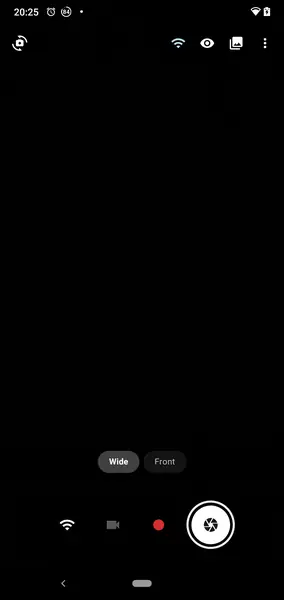
LensCast turns your Android device into a networked camera station with professional controls, remote web access, interval photography, and scheduled recording.
Camera
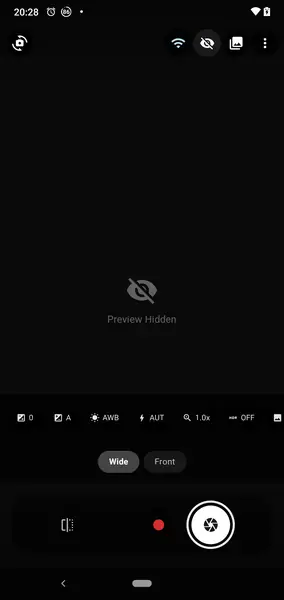
- Live preview with a professional quick settings bar
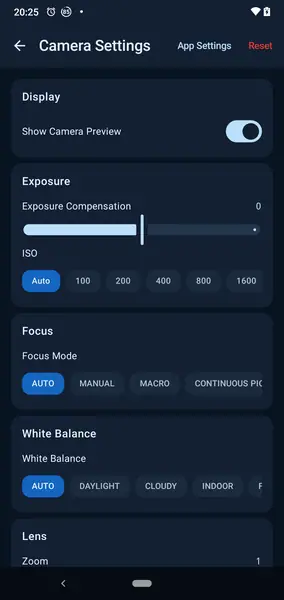
- Manual controls: exposure compensation, ISO, white balance, focus mode, zoom
- Multi-lens support (ultra-wide, wide, telephoto) with runtime lens switching
- HDR, image stabilization, resolution up to 4K, frame rate 15–60 fps
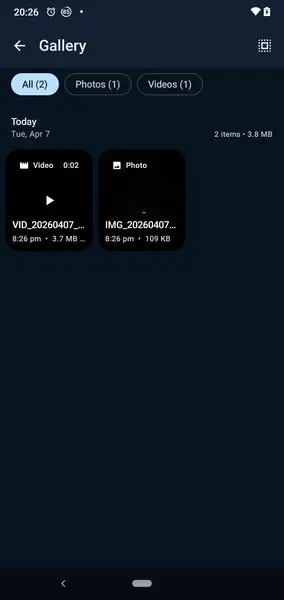
- Photo capture and video recording
- Night vision / IR mode, scene modes, manual focus distance, color temperature
Live streaming
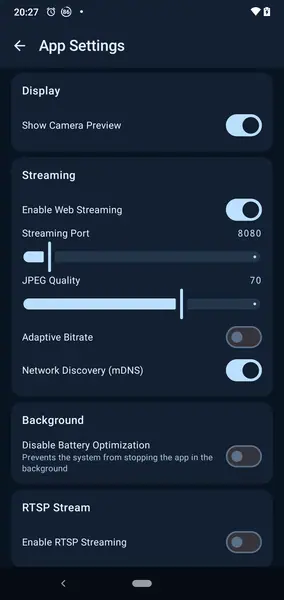
- Real-time MJPEG video streaming to any web browser on the same network
- Low-latency in-browser playback (WebCodecs over WebSocket) with automatic fallback to MJPEG and HLS
- RTSP streaming with AAC audio and H.264/H.265 video at 480p/720p/1080p for VLC, OBS, and NVRs
- ONVIF Profile S device service (off by default) so NVRs such as Home Assistant can discover the camera
- HTTPS mode with a self-signed on-device certificate
Web dashboard
- Watch the live stream, browse and download photos and recordings
- Full remote control of camera and stream settings
- Optional password authentication
Automation
- Object detection gate (optional): the open-source EfficientDet-Lite0 model — Apache-2.0, downloaded on demand with a pinned SHA-256 from TensorFlow's official hosting — triggers MQTT alerts or recording when configured objects appear
- Sound-event gate (optional): the open-source YAMNet model — Apache-2.0, also downloaded on demand with a pinned SHA-256 — triggers alerts or recording when configured sounds are detected
- Interval photography and scheduled or continuous recording
- Quiet hours for notifications
Optional network services (all off by default; each runs only when you enable and configure it)
- Telegram backup: auto-uploads new captures to the Telegram chat you choose (api.telegram.org)
- Web Push notifications: delivers encrypted detection alerts through your browser vendor's push service (such as Google's FCM or Mozilla's autopush)
- Model downloads: the optional detection models above are fetched on demand from TensorFlow's official hosting on Google Cloud storage
- STUN server for WebRTC streaming (WHIP push / WHEP viewing): blank by default, so streaming stays on your local network without contacting any third-party server
No ads, no tracking, no cloud defaults. All processing stays on your device; the web dashboard is served by a built-in HTTP server on your local network.
Note: the F-Droid build ships without the in-app self-updater; updates come from F-Droid.
What's new in version 0.2.2
Since 0.2.1:
- Streaming: unattended streams now heal themselves through a full recovery stack — a watchdog watches the live stream and escalates through increasingly forceful restarts (from a soft restart of the streaming runtime up to restarting the whole server) when frames stall, verifying honestly even with zero viewers or a locked headless mount; a 15-minute out-of-process heartbeat revives a dead app or restarts a wedged server between checks; and a crash while nobody is watching relaunch
APK file information
| Package name | com.raulshma.lenscast |
|---|---|
| Version | 0.2.2 (code 2023) |
| Minimum Android | Android 6.0 · targets Android 16 |
| Architectures | x86_64 |
| SHA-256 | 5d19ce267a92edf2973387a6cd5555e81aafe40d230efa9019d11487e1189eee |
| Signature | 0e76dc693ec63fe538738a1b3aef717c2f5c24e507c34f9bb94d8a92f2b5f25c |
| Licence | GPL-3.0-or-later — copyleft free licence: the code is public and modified versions must stay free |
| Source code | github.com/raulshma/lenscast |
Permissions
- Camera sensitive
- Microphone sensitive
- Approximate location sensitive
- Write to storage
- Read storage
- Read photos
- Read videos
- Internet access
- View network status
- View Wi-Fi status
- Run in the background
- Keep the device awake
- Show notifications
- Start at boot
5 other technical permission(s)
CHANGE_WIFI_MULTICAST_STATE REQUEST_IGNORE_BATTERY_OPTIMIZATIONS SCHEDULE_EXACT_ALARM BIND_QUICK_SETTINGS_TILE USE_FULL_SCREEN_INTENT
Older versions
- LensCast 0.2.2November 23, 2026 · 56.9 MB
- LensCast 0.2.2November 23, 2026 · 48.5 MB
- LensCast 0.2.2November 23, 2026 · 35.0 MB
- LensCast 0.2.1November 20, 2026 · 56.1 MB
- LensCast 0.2.1November 20, 2026 · 47.8 MB
- LensCast 0.2.1November 20, 2026 · 34.3 MB
- LensCast 0.2.0November 11, 2026 · 31.4 MB
- LensCast 0.2.0November 11, 2026 · 27.6 MB
- LensCast 0.2.0November 11, 2026 · 19.8 MB
How to install LensCast APK
- Tap Download APK above, then open the file once the download has finished.
- If Android asks, allow your browser to install unknown apps.
- Tap Install. LensCast then appears with your other apps.
Having trouble? Read our guides how to install an APK on Android and "App not installed": how to fix it.
Frequently asked questions
Is LensCast free?
Yes. LensCast is distributed under the GPL-3.0-or-later licence: free, no subscription, and its source code is public.
Is this APK file safe?
The file is the one built and published by the F-Droid repository from the public source code. Its SHA-256 fingerprint is shown above, so you can compare it after downloading. How to check an APK.
Will LensCast work on my phone?
You need at least Android 6.0. The app also works without Google services, so it runs on recent Huawei phones too.