MangoSSH APK
Secure SSH and Mosh client with encrypted profiles and backups
Scarica l'APK v0.8.2 · 41,1 MB- Versione0.8.2
- Dimensione41,1 MB
- RichiedeAndroid 8.0
- Aggiornata17/11/2026
- LicenzaGPL-3.0-or-later
- PrezzoGratis
Informazioni su MangoSSH
Descrizione fornita dallo sviluppatore (in inglese).
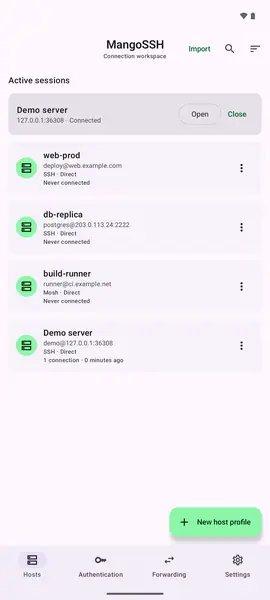
MangoSSH is a free and open-source SSH and Mosh client for Android phones and tablets. Profiles and keys stay in an encrypted vault, and encrypted backups can live on your own WebDAV server.
Sessions:
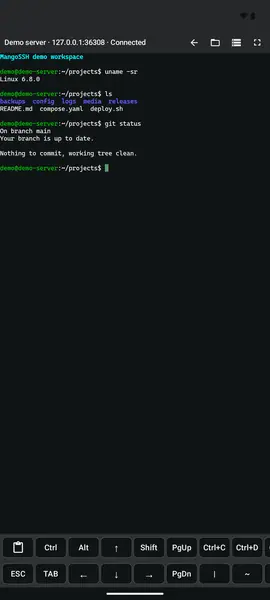
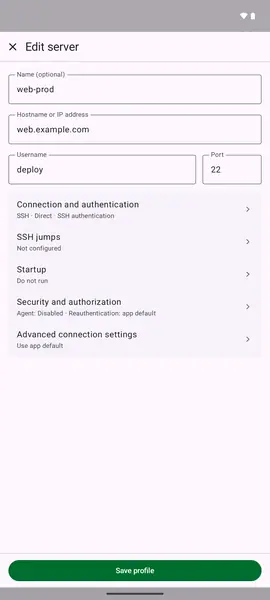
- SSH and native Mosh terminals; Mosh keeps an authenticated SSH companion for files, port forwards, and server resource reports
- Jump hosts, SSH agent forwarding, and optional tmux workspaces that reattach on reconnect
- Snippets that run automatically when a shell opens
- Live connection health and sessions that stay up in the background
Authentication and security:
- Password, private-key, and keyboard-interactive authentication with one-time password prompts
- Explicit host-key confirmation and a clear warning when a saved key changes
- Generate, import, and export RSA, ECDSA, and Ed25519 keys
- Encrypted local vault for profiles, keys, and host fingerprints
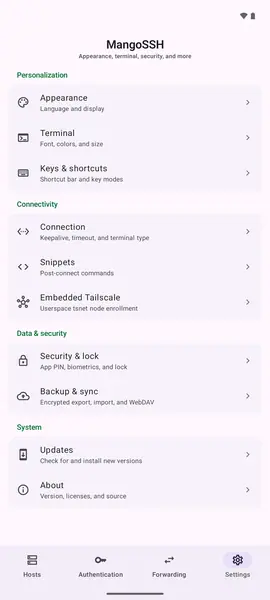
- App lock with PIN or biometrics and a configurable auto-lock delay
Files and forwarding:
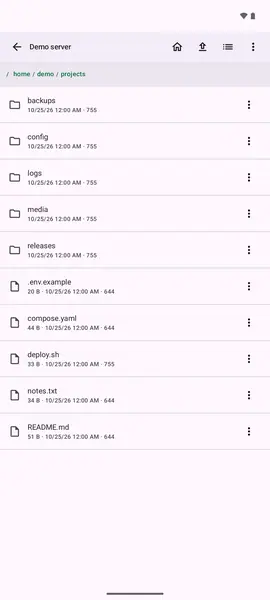
- SFTP browser with file and folder upload and download
- Pause, resume, and retry transfers, and continue them after reconnecting to the same verified host
- Edit small text files in place with a diff preview and encrypted drafts
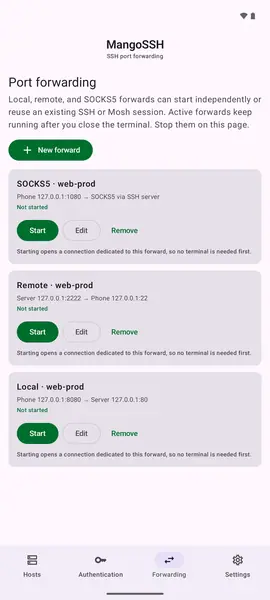
- Local, remote, and SOCKS5 port forwarding, with or without an open terminal
Networking:
- Per-profile route: direct, the system Tailscale VPN, or an embedded, outbound-only Tailscale node (tsnet)
Terminal:
- Cascadia Mono PL, JetBrains Mono NL, and Fira Code fonts
- Mango Dark, Dracula, Nord, and Solarized themes, or custom colors
- Configurable shortcut bar, scrollback, pinch-to-zoom, and immersive mode
Backup and more:
- Encrypted file and WebDAV backups with a preview before merging, recovery points, and remote history
- Import hosts from an OpenSSH config file
- English and Simplified Chinese; two-pane layout on tablets
Mosh is rebuilt from the included GPL-licensed source for arm64-v8a, armeabi-v7a, x86, and x86_64. Embedded Tailscale is opt-in, does not request Android VPN access, and requires the user to authorize their own Tailnet account, on Tailscale or on a self-hosted control server such as Headscale.
MangoSSH does not include advertisements or analytics. Credentials, private keys, host fingerprints, OTP answers, and session keys are never included in diagnostics.
Novità della versione 0.8.2
Closed terminals now open a reconnect confirmation directly, even with hidden controls or immersive mode. Connection errors appear in the same dialog, which follows terminal colors and only offers startup snippets when configured. Cancelling keeps the scrollback without connecting. Reconnecting keeps tmux workspaces and does not replay unsent input or startup snippets by default. Deleted host profiles show a clear message.
Android 17 now requests local-network permission when needed for LAN con
Informazioni sul file APK
| Nome del pacchetto | website.sung.mangossh |
|---|---|
| Versione | 0.8.2 (codice 8002) |
| Android minimo | Android 8.0 · pensata per API 37 |
| Architetture | arm64-v8a, armeabi-v7a, x86, x86_64 |
| SHA-256 | 94fd7c8540381963ea4773579cbbf06e94828edec3e5a4bfd5b04e3e51815a31 |
| Firma | 6ad86ccb0026c60606b016a643fb5f90c090035591c2c734d0fd66004b9373be |
| Licenza | GPL-3.0-or-later — licenza libera copyleft: il codice è pubblico e le versioni modificate devono restare libere |
| Codice sorgente | github.com/sunging/MangoSSH |
Autorizzazioni richieste
- Accesso a Internet
- Vedere lo stato della rete
- Impedire lo standby
- Mostrare notifiche
- Funzionare in background
- Impronta / biometria
- Impronta digitale
Altre 1 autorizzazioni tecniche
ACCESS_LOCAL_NETWORK
Come installare MangoSSH APK
- Tocca Scarica l'APK qui sopra, poi apri il file al termine del download.
- Se Android lo chiede, consenti al browser di installare app sconosciute.
- Tocca Installa. MangoSSH comparirà insieme alle altre app.
→ Come installare un file APK su Android (passo passo)
→ «App non installata»: cause e soluzioni
Domande frequenti
MangoSSH è gratis?
Sì. MangoSSH è distribuita con licenza GPL-3.0-or-later: gratuita, senza abbonamento e con codice sorgente pubblico.
Questo file APK è sicuro?
Il file è quello compilato e pubblicato dal repository F-Droid a partire dal codice sorgente pubblico. L'impronta SHA-256 è indicata qui sopra: puoi confrontarla dopo il download. Un APK è pericoloso? Come verificare un file prima di installarlo
MangoSSH funziona sul mio telefono?
Serve almeno Android 8.0. L'app funziona anche senza i servizi Google, quindi anche sui telefoni Huawei recenti.