MangoSSH APK
Secure SSH and Mosh client with encrypted profiles and backups
Baixar APK v0.8.2 · 41,1 MB- Versão0.8.2
- Tamanho41,1 MB
- RequerAndroid 8.0
- Atualizado17/11/2026
- LicençaGPL-3.0-or-later
- PreçoGrátis
Sobre o MangoSSH
Descrição fornecida pelo desenvolvedor (em inglês).
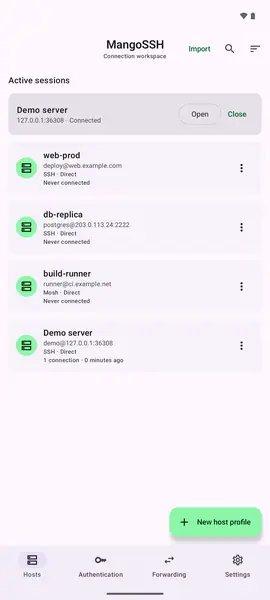
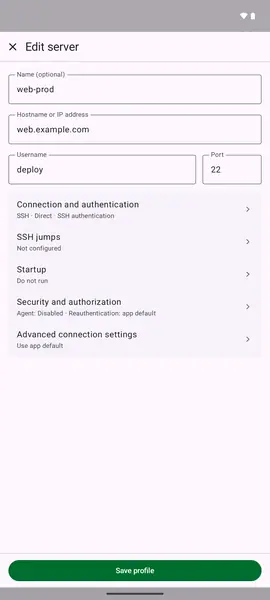
MangoSSH is a free and open-source SSH and Mosh client for Android phones and tablets. Profiles and keys stay in an encrypted vault, and encrypted backups can live on your own WebDAV server.
Sessions:
- SSH and native Mosh terminals; Mosh keeps an authenticated SSH companion for files, port forwards, and server resource reports
- Jump hosts, SSH agent forwarding, and optional tmux workspaces that reattach on reconnect
- Snippets that run automatically when a shell opens
- Live connection health and sessions that stay up in the background
Authentication and security:
- Password, private-key, and keyboard-interactive authentication with one-time password prompts
- Explicit host-key confirmation and a clear warning when a saved key changes
- Generate, import, and export RSA, ECDSA, and Ed25519 keys
- Encrypted local vault for profiles, keys, and host fingerprints
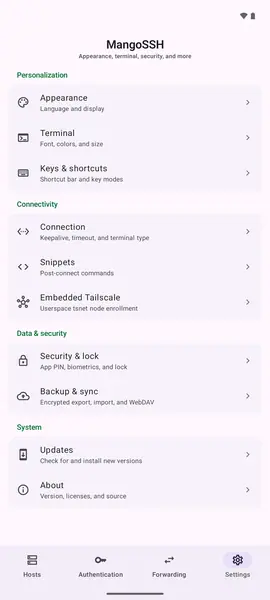
- App lock with PIN or biometrics and a configurable auto-lock delay
Files and forwarding:
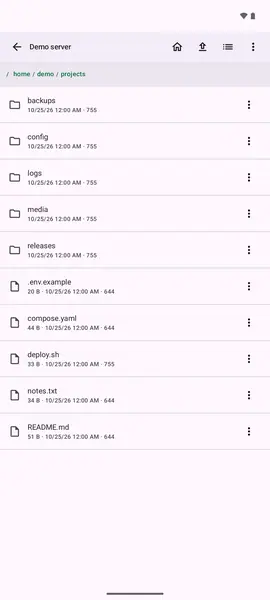
- SFTP browser with file and folder upload and download
- Pause, resume, and retry transfers, and continue them after reconnecting to the same verified host
- Edit small text files in place with a diff preview and encrypted drafts
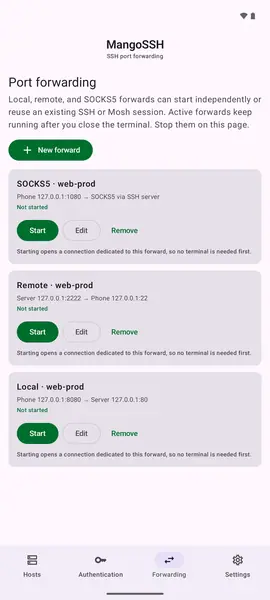
- Local, remote, and SOCKS5 port forwarding, with or without an open terminal
Networking:
- Per-profile route: direct, the system Tailscale VPN, or an embedded, outbound-only Tailscale node (tsnet)
Terminal:
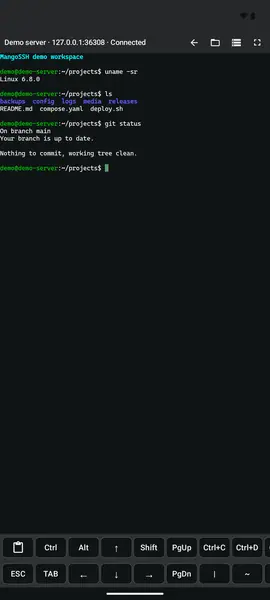
- Cascadia Mono PL, JetBrains Mono NL, and Fira Code fonts
- Mango Dark, Dracula, Nord, and Solarized themes, or custom colors
- Configurable shortcut bar, scrollback, pinch-to-zoom, and immersive mode
Backup and more:
- Encrypted file and WebDAV backups with a preview before merging, recovery points, and remote history
- Import hosts from an OpenSSH config file
- English and Simplified Chinese; two-pane layout on tablets
Mosh is rebuilt from the included GPL-licensed source for arm64-v8a, armeabi-v7a, x86, and x86_64. Embedded Tailscale is opt-in, does not request Android VPN access, and requires the user to authorize their own Tailnet account, on Tailscale or on a self-hosted control server such as Headscale.
MangoSSH does not include advertisements or analytics. Credentials, private keys, host fingerprints, OTP answers, and session keys are never included in diagnostics.
Novidades da versão 0.8.2
Closed terminals now open a reconnect confirmation directly, even with hidden controls or immersive mode. Connection errors appear in the same dialog, which follows terminal colors and only offers startup snippets when configured. Cancelling keeps the scrollback without connecting. Reconnecting keeps tmux workspaces and does not replay unsent input or startup snippets by default. Deleted host profiles show a clear message.
Android 17 now requests local-network permission when needed for LAN con
Informações do arquivo APK
| Nome do pacote | website.sung.mangossh |
|---|---|
| Versão | 0.8.2 (código 8002) |
| Android mínimo | Android 8.0 · feito para API 37 |
| Arquiteturas | arm64-v8a, armeabi-v7a, x86, x86_64 |
| SHA-256 | 94fd7c8540381963ea4773579cbbf06e94828edec3e5a4bfd5b04e3e51815a31 |
| Assinatura | 6ad86ccb0026c60606b016a643fb5f90c090035591c2c734d0fd66004b9373be |
| Licença | GPL-3.0-or-later — licença livre copyleft: o código é público e versões modificadas devem continuar livres |
| Código-fonte | github.com/sunging/MangoSSH |
Permissões solicitadas
- Acesso à internet
- Ver o estado da rede
- Impedir o modo de espera
- Mostrar notificações
- Funcionar em segundo plano
- Digital / biometria
- Impressão digital
Mais 1 permissão(ões) técnica(s)
ACCESS_LOCAL_NETWORK
Como instalar o MangoSSH APK
- Toque em Baixar APK acima e abra o arquivo quando o download terminar.
- Se o Android pedir, permita que o navegador instale apps desconhecidos.
- Toque em Instalar. O MangoSSH aparecerá junto aos seus outros apps.
→ Como instalar um arquivo APK no Android (passo a passo)
→ "App não instalado": causas e soluções
Perguntas frequentes
O MangoSSH é grátis?
Sim. O MangoSSH é distribuído sob a licença GPL-3.0-or-later: grátis, sem assinatura e com código-fonte público.
Este arquivo APK é seguro?
O arquivo é o compilado e publicado pelo repositório F-Droid a partir do código-fonte público. A impressão digital SHA-256 aparece acima para você comparar depois do download. APK é perigoso? Como verificar um arquivo antes de instalar
O MangoSSH funciona no meu celular?
É preciso ter pelo menos Android 8.0. O app também funciona sem os serviços do Google, inclusive em celulares Huawei recentes.