Nexus Command Center APK
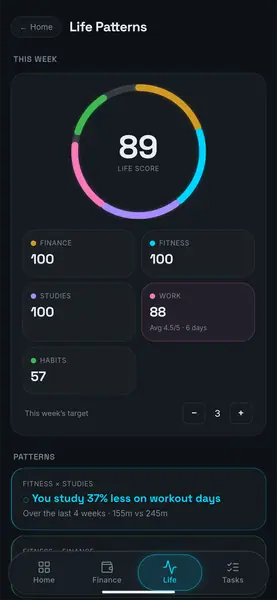
One Life Score for finance, fitness, study, work and habits
Scarica l'APK v1.21.1 · 3,9 MB- Versione1.21.1
- Dimensione3,9 MB
- RichiedeAndroid 8.0
- Aggiornata23/11/2026
- LicenzaMIT
- PrezzoGratis
Informazioni su Nexus Command Center
Descrizione fornita dallo sviluppatore (in inglese).
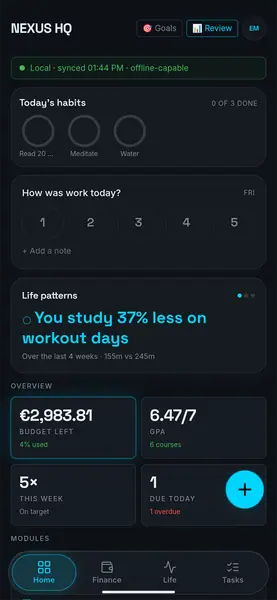
Nexus Command Center is the hub of the Limecore suite — a personal life dashboard that combines five domains (Finance, Fitness, Studies, Work, Habits) into a single Life Score.
Features:
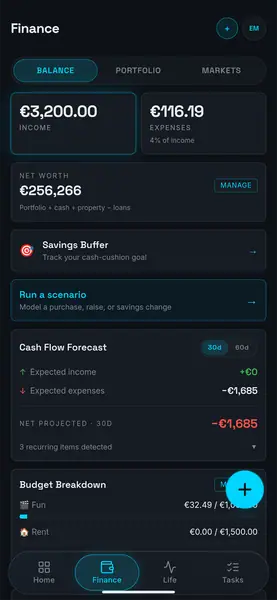
- Budgets, accounts, net worth, portfolio and live market data
- Pulls in workouts from LimeLog and study sessions from StudyDesk
- Streak-aware habit tracker
- Configurable Life Profiles and goals
- Weekly and yearly reviews with heatmaps
Local-first with on-device storage; optional account-gated cloud sync. No Google Play Services, no Firebase — Google sign-in is a plain web OAuth flow. Third-party market data and an optional AI feature are user-initiated HTTPS calls. Market data sources: Finnhub, CoinGecko, Yahoo Finance, the ECB, CNN Business (production.dataviz.cnn.io) for the Fear & Greed index, and ExchangeRate-API (open.er-api.com) for currency rates.
Available in English, Finnish, French, German, Spanish, Chinese, Hindi, Portuguese, Indonesian and Arabic.
Novità della versione 1.21.1
Safer PIN, your choice.
Your PIN is now protected by the Android Keystore. Forgot PIN works from the lock screen, Clear All Data removes the PIN, and you can change your PIN in Settings. The app-open record and the F-Droid update check are off until you say yes. Export saves a real file without sign-in data. Net-worth goals keep their own currency, and delete account never pretends.
Informazioni sul file APK
| Nome del pacchetto | com.limecore.nexus |
|---|---|
| Versione | 1.21.1 (codice 47) |
| Android minimo | Android 8.0 · pensata per Android 16 |
| Architetture | Tutte (universale) |
| SHA-256 | 8b64ef9fcb4b21de05ed9ba2e815f54b07e9c357af6c36feedd9c50d8e8a14ef |
| Firma | 27e17d1fba157da6eacde58485aab56066200cc45ad00bd518d828367ec155e4 |
| Licenza | MIT — licenza libera permissiva: il codice sorgente è pubblico e riutilizzabile |
| Codice sorgente | github.com/Limecore-Studio/nexus-command-center |
| Sito ufficiale | limecore.dev |
Autorizzazioni richieste
- Accesso a Internet
- Vedere lo stato della rete
- Impronta / biometria
- Mostrare notifiche
- Impedire lo standby
- Avviarsi all'accensione
- Impronta digitale
Altre 2 autorizzazioni tecniche
USE_EXACT_ALARM SCHEDULE_EXACT_ALARM
Versioni precedenti
- Nexus Command Center 1.21.123 novembre 2026 · 3,9 MB
- Nexus Command Center 1.21.020 novembre 2026 · 3,9 MB
- Nexus Command Center 1.20.09 novembre 2026 · 3,8 MB
Come installare Nexus Command Center APK
- Tocca Scarica l'APK qui sopra, poi apri il file al termine del download.
- Se Android lo chiede, consenti al browser di installare app sconosciute.
- Tocca Installa. Nexus Command Center comparirà insieme alle altre app.
→ Come installare un file APK su Android (passo passo)
→ «App non installata»: cause e soluzioni
Domande frequenti
Nexus Command Center è gratis?
Sì. Nexus Command Center è distribuita con licenza MIT: gratuita, senza abbonamento e con codice sorgente pubblico.
Questo file APK è sicuro?
Il file è quello compilato e pubblicato dal repository F-Droid a partire dal codice sorgente pubblico. L'impronta SHA-256 è indicata qui sopra: puoi confrontarla dopo il download. Un APK è pericoloso? Come verificare un file prima di installarlo
Nexus Command Center funziona sul mio telefono?
Serve almeno Android 8.0. L'app funziona anche senza i servizi Google, quindi anche sui telefoni Huawei recenti.