Nexus Command Center APK
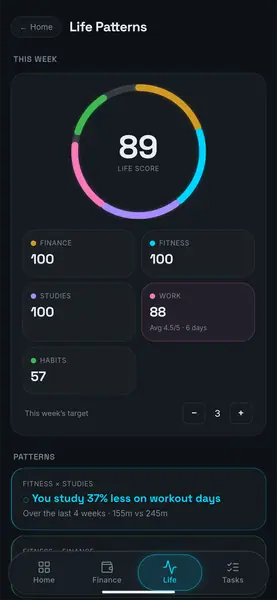
One Life Score for finance, fitness, study, work and habits
Download APK v1.21.1 · 3.9 MB- Version1.21.1
- Size3.9 MB
- RequiresAndroid 8.0
- Updated11/23/2026
- LicenceMIT
- PriceFree
About Nexus Command Center
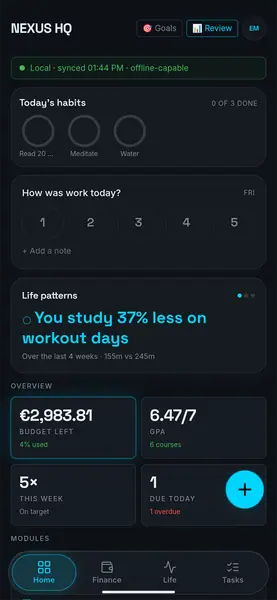
Nexus Command Center is the hub of the Limecore suite — a personal life dashboard that combines five domains (Finance, Fitness, Studies, Work, Habits) into a single Life Score.
Features:
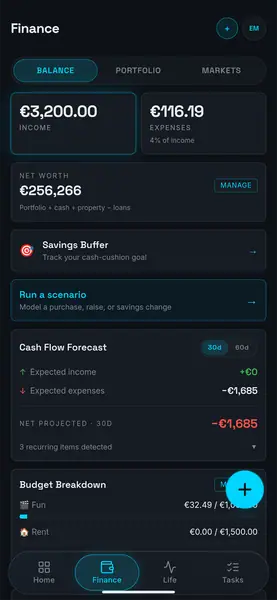
- Budgets, accounts, net worth, portfolio and live market data
- Pulls in workouts from LimeLog and study sessions from StudyDesk
- Streak-aware habit tracker
- Configurable Life Profiles and goals
- Weekly and yearly reviews with heatmaps
Local-first with on-device storage; optional account-gated cloud sync. No Google Play Services, no Firebase — Google sign-in is a plain web OAuth flow. Third-party market data and an optional AI feature are user-initiated HTTPS calls. Market data sources: Finnhub, CoinGecko, Yahoo Finance, the ECB, CNN Business (production.dataviz.cnn.io) for the Fear & Greed index, and ExchangeRate-API (open.er-api.com) for currency rates.
Available in English, Finnish, French, German, Spanish, Chinese, Hindi, Portuguese, Indonesian and Arabic.
What's new in version 1.21.1
Safer PIN, your choice.
Your PIN is now protected by the Android Keystore. Forgot PIN works from the lock screen, Clear All Data removes the PIN, and you can change your PIN in Settings. The app-open record and the F-Droid update check are off until you say yes. Export saves a real file without sign-in data. Net-worth goals keep their own currency, and delete account never pretends.
APK file information
| Package name | com.limecore.nexus |
|---|---|
| Version | 1.21.1 (code 47) |
| Minimum Android | Android 8.0 · targets Android 16 |
| Architectures | All (universal) |
| SHA-256 | 8b64ef9fcb4b21de05ed9ba2e815f54b07e9c357af6c36feedd9c50d8e8a14ef |
| Signature | 27e17d1fba157da6eacde58485aab56066200cc45ad00bd518d828367ec155e4 |
| Licence | MIT — permissive free licence: the source code is public and reusable |
| Source code | github.com/Limecore-Studio/nexus-command-center |
| Official website | limecore.dev |
Permissions
- Internet access
- View network status
- Fingerprint / biometrics
- Show notifications
- Keep the device awake
- Start at boot
- Fingerprint
2 other technical permission(s)
USE_EXACT_ALARM SCHEDULE_EXACT_ALARM
Older versions
- Nexus Command Center 1.21.1November 23, 2026 · 3.9 MB
- Nexus Command Center 1.21.0November 20, 2026 · 3.9 MB
- Nexus Command Center 1.20.0November 9, 2026 · 3.8 MB
How to install Nexus Command Center APK
- Tap Download APK above, then open the file once the download has finished.
- If Android asks, allow your browser to install unknown apps.
- Tap Install. Nexus Command Center then appears with your other apps.
Having trouble? Read our guides how to install an APK on Android and "App not installed": how to fix it.
Frequently asked questions
Is Nexus Command Center free?
Yes. Nexus Command Center is distributed under the MIT licence: free, no subscription, and its source code is public.
Is this APK file safe?
The file is the one built and published by the F-Droid repository from the public source code. Its SHA-256 fingerprint is shown above, so you can compare it after downloading. How to check an APK.
Will Nexus Command Center work on my phone?
You need at least Android 8.0. The app also works without Google services, so it runs on recent Huawei phones too.