Password Generator (PFA) APK
(SECUSO) Generate passwords for your accounts from one master password
Scarica l'APK v1.3.3 · 8,0 MB- Versione1.3.3
- Dimensione8,0 MB
- RichiedeAndroid 5.0
- Aggiornata24/07/2025
- LicenzaGPL-3.0-only
- PrezzoGratis
Informazioni su Password Generator (PFA)
Descrizione fornita dallo sviluppatore (in inglese).
With Privacy Friendly Password Generator you can generate different passwords for all your accounts while remembering only one master password. Detailed information about generating passwords can be found at the app's help page or at https://secuso.org/pfa. The app belongs to the Privacy Friendly Apps group developed by the research group SECUSO. More information can be found an https://secuso.org/pfa
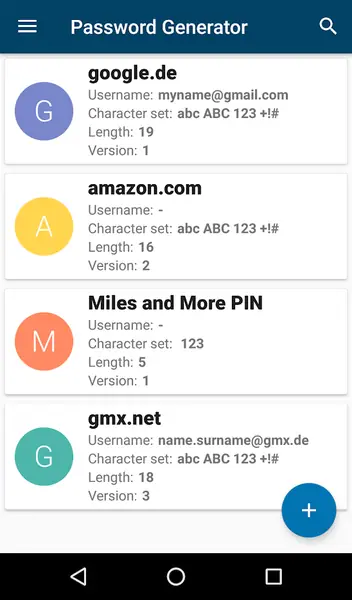
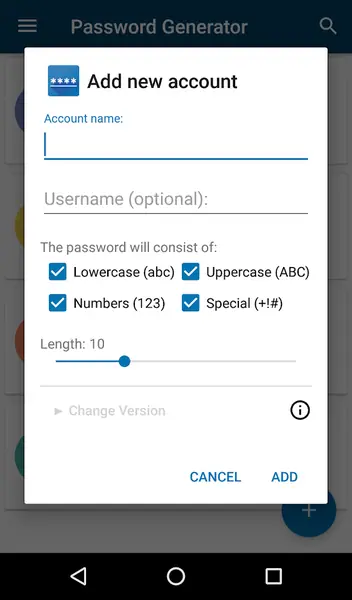
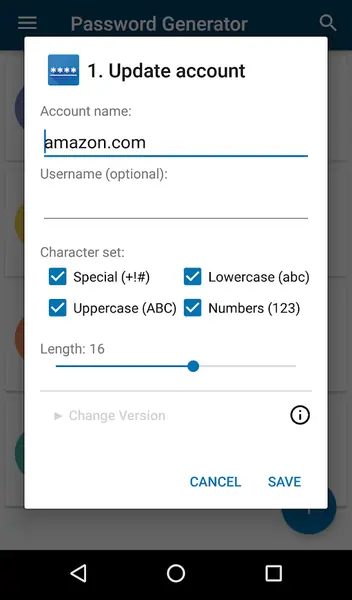
In case you wish to generate a password for a user account, you can add this account to Privacy Friendly Password Generator. Therefore, you only have to enter which characters (lower-case letters, upper-case letters, numbers, special characters) you would like the password to consist of and how long it should be. The account are arranged in a list. To generate a password, click on the account and enter your master password. The master password is a password made up by you and it guides all other passwords. Like the other passwords it is not stored in the application. So if you wish you can write it down and keep it in a safe place. Finally, Privacy Friendly Password Generator displays the password which has been generated for you account. This password can be re-generated any time.
In case you wish to find out how Privacy Friendly Password Generator generates the passwords, have a look at https://secuso.org/pfa
How does Privacy Friendly Password Generator differ from other similar apps?
- No permissions
Privacy Friendly Password Generator does not require any permissions. For comparison: The Top Ten of similar apps from the Google Play Store requires an average of 3,4 permissions (in November 2016). These are for instance the location permission or the permissions to access, modify or delete storage.
- Protection of passwords
Privacy Friendly Password Generator does not store any generated password, nor does it store the master password. For the generation of password a stateless algorithm is used. This means that the passwords only exist during the generation and are not stored in the program after the application has been closed. Additionally, the app prevents devices from taking screenshots.
- No advertisement
Moreover, Privacy Friendly Password Generator distinguishes from many other applications in the way that it completely relinquishes advertisements. Advertisement might track a user's actions. It could also shorten battery life or use mobile data.
You can reach us via Bluesky - @secusoresearch.bsky.social https://bsky.app/profile/secusoresearch.bsky.social Mastodon - @SECUSO_Research@bawü.social https://xn--baw-joa.social/@SECUSO_Research/ Job opening - https://secuso.aifb.kit.edu/english/Job_Offers.php
Informazioni sul file APK
| Nome del pacchetto | org.secuso.privacyfriendlypasswordgenerator |
|---|---|
| Versione | 1.3.3 (codice 100) |
| Android minimo | Android 5.0 · pensata per Android 14 |
| Architetture | Tutte (universale) |
| SHA-256 | ac6f106229cf23b20aef9d0654eea6d0969a2cd20e702904d2640618dbb67187 |
| Firma | a379cc64d5e90d88a69c58113bf96732b3e1389da623e574704222310653a994 |
| Licenza | GPL-3.0-only — licenza libera copyleft: il codice è pubblico e le versioni modificate devono restare libere |
| Codice sorgente | github.com/SecUSo/privacy-friendly-passwordgenerator |
| Sito ufficiale | secuso.aifb.kit.edu/english/Password_Generator.php |
Autorizzazioni richieste
Nessuna autorizzazione particolare.
Versioni precedenti
- Password Generator (PFA) 1.3.324 luglio 2025 · 8,0 MB
- Password Generator (PFA) 1.3.06 settembre 2023 · 5,9 MB
- Password Generator (PFA) 1.2.07 agosto 2022 · 4,1 MB
Come installare Password Generator (PFA) APK
- Tocca Scarica l'APK qui sopra, poi apri il file al termine del download.
- Se Android lo chiede, consenti al browser di installare app sconosciute.
- Tocca Installa. Password Generator (PFA) comparirà insieme alle altre app.
→ Come installare un file APK su Android (passo passo)
→ «App non installata»: cause e soluzioni
Domande frequenti
Password Generator (PFA) è gratis?
Sì. Password Generator (PFA) è distribuita con licenza GPL-3.0-only: gratuita, senza abbonamento e con codice sorgente pubblico.
Questo file APK è sicuro?
Il file è quello compilato e pubblicato dal repository F-Droid a partire dal codice sorgente pubblico. L'impronta SHA-256 è indicata qui sopra: puoi confrontarla dopo il download. Un APK è pericoloso? Come verificare un file prima di installarlo
Password Generator (PFA) funziona sul mio telefono?
Serve almeno Android 5.0. L'app funziona anche senza i servizi Google, quindi anche sui telefoni Huawei recenti.





