Password Generator (PFA) APK
(SECUSO) Generate passwords for your accounts from one master password
Baixar APK v1.3.3 · 8,0 MB- Versão1.3.3
- Tamanho8,0 MB
- RequerAndroid 5.0
- Atualizado24/07/2025
- LicençaGPL-3.0-only
- PreçoGrátis
Sobre o Password Generator (PFA)
Descrição fornecida pelo desenvolvedor (em inglês).
With Privacy Friendly Password Generator you can generate different passwords for all your accounts while remembering only one master password. Detailed information about generating passwords can be found at the app's help page or at https://secuso.org/pfa. The app belongs to the Privacy Friendly Apps group developed by the research group SECUSO. More information can be found an https://secuso.org/pfa
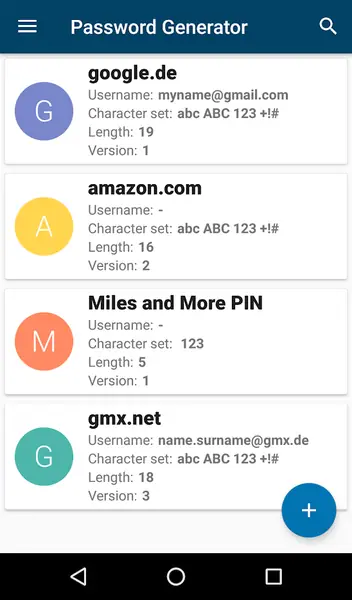
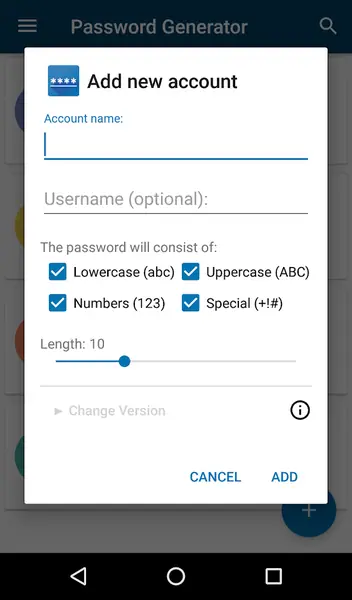
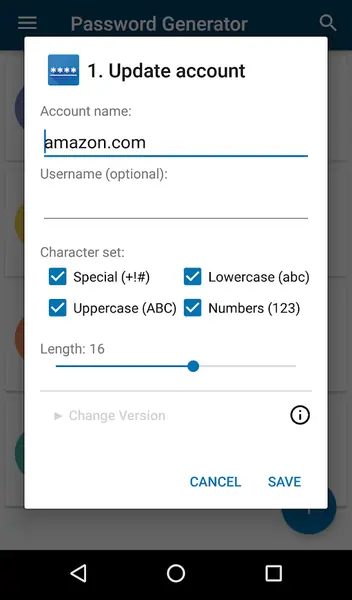
In case you wish to generate a password for a user account, you can add this account to Privacy Friendly Password Generator. Therefore, you only have to enter which characters (lower-case letters, upper-case letters, numbers, special characters) you would like the password to consist of and how long it should be. The account are arranged in a list. To generate a password, click on the account and enter your master password. The master password is a password made up by you and it guides all other passwords. Like the other passwords it is not stored in the application. So if you wish you can write it down and keep it in a safe place. Finally, Privacy Friendly Password Generator displays the password which has been generated for you account. This password can be re-generated any time.
In case you wish to find out how Privacy Friendly Password Generator generates the passwords, have a look at https://secuso.org/pfa
How does Privacy Friendly Password Generator differ from other similar apps?
- No permissions
Privacy Friendly Password Generator does not require any permissions. For comparison: The Top Ten of similar apps from the Google Play Store requires an average of 3,4 permissions (in November 2016). These are for instance the location permission or the permissions to access, modify or delete storage.
- Protection of passwords
Privacy Friendly Password Generator does not store any generated password, nor does it store the master password. For the generation of password a stateless algorithm is used. This means that the passwords only exist during the generation and are not stored in the program after the application has been closed. Additionally, the app prevents devices from taking screenshots.
- No advertisement
Moreover, Privacy Friendly Password Generator distinguishes from many other applications in the way that it completely relinquishes advertisements. Advertisement might track a user's actions. It could also shorten battery life or use mobile data.
You can reach us via Bluesky - @secusoresearch.bsky.social https://bsky.app/profile/secusoresearch.bsky.social Mastodon - @SECUSO_Research@bawü.social https://xn--baw-joa.social/@SECUSO_Research/ Job opening - https://secuso.aifb.kit.edu/english/Job_Offers.php
Informações do arquivo APK
| Nome do pacote | org.secuso.privacyfriendlypasswordgenerator |
|---|---|
| Versão | 1.3.3 (código 100) |
| Android mínimo | Android 5.0 · feito para Android 14 |
| Arquiteturas | Todas (universal) |
| SHA-256 | ac6f106229cf23b20aef9d0654eea6d0969a2cd20e702904d2640618dbb67187 |
| Assinatura | a379cc64d5e90d88a69c58113bf96732b3e1389da623e574704222310653a994 |
| Licença | GPL-3.0-only — licença livre copyleft: o código é público e versões modificadas devem continuar livres |
| Código-fonte | github.com/SecUSo/privacy-friendly-passwordgenerator |
| Site oficial | secuso.aifb.kit.edu/english/Password_Generator.php |
Permissões solicitadas
Nenhuma permissão especial.
Versões anteriores
- Password Generator (PFA) 1.3.324 de julho de 2025 · 8,0 MB
- Password Generator (PFA) 1.3.06 de setembro de 2023 · 5,9 MB
- Password Generator (PFA) 1.2.07 de agosto de 2022 · 4,1 MB
Como instalar o Password Generator (PFA) APK
- Toque em Baixar APK acima e abra o arquivo quando o download terminar.
- Se o Android pedir, permita que o navegador instale apps desconhecidos.
- Toque em Instalar. O Password Generator (PFA) aparecerá junto aos seus outros apps.
→ Como instalar um arquivo APK no Android (passo a passo)
→ "App não instalado": causas e soluções
Perguntas frequentes
O Password Generator (PFA) é grátis?
Sim. O Password Generator (PFA) é distribuído sob a licença GPL-3.0-only: grátis, sem assinatura e com código-fonte público.
Este arquivo APK é seguro?
O arquivo é o compilado e publicado pelo repositório F-Droid a partir do código-fonte público. A impressão digital SHA-256 aparece acima para você comparar depois do download. APK é perigoso? Como verificar um arquivo antes de instalar
O Password Generator (PFA) funciona no meu celular?
É preciso ter pelo menos Android 5.0. O app também funciona sem os serviços do Google, inclusive em celulares Huawei recentes.





