
SearchLauncher APK
Keyboard-first launcher. Search apps, contacts and the web, browse without ads
Scarica l'APK v0.1.7 · 17,5 MB- Versione0.1.7
- Dimensione17,5 MB
- RichiedeAndroid 10
- Aggiornata23/11/2026
- LicenzaMIT
- PrezzoGratis
Informazioni su SearchLauncher
Descrizione fornita dallo sviluppatore (in inglese).
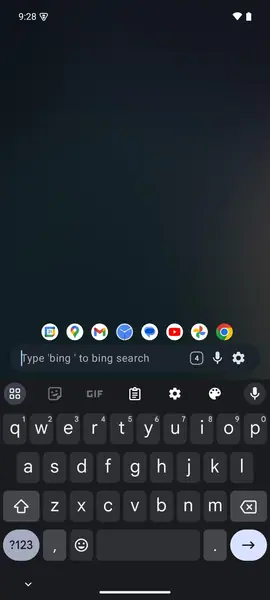
SearchLauncher is a keyboard-first Android launcher. Your home screen opens with a keyboard. One bar finds everything on your phone and everything on the web, and opens what you find in a browser that blocks ads.
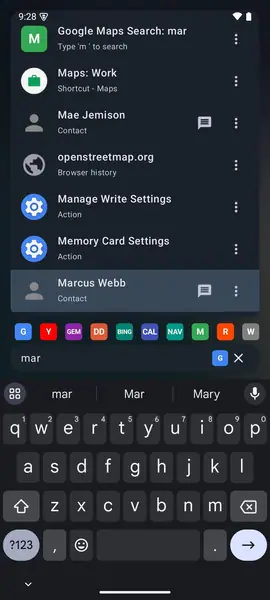
SEARCH ANYTHING Apps, app shortcuts, contacts, device settings, downloads, calendar events for the coming week, text snippets and your own custom actions. Ranking learns from what you pick, so the next time is faster.
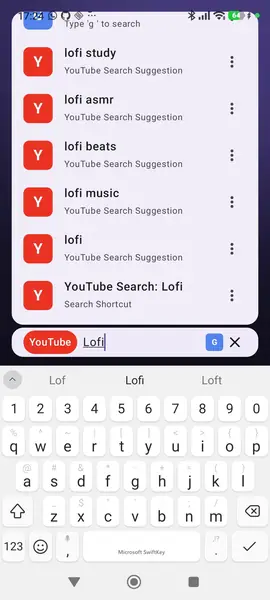
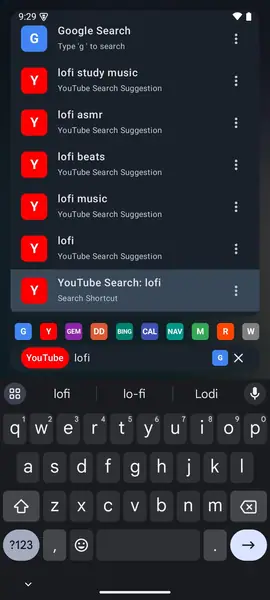
SEARCH INSIDE APPS, NOT JUST FOR THEM Type y for YouTube, m for Maps, w for Wikipedia, then what you are looking for. Add a shortcut for any site with a search URL, and give it whatever letter you like.
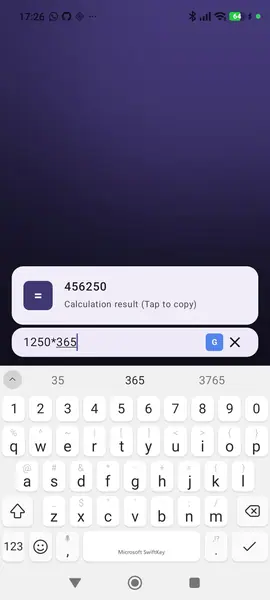
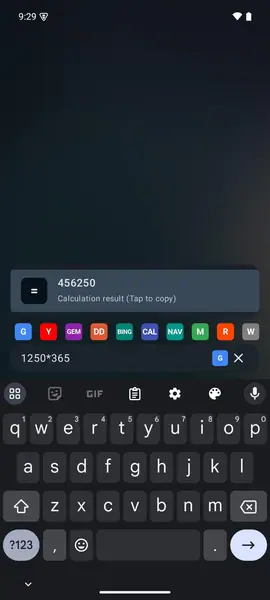
ONE FIELD THAT KNOWS WHAT YOU TYPED A sum gets an answer you can tap to copy. A web address opens. "5m pasta" sets a timer. A phone number offers to call it, message it, or save it as a contact. An email address offers to write to it.
A BROWSER WITH NO ADS Web results open in the app, with ads and trackers blocked by default. Swipe the search bar sideways to move between tabs, or up to see them all as live previews. Both work from the home screen, so your tabs are one gesture away without opening a browser first. Save a page under a title you choose, and find visited pages back from the search bar. Private windows, file uploads, picture-in-picture video and hardware keyboard shortcuts are all included.
FEWER ICONS, MORE ROOM FOR WIDGETS Add a widget by typing its name, resize it by dragging, and tap the wallpaper to show or hide them all. On a tablet they lay out in columns rather than one widget stretched across the display.
MAKE IT YOURS Swipe through your own wallpapers. The theme colour can follow the wallpaper behind the search bar. Monochrome icons are optional. Dark mode, a true black OLED mode, a row of favourites, voice search, and export and import of everything you have set up.
Use it as your default launcher, or as a widget on the launcher you already have.
PRIVACY Nothing is sent anywhere by default. Search suggestions are optional, and when you turn them on, what you type goes to whichever provider the shortcut names. Crash reporting is opt-in. Contacts and calendar entries are read on your device to answer what you typed and are never uploaded. The browser's blocklist is downloaded from the StevenBlack hosts project.
SearchLauncher is free and open source: https://github.com/ontola/searchlauncher
Novità della versione 0.1.7
If the built-in browser freezes, the launcher now restarts itself instead of staying stuck. Press Home and the home screen comes back. After such a freeze or crash, the tab that was open reloads its address fresh once.
Informazioni sul file APK
| Nome del pacchetto | com.searchlauncher.app |
|---|---|
| Versione | 0.1.7 (codice 310) |
| Android minimo | Android 10 · pensata per Android 16 |
| Architetture | arm64-v8a, armeabi-v7a, x86_64 |
| SHA-256 | 42a1b14819847d90e3fc7b903b6489b866d8148dd9a977bb04d24fe6e1356517 |
| Firma | 553f628023ac5739ed10cfdfad26e9c79ad5ef669cd187c8effa97c733b1d6b0 |
| Licenza | MIT — licenza libera permissiva: il codice sorgente è pubblico e riutilizzabile |
| Codice sorgente | github.com/ontola/searchlauncher |
Autorizzazioni richieste
- Vedere le app installate sensibile
- Mostrare notifiche
- Installare altre app sensibile
- Accesso a Internet
- Leggere i contatti sensibile
- Leggere il calendario sensibile
- Microfono sensibile
- Fotocamera sensibile
- Posizione approssimativa sensibile
- Posizione precisa (GPS) sensibile
Altre 9 autorizzazioni tecniche
PACKAGE_USAGE_STATS DOWNLOAD_WITHOUT_NOTIFICATION REQUEST_DELETE_PACKAGES CREDENTIAL_MANAGER_SET_ORIGIN CREDENTIAL_MANAGER_QUERY_CANDIDATE_CREDENTIALS WRITE_SETTINGS MODIFY_AUDIO_SETTINGS EXPAND_STATUS_BAR ACCESS_HIDDEN_PROFILES
Versioni precedenti
- SearchLauncher 0.1.723 novembre 2026 · 17,5 MB
- SearchLauncher 0.1.617 novembre 2026 · 17,5 MB
- SearchLauncher 0.0.512 ottobre 2026 · 22,6 MB
Come installare SearchLauncher APK
- Tocca Scarica l'APK qui sopra, poi apri il file al termine del download.
- Se Android lo chiede, consenti al browser di installare app sconosciute.
- Tocca Installa. SearchLauncher comparirà insieme alle altre app.
→ Come installare un file APK su Android (passo passo)
→ «App non installata»: cause e soluzioni
Domande frequenti
SearchLauncher è gratis?
Sì. SearchLauncher è distribuita con licenza MIT: gratuita, senza abbonamento e con codice sorgente pubblico.
Questo file APK è sicuro?
Il file è quello compilato e pubblicato dal repository F-Droid a partire dal codice sorgente pubblico. L'impronta SHA-256 è indicata qui sopra: puoi confrontarla dopo il download. Un APK è pericoloso? Come verificare un file prima di installarlo
SearchLauncher funziona sul mio telefono?
Serve almeno Android 10. L'app funziona anche senza i servizi Google, quindi anche sui telefoni Huawei recenti.





