
SearchLauncher APK
Keyboard-first launcher. Search apps, contacts and the web, browse without ads
Download APK v0.1.7 · 17.5 MB- Version0.1.7
- Size17.5 MB
- RequiresAndroid 10
- Updated11/23/2026
- LicenceMIT
- PriceFree
About SearchLauncher
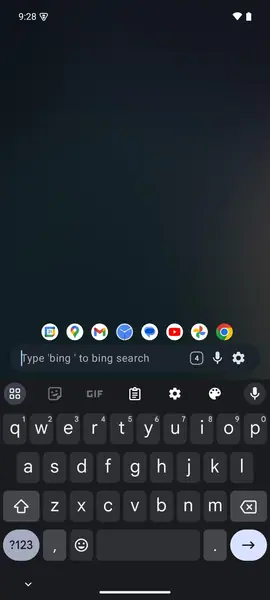
SearchLauncher is a keyboard-first Android launcher. Your home screen opens with a keyboard. One bar finds everything on your phone and everything on the web, and opens what you find in a browser that blocks ads.
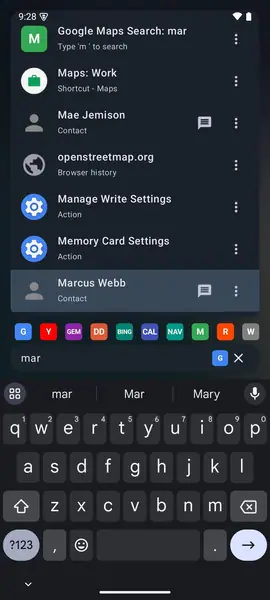
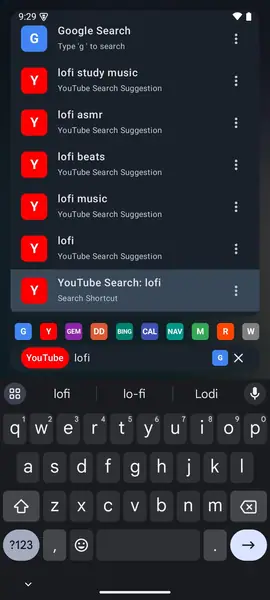
SEARCH ANYTHING Apps, app shortcuts, contacts, device settings, downloads, calendar events for the coming week, text snippets and your own custom actions. Ranking learns from what you pick, so the next time is faster.
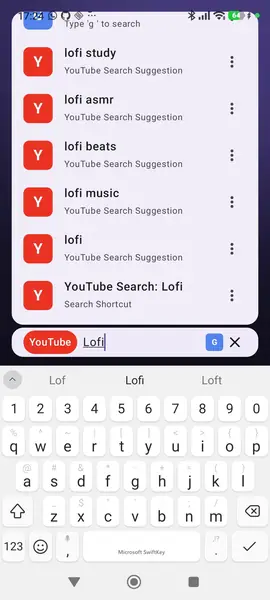
SEARCH INSIDE APPS, NOT JUST FOR THEM Type y for YouTube, m for Maps, w for Wikipedia, then what you are looking for. Add a shortcut for any site with a search URL, and give it whatever letter you like.
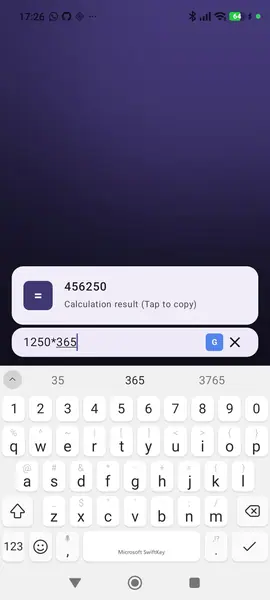
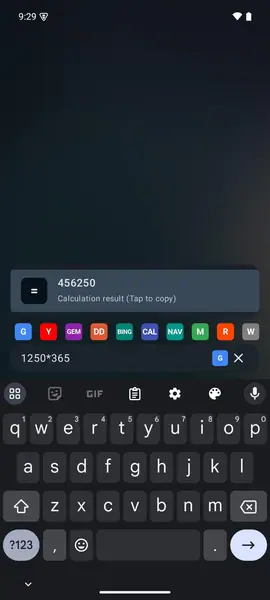
ONE FIELD THAT KNOWS WHAT YOU TYPED A sum gets an answer you can tap to copy. A web address opens. "5m pasta" sets a timer. A phone number offers to call it, message it, or save it as a contact. An email address offers to write to it.
A BROWSER WITH NO ADS Web results open in the app, with ads and trackers blocked by default. Swipe the search bar sideways to move between tabs, or up to see them all as live previews. Both work from the home screen, so your tabs are one gesture away without opening a browser first. Save a page under a title you choose, and find visited pages back from the search bar. Private windows, file uploads, picture-in-picture video and hardware keyboard shortcuts are all included.
FEWER ICONS, MORE ROOM FOR WIDGETS Add a widget by typing its name, resize it by dragging, and tap the wallpaper to show or hide them all. On a tablet they lay out in columns rather than one widget stretched across the display.
MAKE IT YOURS Swipe through your own wallpapers. The theme colour can follow the wallpaper behind the search bar. Monochrome icons are optional. Dark mode, a true black OLED mode, a row of favourites, voice search, and export and import of everything you have set up.
Use it as your default launcher, or as a widget on the launcher you already have.
PRIVACY Nothing is sent anywhere by default. Search suggestions are optional, and when you turn them on, what you type goes to whichever provider the shortcut names. Crash reporting is opt-in. Contacts and calendar entries are read on your device to answer what you typed and are never uploaded. The browser's blocklist is downloaded from the StevenBlack hosts project.
SearchLauncher is free and open source: https://github.com/ontola/searchlauncher
What's new in version 0.1.7
If the built-in browser freezes, the launcher now restarts itself instead of staying stuck. Press Home and the home screen comes back. After such a freeze or crash, the tab that was open reloads its address fresh once.
APK file information
| Package name | com.searchlauncher.app |
|---|---|
| Version | 0.1.7 (code 310) |
| Minimum Android | Android 10 · targets Android 16 |
| Architectures | arm64-v8a, armeabi-v7a, x86_64 |
| SHA-256 | 42a1b14819847d90e3fc7b903b6489b866d8148dd9a977bb04d24fe6e1356517 |
| Signature | 553f628023ac5739ed10cfdfad26e9c79ad5ef669cd187c8effa97c733b1d6b0 |
| Licence | MIT — permissive free licence: the source code is public and reusable |
| Source code | github.com/ontola/searchlauncher |
Permissions
- See installed apps sensitive
- Show notifications
- Install other apps sensitive
- Internet access
- Read contacts sensitive
- Read calendar sensitive
- Microphone sensitive
- Camera sensitive
- Approximate location sensitive
- Precise location (GPS) sensitive
9 other technical permission(s)
PACKAGE_USAGE_STATS DOWNLOAD_WITHOUT_NOTIFICATION REQUEST_DELETE_PACKAGES CREDENTIAL_MANAGER_SET_ORIGIN CREDENTIAL_MANAGER_QUERY_CANDIDATE_CREDENTIALS WRITE_SETTINGS MODIFY_AUDIO_SETTINGS EXPAND_STATUS_BAR ACCESS_HIDDEN_PROFILES
Older versions
- SearchLauncher 0.1.7November 23, 2026 · 17.5 MB
- SearchLauncher 0.1.6November 17, 2026 · 17.5 MB
- SearchLauncher 0.0.51October 2, 2026 · 22.6 MB
How to install SearchLauncher APK
- Tap Download APK above, then open the file once the download has finished.
- If Android asks, allow your browser to install unknown apps.
- Tap Install. SearchLauncher then appears with your other apps.
Having trouble? Read our guides how to install an APK on Android and "App not installed": how to fix it.
Frequently asked questions
Is SearchLauncher free?
Yes. SearchLauncher is distributed under the MIT licence: free, no subscription, and its source code is public.
Is this APK file safe?
The file is the one built and published by the F-Droid repository from the public source code. Its SHA-256 fingerprint is shown above, so you can compare it after downloading. How to check an APK.
Will SearchLauncher work on my phone?
You need at least Android 10. The app also works without Google services, so it runs on recent Huawei phones too.





