
Seca Messages APK
Private SMS, and end-to-end encrypted messages between Seca phones
Scarica l'APK v0.1.0-beta14 · 22,5 MB- Versione0.1.0-beta14
- Dimensione22,5 MB
- RichiedeAndroid 12
- Aggiornata23/11/2026
- LicenzaAGPL-3.0-or-later
- PrezzoGratis
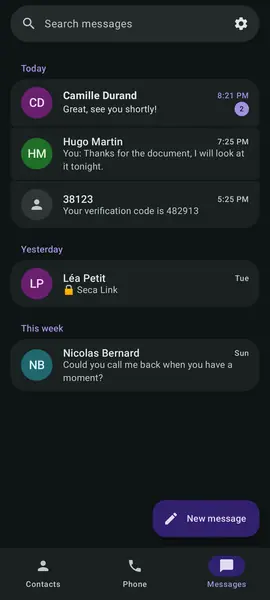
Informazioni su Seca Messages
Descrizione fornita dallo sviluppatore (in inglese).
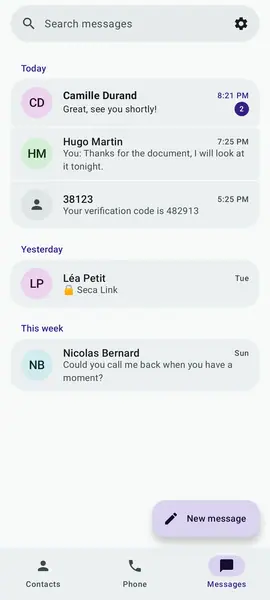
Ordinary texts, and end-to-end encrypted messages between Seca phones.
With Seca Link off, the app does not use the Internet at all. Turn it on and messages between two Seca phones travel encrypted with the Signal protocol, through public relays that see neither who writes nor what is written. No account, no server of ours.
One of three apps — Contacts, Phone and Messages — sharing one Material 3 Expressive design. Android 12 or newer, with or without Google, at its best on GrapheneOS. In English, French, German, Spanish and Polish.
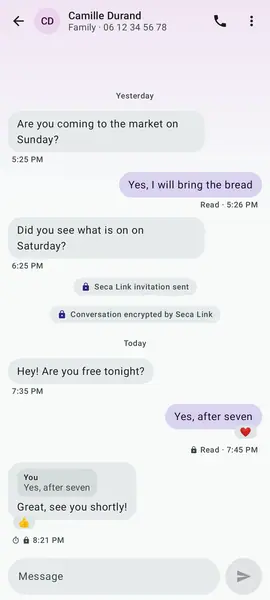
Seca Link: end-to-end encrypted
- Between two Seca phones, messages travel encrypted with the Signal protocol (libsignal, post-quantum PQXDH), bypassing the carrier.
- No account, no Seca server: encrypted messages travel through public Nostr relays, which see neither who writes nor what is written.
- Two contacts connect through an invisible SMS; everything then goes over the Internet.
- Read receipts and typing indicator, each of which can be turned off.
- Safety number to compare, or to scan as a QR code.
- Encrypted photos and voice messages; the microphone is asked for only when you record one.
- Four public relays are set by default (relay.damus.io, nos.lol, relay.primal.net, nostr.mom) and the list is yours to change.
- Off by default: without Seca Link, the app does not use the Internet.
SMS
- MMS, both ways. A picture message sent to you arrives and is shown in the conversation. Sending one works too, through your carrier, so it reaches any phone: a picture, a video, a file, a contact card or a voice message, with no account at either end. Pictures are shrunk to what a network will carry. Group conversations over MMS are still being worked on.
- Conversations with your contacts' photos and profiles, search across every message.
- Reply from the notification, scheduled messages.
- Verification codes copied in one tap and erased automatically after a while.
- Advertising texts filed as spam.
- Pinned and archived conversations.
Also
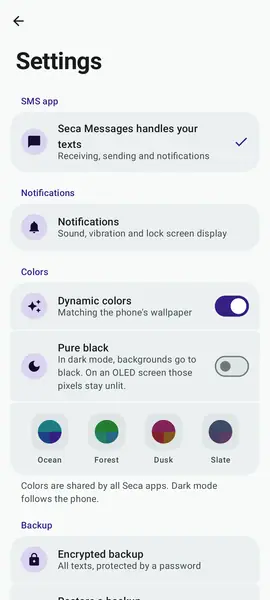
- Password-encrypted backup.
- App lock, and a hidden preview in recent apps.
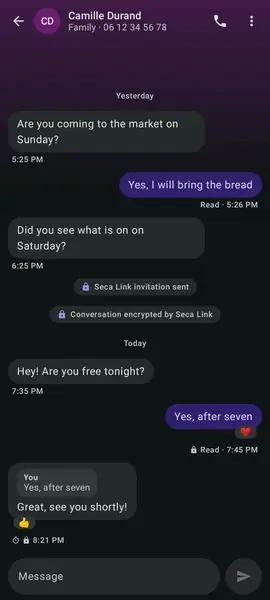
- Wallpaper colours or Seca palettes, dark theme.
No ads, no trackers, no account. Open source.
Novità della versione 0.1.0-beta14
A group conversation is the group, not whoever wrote last. What you attach waits in the composer until you send it. A long text in a language with accents goes in several parts, and every part now reports back: one that arrived no longer shows as failed. Delivery reports work at all, for the first time. The carrier says how large a message may be, not us. A message is announced unless you are reading that very conversation. The archive sits at the top.
Informazioni sul file APK
| Nome del pacchetto | com.seca.messages |
|---|---|
| Versione | 0.1.0-beta14 (codice 14) |
| Android minimo | Android 12 · pensata per Android 16 |
| Architetture | arm64-v8a, armeabi-v7a |
| SHA-256 | 215b7d37d8206219428497a985bccde1337579f3969a5c4e15fa671ef24deabe |
| Firma | 2fdea7b46beffe16459bb4dcdd34db5e0cb912274a5eb628e4b0d8a596211790 |
| Licenza | AGPL-3.0-or-later — licenza libera copyleft: il codice è pubblico e le versioni modificate devono restare libere |
| Codice sorgente | github.com/arditore/Seca |
Autorizzazioni richieste
- Leggere gli SMS sensibile
- Accesso a Internet
- Ricevere SMS sensibile
- Inviare SMS sensibile
- Stato del telefono sensibile
- Leggere i contatti sensibile
- Impronta / biometria
- Mostrare notifiche
- Avviarsi all'accensione
- Funzionare in background
- Fotocamera sensibile
- Microfono sensibile
- Vedere lo stato della rete
Altre 3 autorizzazioni tecniche
REQUEST_IGNORE_BATTERY_OPTIMIZATIONS RECEIVE_MMS SCHEDULE_EXACT_ALARM
Versioni precedenti
- Seca Messages 0.1.0-beta1423 novembre 2026 · 22,5 MB
- Seca Messages 0.1.0-beta1317 novembre 2026 · 22,4 MB
- Seca Messages 0.1.0-beta109 novembre 2026 · 22,2 MB
Come installare Seca Messages APK
- Tocca Scarica l'APK qui sopra, poi apri il file al termine del download.
- Se Android lo chiede, consenti al browser di installare app sconosciute.
- Tocca Installa. Seca Messages comparirà insieme alle altre app.
→ Come installare un file APK su Android (passo passo)
→ «App non installata»: cause e soluzioni
Domande frequenti
Seca Messages è gratis?
Sì. Seca Messages è distribuita con licenza AGPL-3.0-or-later: gratuita, senza abbonamento e con codice sorgente pubblico.
Questo file APK è sicuro?
Il file è quello compilato e pubblicato dal repository F-Droid a partire dal codice sorgente pubblico. L'impronta SHA-256 è indicata qui sopra: puoi confrontarla dopo il download. Un APK è pericoloso? Come verificare un file prima di installarlo
Seca Messages funziona sul mio telefono?
Serve almeno Android 12. L'app funziona anche senza i servizi Google, quindi anche sui telefoni Huawei recenti.