Seca Messages APK
Private SMS, and end-to-end encrypted messages between Seca phones
Download APK v0.1.0-beta14 · 22.5 MB- Version0.1.0-beta14
- Size22.5 MB
- RequiresAndroid 12
- Updated11/23/2026
- LicenceAGPL-3.0-or-later
- PriceFree
About Seca Messages
Ordinary texts, and end-to-end encrypted messages between Seca phones.
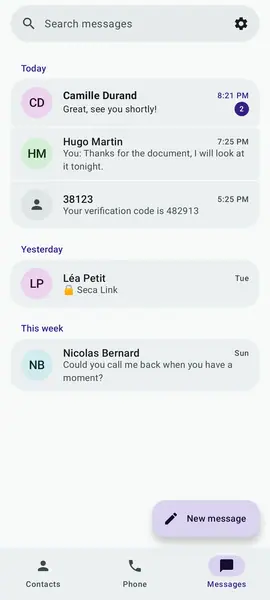
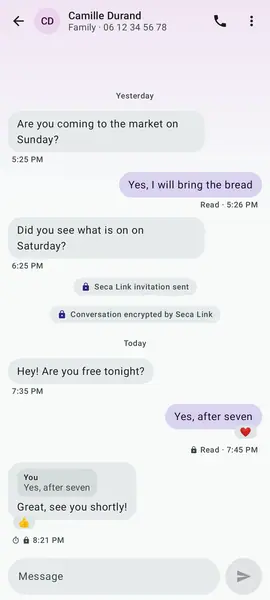
With Seca Link off, the app does not use the Internet at all. Turn it on and messages between two Seca phones travel encrypted with the Signal protocol, through public relays that see neither who writes nor what is written. No account, no server of ours.
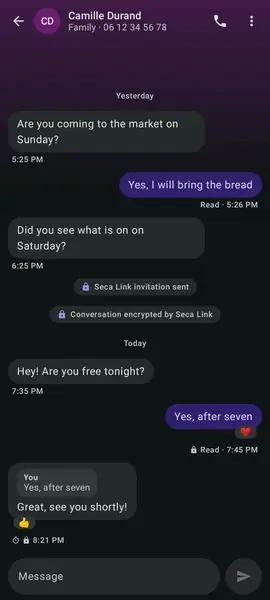
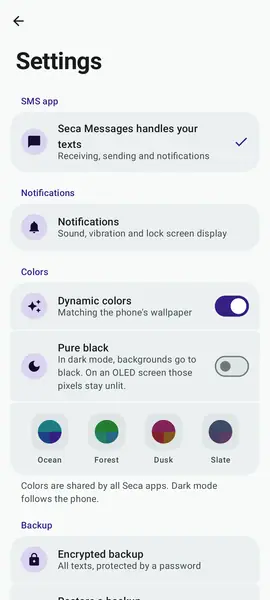
One of three apps — Contacts, Phone and Messages — sharing one Material 3 Expressive design. Android 12 or newer, with or without Google, at its best on GrapheneOS. In English, French, German, Spanish and Polish.
Seca Link: end-to-end encrypted
- Between two Seca phones, messages travel encrypted with the Signal protocol (libsignal, post-quantum PQXDH), bypassing the carrier.
- No account, no Seca server: encrypted messages travel through public Nostr relays, which see neither who writes nor what is written.
- Two contacts connect through an invisible SMS; everything then goes over the Internet.
- Read receipts and typing indicator, each of which can be turned off.
- Safety number to compare, or to scan as a QR code.
- Encrypted photos and voice messages; the microphone is asked for only when you record one.
- Four public relays are set by default (relay.damus.io, nos.lol, relay.primal.net, nostr.mom) and the list is yours to change.
- Off by default: without Seca Link, the app does not use the Internet.
SMS
- MMS, both ways. A picture message sent to you arrives and is shown in the conversation. Sending one works too, through your carrier, so it reaches any phone: a picture, a video, a file, a contact card or a voice message, with no account at either end. Pictures are shrunk to what a network will carry. Group conversations over MMS are still being worked on.
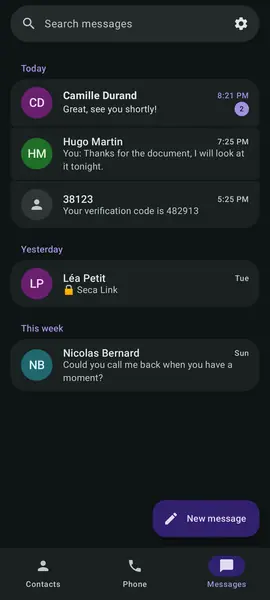
- Conversations with your contacts' photos and profiles, search across every message.
- Reply from the notification, scheduled messages.
- Verification codes copied in one tap and erased automatically after a while.
- Advertising texts filed as spam.
- Pinned and archived conversations.
Also
- Password-encrypted backup.
- App lock, and a hidden preview in recent apps.
- Wallpaper colours or Seca palettes, dark theme.
No ads, no trackers, no account. Open source.
What's new in version 0.1.0-beta14
A group conversation is the group, not whoever wrote last. What you attach waits in the composer until you send it. A long text in a language with accents goes in several parts, and every part now reports back: one that arrived no longer shows as failed. Delivery reports work at all, for the first time. The carrier says how large a message may be, not us. A message is announced unless you are reading that very conversation. The archive sits at the top.
APK file information
| Package name | com.seca.messages |
|---|---|
| Version | 0.1.0-beta14 (code 14) |
| Minimum Android | Android 12 · targets Android 16 |
| Architectures | arm64-v8a, armeabi-v7a |
| SHA-256 | 215b7d37d8206219428497a985bccde1337579f3969a5c4e15fa671ef24deabe |
| Signature | 2fdea7b46beffe16459bb4dcdd34db5e0cb912274a5eb628e4b0d8a596211790 |
| Licence | AGPL-3.0-or-later — copyleft free licence: the code is public and modified versions must stay free |
| Source code | github.com/arditore/Seca |
Permissions
- Read SMS sensitive
- Internet access
- Receive SMS sensitive
- Send SMS sensitive
- Phone status sensitive
- Read contacts sensitive
- Fingerprint / biometrics
- Show notifications
- Start at boot
- Run in the background
- Camera sensitive
- Microphone sensitive
- View network status
3 other technical permission(s)
REQUEST_IGNORE_BATTERY_OPTIMIZATIONS RECEIVE_MMS SCHEDULE_EXACT_ALARM
Older versions
- Seca Messages 0.1.0-beta14November 23, 2026 · 22.5 MB
- Seca Messages 0.1.0-beta13November 17, 2026 · 22.4 MB
- Seca Messages 0.1.0-beta10November 9, 2026 · 22.2 MB
How to install Seca Messages APK
- Tap Download APK above, then open the file once the download has finished.
- If Android asks, allow your browser to install unknown apps.
- Tap Install. Seca Messages then appears with your other apps.
Having trouble? Read our guides how to install an APK on Android and "App not installed": how to fix it.
Frequently asked questions
Is Seca Messages free?
Yes. Seca Messages is distributed under the AGPL-3.0-or-later licence: free, no subscription, and its source code is public.
Is this APK file safe?
The file is the one built and published by the F-Droid repository from the public source code. Its SHA-256 fingerprint is shown above, so you can compare it after downloading. How to check an APK.
Will Seca Messages work on my phone?
You need at least Android 12. The app also works without Google services, so it runs on recent Huawei phones too.