
Presence Publisher APK
MQTTトピックへの定期的なパブリッシュ
APK をダウンロード v2.8.3 · 3.2 MB- バージョン2.8.3
- サイズ3.2 MB
- 必要環境Android 6.0
- 更新日2026/11/17
- ライセンスMIT
- 価格無料
Presence Publisher について
開発者による説明(英語)。
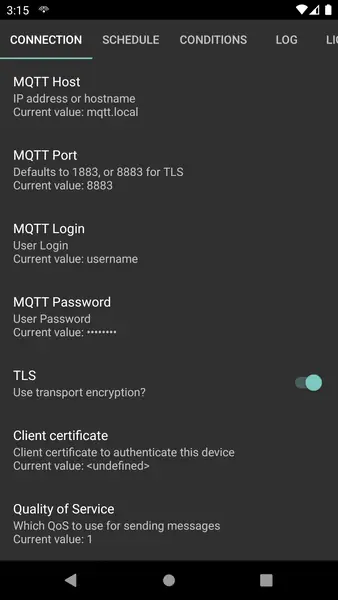
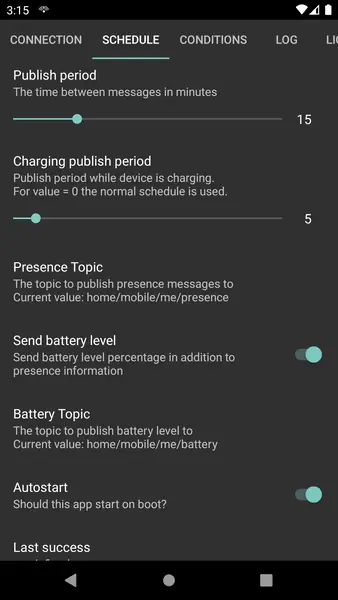
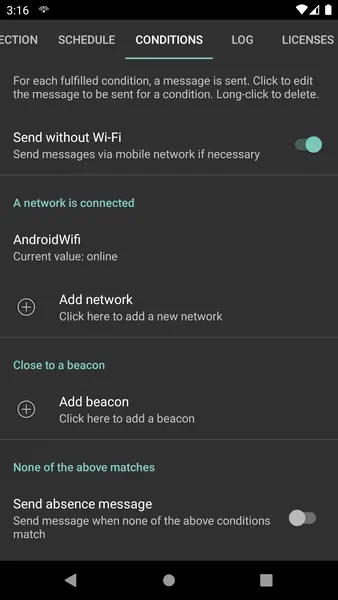
This free open-source app regularly publishes to a configurable MQTT topic whenever connected to a given Wi-Fi network or in proximity to a Bluetooth beacon. It can be used to integrate the presence of your phone in home automation.
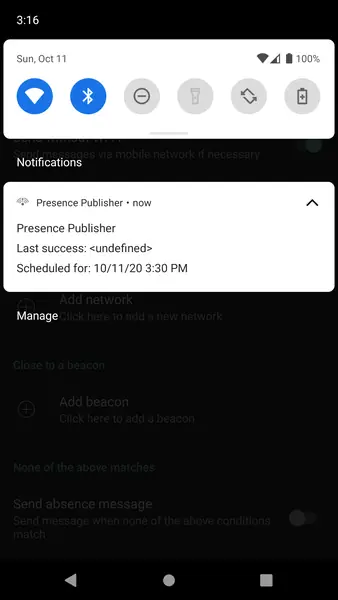
The app uses the AndroidX WorkManager library, so notifications are sent even if the phone is in stand-by. In addition to regularly scheduled checks, the app also reacts to changes in the network connection.
The MQTT client supports anonymous and username / password authentication as well as client certificate authentication. For more details on how to configure certificate-based authentication, please have a look at https://github.com/ostrya/PresencePublisher/blob/main/README.md.
Note that the data you choose to publish is sent only to the server of your choice. The app does not send any data to me or any other third party.
If you want to know more about how this app processes your location data, please have a look at the privacy policy at https://ostrya.github.io/PresencePublisher/en/PRIVACY_POLICY.html.
Permissions
- ACCESS_BACKGROUND_LOCATION: on Android 10+, necessary to retrieve name of connected Wi-Fi while running in background
- ACCESS_FINE_LOCATION: necessary to discover beacons; on Android 9+, necessary to retrieve name of connected Wi-Fi
- ACCESS_LOCAL_NETWORK: on Android 17+, necessary to send MQTT messages to local network
- ACCESS_NETWORK_STATE: necessary to register network change listener
- ACCESS_WIFI_STATE: necessary to retrieve SSID of connected Wi-Fi
- BLUETOOTH: necessary up to Android 11 to communicate with beacons
- BLUETOOTH_ADMIN: necessary up to Android 11 to discover beacons
- BLUETOOTH_CONNECT: on Android 12+, necessary to read beacon names
- BLUETOOTH_SCAN: on Android 12+, necessary to discover beacons
- FOREGROUND_SERVICE: on Android 9+, necessary to run the app reliably
- FOREGROUND_SERVICE_DATA_SYNC: on Android 14+, necessary to send MQTT messages
- INTERNET: only necessary if your MQTT server is not running locally
- POST_NOTIFICATIONS: on Android 13+, necessary to create notifications
- RECEIVE_BOOT_COMPLETED: necessary to start service on start-up
- REQUEST_IGNORE_BATTERY_OPTIMIZATIONS: on Android 6+, necessary to request disabling battery optimization
バージョン 2.8.3 の新機能
v2.8.3
- MQTT publishing fixed
v2.8.2
- settings can now be backed up and restored
v2.8.1
- fixed bug in address check
v2.8.0
- upgraded dependencies and adapted for Android 17
⚠️ After the update, the app needs to be opened once to acquire the permission to access the local network for MQTT messages.
APK ファイルの情報
| パッケージ名 | org.ostrya.presencepublisher |
|---|---|
| バージョン | 2.8.3 (コード 63) |
| 最低 Android バージョン | Android 6.0 · 対象 API 37 |
| アーキテクチャ | arm64-v8a, armeabi-v7a, x86, x86_64 |
| SHA-256 | e55e07b80bceba357bb7602561c91d15fa69fe675373758a23616499fc7e1b7a |
| 署名 | e05dca379f66dd2ad049831d497a4be3b84c24a87360b329db67fe3baa7702b4 |
| ライセンス | MIT — 寛容型の自由ライセンス:ソースコードは公開され、再利用できます |
| ソースコード | github.com/ostrya/PresencePublisher |
権限
- バックグラウンドでの位置情報 要注意
- 正確な位置情報(GPS) 要注意
- ネットワーク状態の確認
- Wi-Fi 状態の確認
- Bluetooth
- Bluetooth 接続
- Bluetooth 機器の検索
- バックグラウンドで動作
- インターネット接続
- 通知の表示
- 起動時に実行
- おおよその位置情報 要注意
- スリープの防止
その他の技術的な権限(3 件)
ACCESS_LOCAL_NETWORK BLUETOOTH_ADMIN REQUEST_IGNORE_BATTERY_OPTIMIZATIONS
以前のバージョン
- Presence Publisher 2.8.32026年11月17日 · 3.2 MB
- Presence Publisher 2.8.22026年11月9日 · 3.2 MB
- Presence Publisher 2.8.12026年11月4日 · 3.2 MB
Presence Publisher APK のインストール方法
- 上のAPK をダウンロードをタップし、ダウンロード後にファイルを開きます。
- Android に確認されたら、ブラウザに不明なアプリのインストールを許可します。
- インストールをタップします。Presence Publisher がほかのアプリと一緒に表示されます。
→ Android に APK ファイルをインストールする方法(手順付き)
→ 「アプリはインストールされていません」:原因と対処法
よくある質問
Presence Publisher は無料ですか?
はい。Presence Publisher は MIT ライセンスで配布されており、無料・サブスクリプション不要で、ソースコードも公開されています。
この APK ファイルは安全ですか?
このファイルは F-Droid リポジトリが公開ソースコードからビルドして公開したものです。SHA-256 フィンガープリントを上に記載しているので、ダウンロード後に照合できます。 APK は危険?インストール前にファイルを確認する方法
Presence Publisher は自分のスマホで動きますか?
Android 6.0 以上が必要です。Google サービスがなくても動作するため、最近の Huawei 端末でも使えます。





