
Presence Publisher APK
Regelmatig naar een MQTT onderwerp publiceren
APK downloaden v2.8.3 · 3,2 MB- Versie2.8.3
- Grootte3,2 MB
- VereistAndroid 6.0
- Bijgewerkt17-11-2026
- LicentieMIT
- PrijsGratis
Over Presence Publisher
Beschrijving van de ontwikkelaar (in het Engels).
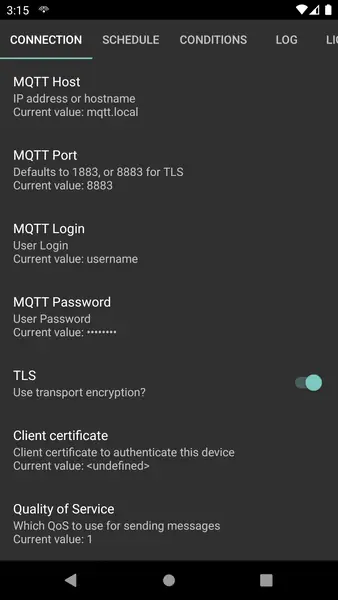
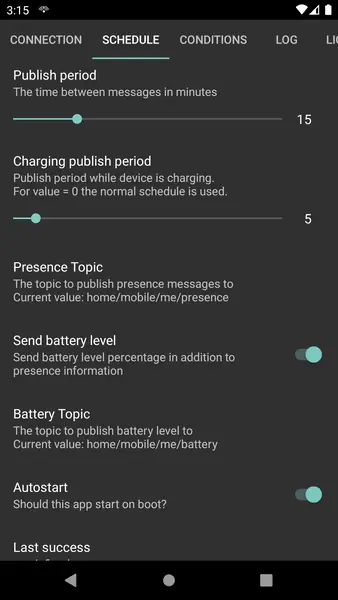
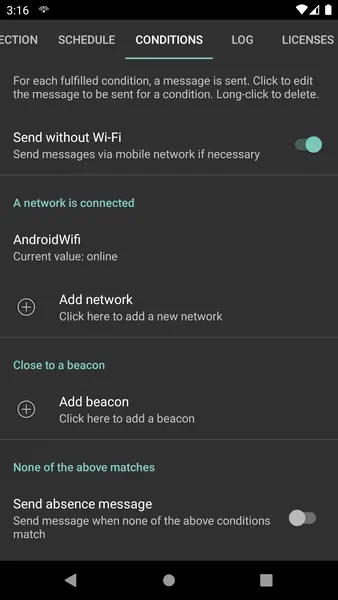
This free open-source app regularly publishes to a configurable MQTT topic whenever connected to a given Wi-Fi network or in proximity to a Bluetooth beacon. It can be used to integrate the presence of your phone in home automation.
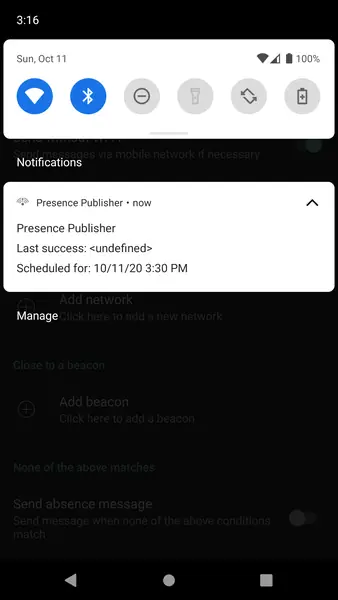
The app uses the AndroidX WorkManager library, so notifications are sent even if the phone is in stand-by. In addition to regularly scheduled checks, the app also reacts to changes in the network connection.
The MQTT client supports anonymous and username / password authentication as well as client certificate authentication. For more details on how to configure certificate-based authentication, please have a look at https://github.com/ostrya/PresencePublisher/blob/main/README.md.
Note that the data you choose to publish is sent only to the server of your choice. The app does not send any data to me or any other third party.
If you want to know more about how this app processes your location data, please have a look at the privacy policy at https://ostrya.github.io/PresencePublisher/en/PRIVACY_POLICY.html.
Permissions
- ACCESS_BACKGROUND_LOCATION: on Android 10+, necessary to retrieve name of connected Wi-Fi while running in background
- ACCESS_FINE_LOCATION: necessary to discover beacons; on Android 9+, necessary to retrieve name of connected Wi-Fi
- ACCESS_LOCAL_NETWORK: on Android 17+, necessary to send MQTT messages to local network
- ACCESS_NETWORK_STATE: necessary to register network change listener
- ACCESS_WIFI_STATE: necessary to retrieve SSID of connected Wi-Fi
- BLUETOOTH: necessary up to Android 11 to communicate with beacons
- BLUETOOTH_ADMIN: necessary up to Android 11 to discover beacons
- BLUETOOTH_CONNECT: on Android 12+, necessary to read beacon names
- BLUETOOTH_SCAN: on Android 12+, necessary to discover beacons
- FOREGROUND_SERVICE: on Android 9+, necessary to run the app reliably
- FOREGROUND_SERVICE_DATA_SYNC: on Android 14+, necessary to send MQTT messages
- INTERNET: only necessary if your MQTT server is not running locally
- POST_NOTIFICATIONS: on Android 13+, necessary to create notifications
- RECEIVE_BOOT_COMPLETED: necessary to start service on start-up
- REQUEST_IGNORE_BATTERY_OPTIMIZATIONS: on Android 6+, necessary to request disabling battery optimization
Nieuw in versie 2.8.3
v2.8.3
- MQTT publishing fixed
v2.8.2
- settings can now be backed up and restored
v2.8.1
- fixed bug in address check
v2.8.0
- upgraded dependencies and adapted for Android 17
⚠️ After the update, the app needs to be opened once to acquire the permission to access the local network for MQTT messages.
Informatie over het APK-bestand
| Pakketnaam | org.ostrya.presencepublisher |
|---|---|
| Versie | 2.8.3 (code 63) |
| Minimaal Android | Android 6.0 · bedoeld voor API 37 |
| Architecturen | arm64-v8a, armeabi-v7a, x86, x86_64 |
| SHA-256 | e55e07b80bceba357bb7602561c91d15fa69fe675373758a23616499fc7e1b7a |
| Handtekening | e05dca379f66dd2ad049831d497a4be3b84c24a87360b329db67fe3baa7702b4 |
| Licentie | MIT — vrije, ruime licentie: de broncode is openbaar en herbruikbaar |
| Broncode | github.com/ostrya/PresencePublisher |
Machtigingen
- Locatie op de achtergrond gevoelig
- Precieze locatie (gps) gevoelig
- Netwerkstatus bekijken
- Wifistatus bekijken
- Bluetooth
- Verbinden via bluetooth
- Bluetooth-apparaten zoeken
- Op de achtergrond draaien
- Internettoegang
- Meldingen tonen
- Starten bij opstarten
- Geschatte locatie gevoelig
- Slaapstand voorkomen
3 andere technische machtiging(en)
ACCESS_LOCAL_NETWORK BLUETOOTH_ADMIN REQUEST_IGNORE_BATTERY_OPTIMIZATIONS
Oudere versies
- Presence Publisher 2.8.317 november 2026 · 3,2 MB
- Presence Publisher 2.8.29 november 2026 · 3,2 MB
- Presence Publisher 2.8.14 november 2026 · 3,2 MB
Presence Publisher APK installeren
- Tik hierboven op APK downloaden en open het bestand als de download klaar is.
- Als Android erom vraagt, sta je browser toe om onbekende apps te installeren.
- Tik op Installeren. Presence Publisher verschijnt dan bij je andere apps.
→ Een APK-bestand installeren op Android (stap voor stap)
→ “App niet geïnstalleerd”: oorzaken en oplossingen
Veelgestelde vragen
Is Presence Publisher gratis?
Ja. Presence Publisher wordt verspreid onder de licentie MIT: gratis, zonder abonnement en met openbare broncode.
Is dit APK-bestand veilig?
Het bestand is gebouwd en gepubliceerd door de F-Droid-repository op basis van de openbare broncode. De SHA-256-vingerafdruk staat hierboven, zodat je die na het downloaden kunt vergelijken. Is een APK gevaarlijk? Zo controleer je een bestand vóór installatie
Werkt Presence Publisher op mijn telefoon?
Je hebt minimaal Android 6.0 nodig. De app werkt ook zonder Google-diensten, dus ook op recente Huawei-telefoons.





