Notes Tech APK
Encrypted Markdown notes, 100% local. No Internet permission.
Baixar APK v3.4.0 · 7,4 MB- Versão3.4.0
- Tamanho7,4 MB
- RequerAndroid 7.0
- Atualizado23/11/2026
- LicençaApache-2.0
- PreçoGrátis
Sobre o Notes Tech
Descrição fornecida pelo desenvolvedor (em inglês).
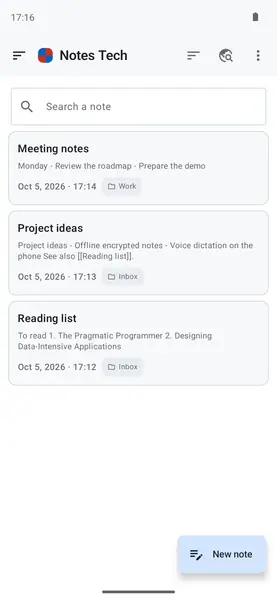
Notes Tech: 100% local Markdown note-taking, encrypted at rest. Written in Kotlin.
Radical privacy
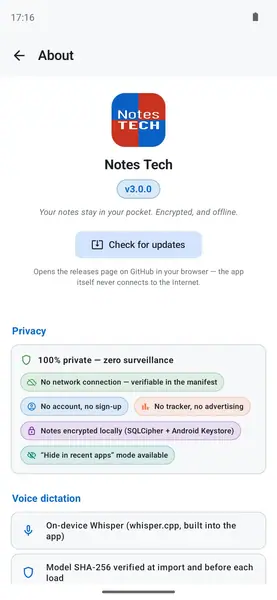
- No INTERNET permission — verifiable with aapt dump permissions app.apk
- No account, no telemetry, no tracker, no advertising
- SQLCipher AES-256 database, key sealed by the Android Keystore
- Multi-step panic mode: wipes keys, database and dictation model in seconds
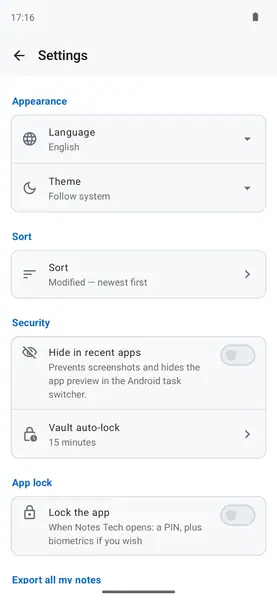
- Optional app lock: a PIN, plus strong biometrics if you wish
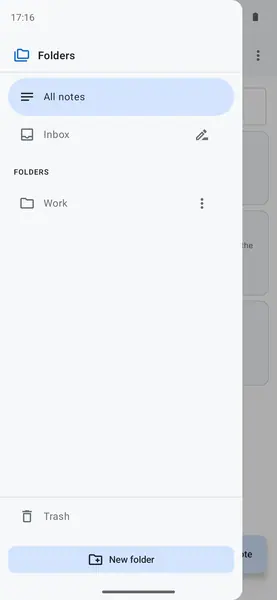
Per-folder vaults
- Argon2id passphrase (m=64MB, t=3) or Keystore-bound PIN (Android 9+)
- AES-256-GCM per note, bound to its note (anti-swap)
- PIN auto-wipe after 5 failures
- Configurable auto-lock (5 min to never)
On-device voice dictation
- whisper.cpp built into the app; Whisper model imported manually
- SHA-256 verified at import and before loading
- Recordings deleted after transcription
Editing
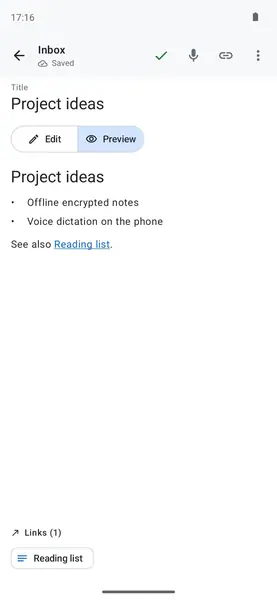
- Notes open to be read (Markdown: headings, lists, links); “Edit” to write, autosave
- Long press to select notes, then archive, move, trash with Undo, pin, color or delete them at once
- An Archive for the notes you keep out of your lists
- Notes that erase themselves: after 1 hour, 24 hours, 7 or 30 days, or after reading
- Share a note sealed: an encrypted file that only its code opens, sent by any app
- Quick drop: write a note without unlocking the app, from a quick settings tile or the icon's shortcuts
- The keyboard is asked not to learn what you type
- A pastel colour per note in the lists (a vault note's only while its vault is open)
- [[Title]] backlinks with autocomplete + "notes linking here" panel
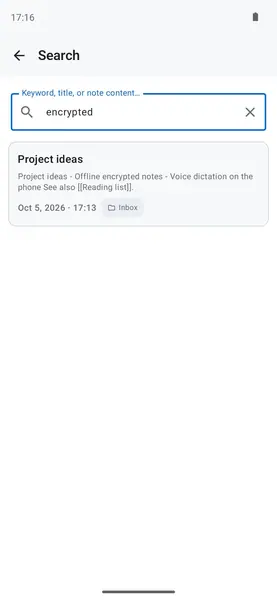
- Instant FTS5 search, find in note with highlighted matches, configurable sort
- Markdown export, one note or a ZIP (YAML frontmatter, Obsidian/Logseq compatible)
- Import of Markdown, text and ZIP files; share text or files from other apps
- Encrypted backup of your notes and vaults, restored without overwriting anything
Five languages
- English, French, German, Italian, Spanish — chosen in Settings
- Light / dark / system theme
- Privacy policy and terms in the five languages
Permissions
- Microphone: dictation only, asked when you turn it on
- Biometrics: app lock only, gives access to no data
Open source Apache 2.0 Full and verifiable source code on GitHub: gitubpatrice/notes_tech
For thinkers, therapists, students, researchers, writers and journalists who want to take sensitive or dense notes without them ever leaving their phone.
Novidades da versão 3.4.0
New: notes that erase themselves — in 1 h, 24 h, 7 or 30 days, or after reading (⋮ › Lifetime). Share a note sealed: an encrypted file that only its code opens, sent by any app (⋮ › Share sealed). Quick drop: write a note without unlocking the app, from a quick settings tile or a long press on the icon, which also offers New note and Dictate. The keyboard is asked not to learn what you type (Settings). Fixed: the preview keeps your line breaks.
Informações do arquivo APK
| Nome do pacote | com.filestech.notes_tech |
|---|---|
| Versão | 3.4.0 (código 5073) |
| Android mínimo | Android 7.0 · feito para Android 16 |
| Arquiteturas | x86_64 |
| SHA-256 | b8c58d197efb9997c2b68905869fc42eb1eabd19453c054a6099690800d6f8a6 |
| Assinatura | e6eafe5846512cd20abc5c66c964671ddfd8f45f3c3f12cbd5e53f19b90f1210 |
| Licença | Apache-2.0 — licença livre permissiva: o código-fonte é público e reutilizável |
| Código-fonte | github.com/gitubpatrice/notes_tech |
| Site oficial | www.files-tech.com/notes-tech.php |
Permissões solicitadas
- Microfone sensível
- Digital / biometria
- Impressão digital
Versões anteriores
- Notes Tech 3.4.023 de novembro de 2026 · 7,4 MB
- Notes Tech 3.4.023 de novembro de 2026 · 7,1 MB
- Notes Tech 3.4.023 de novembro de 2026 · 5,5 MB
- Notes Tech 3.3.013 de novembro de 2026 · 7,3 MB
- Notes Tech 3.3.013 de novembro de 2026 · 7,0 MB
- Notes Tech 3.3.013 de novembro de 2026 · 5,4 MB
- Notes Tech 3.2.24 de novembro de 2026 · 7,3 MB
- Notes Tech 3.2.24 de novembro de 2026 · 7,0 MB
- Notes Tech 3.2.24 de novembro de 2026 · 5,4 MB
Como instalar o Notes Tech APK
- Toque em Baixar APK acima e abra o arquivo quando o download terminar.
- Se o Android pedir, permita que o navegador instale apps desconhecidos.
- Toque em Instalar. O Notes Tech aparecerá junto aos seus outros apps.
→ Como instalar um arquivo APK no Android (passo a passo)
→ "App não instalado": causas e soluções
Perguntas frequentes
O Notes Tech é grátis?
Sim. O Notes Tech é distribuído sob a licença Apache-2.0: grátis, sem assinatura e com código-fonte público.
Este arquivo APK é seguro?
O arquivo é o compilado e publicado pelo repositório F-Droid a partir do código-fonte público. A impressão digital SHA-256 aparece acima para você comparar depois do download. APK é perigoso? Como verificar um arquivo antes de instalar
O Notes Tech funciona no meu celular?
É preciso ter pelo menos Android 7.0. O app também funciona sem os serviços do Google, inclusive em celulares Huawei recentes.