
Notes Tech APK
Encrypted Markdown notes, 100% local. No Internet permission.
Download APK v3.4.0 · 7.4 MB- Version3.4.0
- Size7.4 MB
- RequiresAndroid 7.0
- Updated11/23/2026
- LicenceApache-2.0
- PriceFree
About Notes Tech
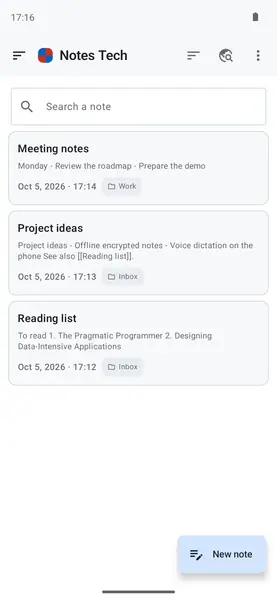
Notes Tech: 100% local Markdown note-taking, encrypted at rest. Written in Kotlin.
Radical privacy
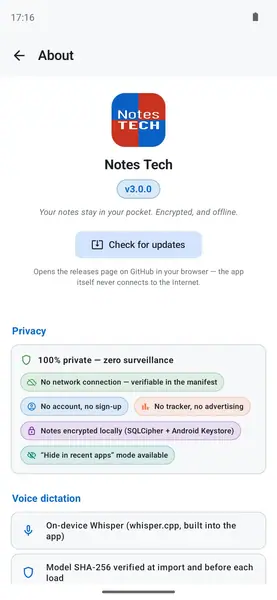
- No INTERNET permission — verifiable with aapt dump permissions app.apk
- No account, no telemetry, no tracker, no advertising
- SQLCipher AES-256 database, key sealed by the Android Keystore
- Multi-step panic mode: wipes keys, database and dictation model in seconds
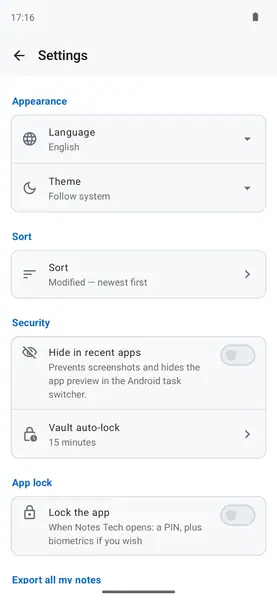
- Optional app lock: a PIN, plus strong biometrics if you wish
Per-folder vaults
- Argon2id passphrase (m=64MB, t=3) or Keystore-bound PIN (Android 9+)
- AES-256-GCM per note, bound to its note (anti-swap)
- PIN auto-wipe after 5 failures
- Configurable auto-lock (5 min to never)
On-device voice dictation
- whisper.cpp built into the app; Whisper model imported manually
- SHA-256 verified at import and before loading
- Recordings deleted after transcription
Editing
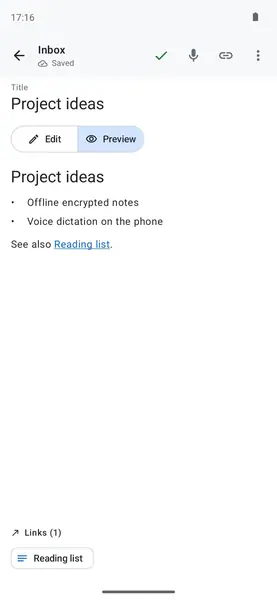
- Notes open to be read (Markdown: headings, lists, links); “Edit” to write, autosave
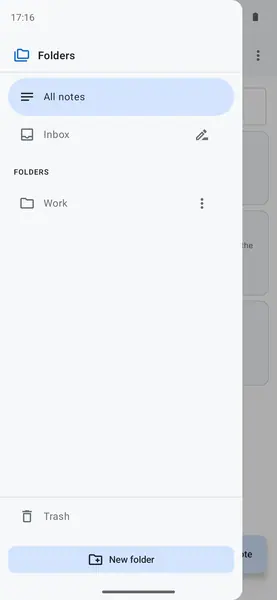
- Long press to select notes, then archive, move, trash with Undo, pin, color or delete them at once
- An Archive for the notes you keep out of your lists
- Notes that erase themselves: after 1 hour, 24 hours, 7 or 30 days, or after reading
- Share a note sealed: an encrypted file that only its code opens, sent by any app
- Quick drop: write a note without unlocking the app, from a quick settings tile or the icon's shortcuts
- The keyboard is asked not to learn what you type
- A pastel colour per note in the lists (a vault note's only while its vault is open)
- [[Title]] backlinks with autocomplete + "notes linking here" panel
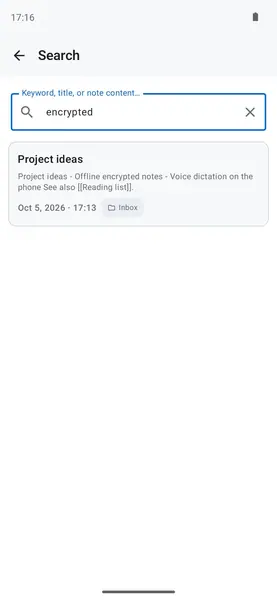
- Instant FTS5 search, find in note with highlighted matches, configurable sort
- Markdown export, one note or a ZIP (YAML frontmatter, Obsidian/Logseq compatible)
- Import of Markdown, text and ZIP files; share text or files from other apps
- Encrypted backup of your notes and vaults, restored without overwriting anything
Five languages
- English, French, German, Italian, Spanish — chosen in Settings
- Light / dark / system theme
- Privacy policy and terms in the five languages
Permissions
- Microphone: dictation only, asked when you turn it on
- Biometrics: app lock only, gives access to no data
Open source Apache 2.0 Full and verifiable source code on GitHub: gitubpatrice/notes_tech
For thinkers, therapists, students, researchers, writers and journalists who want to take sensitive or dense notes without them ever leaving their phone.
What's new in version 3.4.0
New: notes that erase themselves — in 1 h, 24 h, 7 or 30 days, or after reading (⋮ › Lifetime). Share a note sealed: an encrypted file that only its code opens, sent by any app (⋮ › Share sealed). Quick drop: write a note without unlocking the app, from a quick settings tile or a long press on the icon, which also offers New note and Dictate. The keyboard is asked not to learn what you type (Settings). Fixed: the preview keeps your line breaks.
APK file information
| Package name | com.filestech.notes_tech |
|---|---|
| Version | 3.4.0 (code 5073) |
| Minimum Android | Android 7.0 · targets Android 16 |
| Architectures | x86_64 |
| SHA-256 | b8c58d197efb9997c2b68905869fc42eb1eabd19453c054a6099690800d6f8a6 |
| Signature | e6eafe5846512cd20abc5c66c964671ddfd8f45f3c3f12cbd5e53f19b90f1210 |
| Licence | Apache-2.0 — permissive free licence: the source code is public and reusable |
| Source code | github.com/gitubpatrice/notes_tech |
| Official website | www.files-tech.com/notes-tech.php |
Permissions
- Microphone sensitive
- Fingerprint / biometrics
- Fingerprint
Older versions
- Notes Tech 3.4.0November 23, 2026 · 7.4 MB
- Notes Tech 3.4.0November 23, 2026 · 7.1 MB
- Notes Tech 3.4.0November 23, 2026 · 5.5 MB
- Notes Tech 3.3.0November 13, 2026 · 7.3 MB
- Notes Tech 3.3.0November 13, 2026 · 7.0 MB
- Notes Tech 3.3.0November 13, 2026 · 5.4 MB
- Notes Tech 3.2.2November 4, 2026 · 7.3 MB
- Notes Tech 3.2.2November 4, 2026 · 7.0 MB
- Notes Tech 3.2.2November 4, 2026 · 5.4 MB
How to install Notes Tech APK
- Tap Download APK above, then open the file once the download has finished.
- If Android asks, allow your browser to install unknown apps.
- Tap Install. Notes Tech then appears with your other apps.
Having trouble? Read our guides how to install an APK on Android and "App not installed": how to fix it.
Frequently asked questions
Is Notes Tech free?
Yes. Notes Tech is distributed under the Apache-2.0 licence: free, no subscription, and its source code is public.
Is this APK file safe?
The file is the one built and published by the F-Droid repository from the public source code. Its SHA-256 fingerprint is shown above, so you can compare it after downloading. How to check an APK.
Will Notes Tech work on my phone?
You need at least Android 7.0. The app also works without Google services, so it runs on recent Huawei phones too.





