
SayWhen APK
One phrase — and it's on your calendar. No forms, no fields.
Baixar APK v3.2.0 · 1,9 MB- Versão3.2.0
- Tamanho1,9 MB
- RequerAndroid 8.0
- Atualizado17/11/2026
- LicençaGPL-3.0-only
- PreçoGrátis
Sobre o SayWhen
Descrição fornecida pelo desenvolvedor (em inglês).
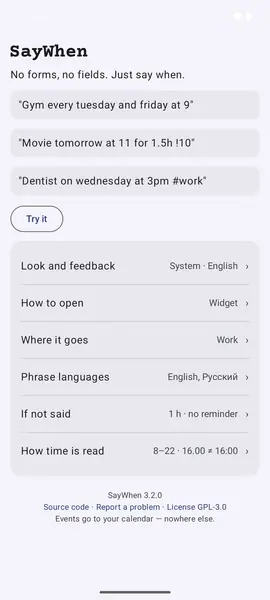
No forms, no fields. Just say when.
Type an event the way you'd say it, in English, Russian, Italian, Spanish, German, or French:
- Gym every tuesday and friday at 9
- Movie tomorrow at 11 for 1.5h !10
- Dentist june 3 at 12:30
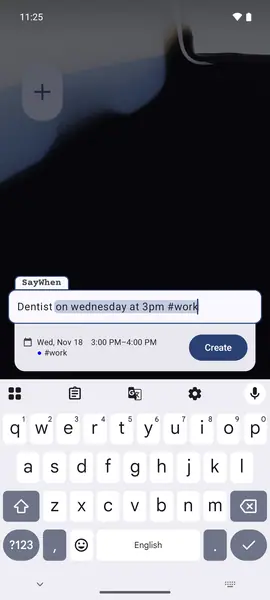
SayWhen parses the phrase as you type: date, time, duration, recurrence, a "!10" reminder. It shows a live preview of what it understood and writes the event straight to the calendar you chose. An alias in the phrase, like #work, sends one event to another calendar. Aliases come from your calendar names, and typing # brings up suggestions. With the Tasks.org integration turned on, a phrase can create a task in a Tasks.org list instead of an event: the lists appear next to your calendars. Tap the home-screen widget, type, done.
Private by construction:
- No sign-up, no server, no analytics, no identifiers
- No network access at all: the app doesn't even declare the INTERNET permission
- Two calendar permissions: read your calendar list, write the event you asked for. Two more for Tasks.org, asked only if you turn that integration on
Events go to your calendar and nowhere else. If your calendar belongs to a synced account, its own sync engine uploads the event, exactly as with any other calendar app.
Novidades da versão 3.2.0
SayWhen now turns on the languages you write in by itself, and it no longer writes to just one calendar.
- An alias in the phrase: "lunch #work" sends the event to another calendar.
- Tasks in Tasks.org: its lists appear next to your calendars.
- Settings on one screen.
- Time with a dot: "16.00" is read as 16:00.
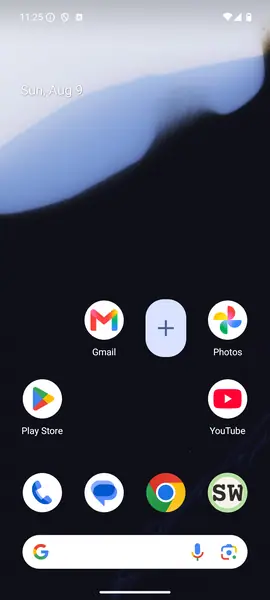
- "+ event" shortcut for launchers.
- Understands "tmrw", "tmr" and "tdy" in English.
Details are on the GitHub release page.
Informações do arquivo APK
| Nome do pacote | com.dmi3dmi3.saywhen |
|---|---|
| Versão | 3.2.0 (código 19) |
| Android mínimo | Android 8.0 · feito para Android 16 |
| Arquiteturas | arm64-v8a, armeabi-v7a, x86, x86_64 |
| SHA-256 | bb6a30e27ed10d2d41d689ea2c568706f1c86cb0f54d2efc7896cdf0baa74042 |
| Assinatura | 522e011d3835ba12de4f8c1278783a567111fac7d2b5cf32e029cb21f2dc42ea |
| Licença | GPL-3.0-only — licença livre copyleft: o código é público e versões modificadas devem continuar livres |
| Código-fonte | github.com/dmi3dmi3/saywhen |
Permissões solicitadas
- Ler a agenda sensível
- Alterar a agenda sensível
Versões anteriores
- SayWhen 3.2.017 de novembro de 2026 · 1,9 MB
- SayWhen 3.1.07 de outubro de 2026 · 1,9 MB
- SayWhen 3.0.026 de setembro de 2026 · 1,9 MB
Como instalar o SayWhen APK
- Toque em Baixar APK acima e abra o arquivo quando o download terminar.
- Se o Android pedir, permita que o navegador instale apps desconhecidos.
- Toque em Instalar. O SayWhen aparecerá junto aos seus outros apps.
→ Como instalar um arquivo APK no Android (passo a passo)
→ "App não instalado": causas e soluções
Perguntas frequentes
O SayWhen é grátis?
Sim. O SayWhen é distribuído sob a licença GPL-3.0-only: grátis, sem assinatura e com código-fonte público.
Este arquivo APK é seguro?
O arquivo é o compilado e publicado pelo repositório F-Droid a partir do código-fonte público. A impressão digital SHA-256 aparece acima para você comparar depois do download. APK é perigoso? Como verificar um arquivo antes de instalar
O SayWhen funciona no meu celular?
É preciso ter pelo menos Android 8.0. O app também funciona sem os serviços do Google, inclusive em celulares Huawei recentes.