
SayWhen APK
One phrase — and it's on your calendar. No forms, no fields.
Download APK v3.2.0 · 1.9 MB- Version3.2.0
- Size1.9 MB
- RequiresAndroid 8.0
- Updated11/17/2026
- LicenceGPL-3.0-only
- PriceFree
About SayWhen
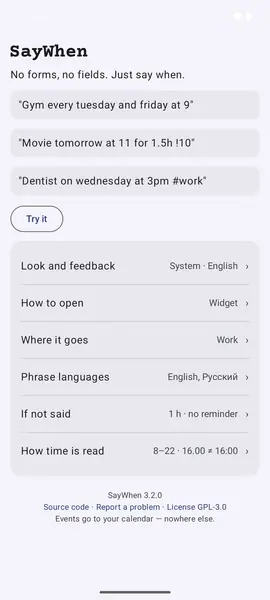
No forms, no fields. Just say when.
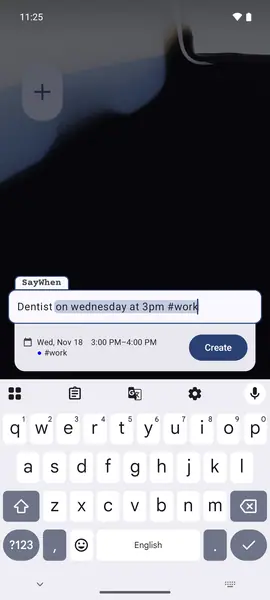
Type an event the way you'd say it, in English, Russian, Italian, Spanish, German, or French:
- Gym every tuesday and friday at 9
- Movie tomorrow at 11 for 1.5h !10
- Dentist june 3 at 12:30
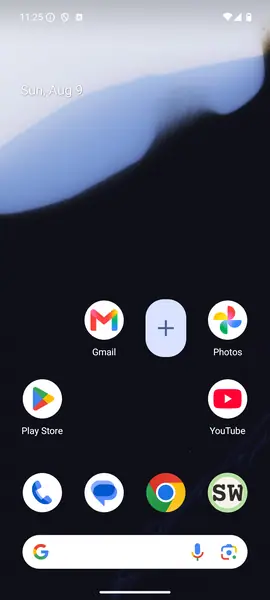
SayWhen parses the phrase as you type: date, time, duration, recurrence, a "!10" reminder. It shows a live preview of what it understood and writes the event straight to the calendar you chose. An alias in the phrase, like #work, sends one event to another calendar. Aliases come from your calendar names, and typing # brings up suggestions. With the Tasks.org integration turned on, a phrase can create a task in a Tasks.org list instead of an event: the lists appear next to your calendars. Tap the home-screen widget, type, done.
Private by construction:
- No sign-up, no server, no analytics, no identifiers
- No network access at all: the app doesn't even declare the INTERNET permission
- Two calendar permissions: read your calendar list, write the event you asked for. Two more for Tasks.org, asked only if you turn that integration on
Events go to your calendar and nowhere else. If your calendar belongs to a synced account, its own sync engine uploads the event, exactly as with any other calendar app.
What's new in version 3.2.0
SayWhen now turns on the languages you write in by itself, and it no longer writes to just one calendar.
- An alias in the phrase: "lunch #work" sends the event to another calendar.
- Tasks in Tasks.org: its lists appear next to your calendars.
- Settings on one screen.
- Time with a dot: "16.00" is read as 16:00.
- "+ event" shortcut for launchers.
- Understands "tmrw", "tmr" and "tdy" in English.
Details are on the GitHub release page.
APK file information
| Package name | com.dmi3dmi3.saywhen |
|---|---|
| Version | 3.2.0 (code 19) |
| Minimum Android | Android 8.0 · targets Android 16 |
| Architectures | arm64-v8a, armeabi-v7a, x86, x86_64 |
| SHA-256 | bb6a30e27ed10d2d41d689ea2c568706f1c86cb0f54d2efc7896cdf0baa74042 |
| Signature | 522e011d3835ba12de4f8c1278783a567111fac7d2b5cf32e029cb21f2dc42ea |
| Licence | GPL-3.0-only — copyleft free licence: the code is public and modified versions must stay free |
| Source code | github.com/dmi3dmi3/saywhen |
Permissions
- Read calendar sensitive
- Edit calendar sensitive
Older versions
- SayWhen 3.2.0November 17, 2026 · 1.9 MB
- SayWhen 3.1.0October 7, 2026 · 1.9 MB
- SayWhen 3.0.0September 26, 2026 · 1.9 MB
How to install SayWhen APK
- Tap Download APK above, then open the file once the download has finished.
- If Android asks, allow your browser to install unknown apps.
- Tap Install. SayWhen then appears with your other apps.
Having trouble? Read our guides how to install an APK on Android and "App not installed": how to fix it.
Frequently asked questions
Is SayWhen free?
Yes. SayWhen is distributed under the GPL-3.0-only licence: free, no subscription, and its source code is public.
Is this APK file safe?
The file is the one built and published by the F-Droid repository from the public source code. Its SHA-256 fingerprint is shown above, so you can compare it after downloading. How to check an APK.
Will SayWhen work on my phone?
You need at least Android 8.0. The app also works without Google services, so it runs on recent Huawei phones too.