
App Manager APK
A fully-featured package manager for android.
APK herunterladen v4.1.1 · 26,8 MB- Version4.1.1
- Größe26,8 MB
- BenötigtAndroid 5.0
- Aktualisiert7.9.2026
- LizenzGPL-3.0-only
- PreisKostenlos
Über App Manager
Beschreibung des Entwicklers (auf Englisch).
App Manager began by merging the features of App_packages Info (formerly Application Info), ClassyShark3xodus, Activity Launcher and Watt into a single app with material design and dark mode to give a modern look and feel.
General features
- Fully reproducible, copylefted libre software (GPLv3+)
- Material 3 with dynamic colours
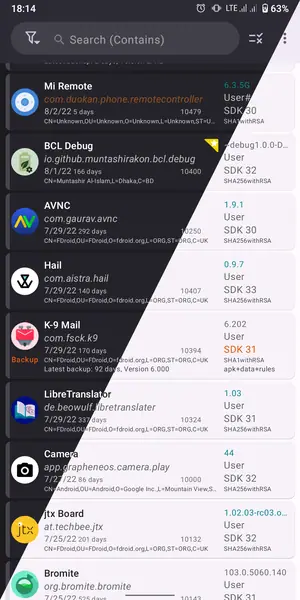
- Display as much information as possible in the main page
- List activities, broadcast receivers, services, providers, app ops, permissions, signatures, shared libraries, etc. of an application
- Launch activities and services
- Create shortcuts of activities
- Intercept activities
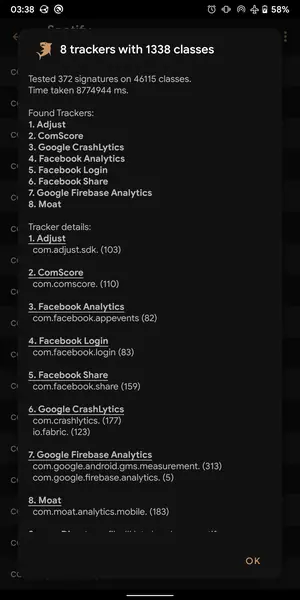
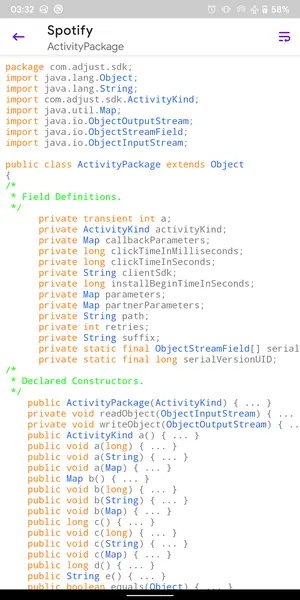
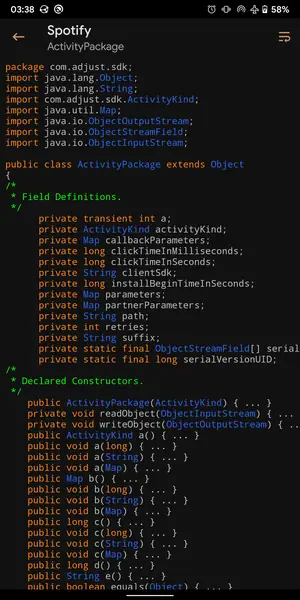
- Scan for trackers and libraries in apps and list (all or only) tracking classes (and their code dump)
- View/save the manifest of an app
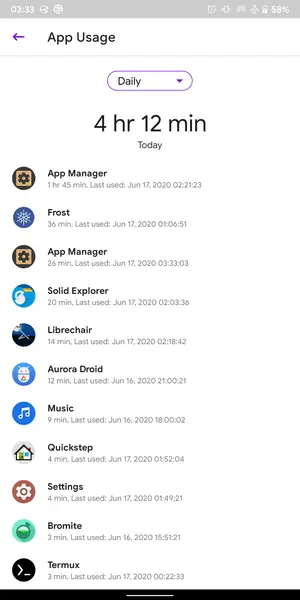
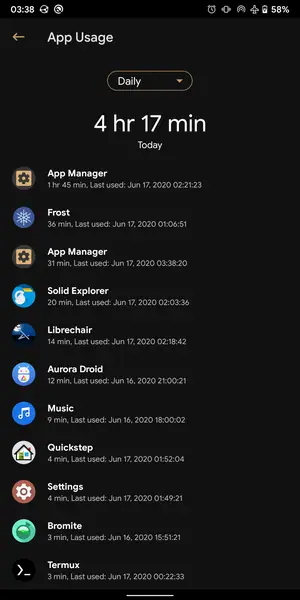
- Display app usage, data usage (mobile and Wi-Fi), and app storage info (requires “Usage Access” permission)
- Install/uninstall APK files (including APKS, APKM and XAPK with OBB files)
- Share APK files
- Back up/restore APK files
- Batch operations
- Single-click operations
- Logcat viewer, manager and exporter
- Profiles
- Debloater
- Code editor
- File manager
- Simple terminal emulator
- Open an app in Aurora Store or in your favourite F-Droid client
- Sign APK files with custom signatures before installing
- Backup encryption: OpenPGP via OpenKeychain, RSA, ECC (hybrid encryption with AES) and AES.
- Track foreground UI components
Root/ADB-only features
- Revoke runtime (AKA dangerous) and development permissions
- Change the mode of an app op
- Display/kill/force-stop running apps or processes
- Clear app data or app cache
- View/change net policy
- Control battery optimization
- Freeze/unfreeze apps
Root-only features
- Block any activities, broadcast receivers, services, or providers of an app with native import/export as well as Watt and Blocker import support
- View/edit/delete shared preferences of any app
- Back up/restore apps with data, rules and extras (such as permissions, battery optimization, SSAID, etc.)
- View system configurations including blacklisted or whitelisted apps, permissions, etc.
- View/change SSAID.
…and many more! This single app combines the features of 5 or 6 apps any tech-savvy person needs!
See the instructions page within the app for more information on how to use the app.
Neu in Version 4.1.1
- Added option to revoke internet permission in Android 14+
- Fixed intercepting browser URLs
- Fixed listing applications on Android 17
- Fixed title ordering in What's New dialog
- Improved installation reliability and performance
- Improved permission management and ADB connectivity
- Added support for editing .bat files
- Improved settings transitions and startup messages.
Informationen zur APK-Datei
| Paketname | io.github.muntashirakon.AppManager |
|---|---|
| Version | 4.1.1 (Code 451) |
| Mindestens | Android 5.0 · ausgelegt für Android 16 |
| Architekturen | arm64-v8a, armeabi-v7a, x86, x86_64 |
| SHA-256 | e1f6ba10812c74016ad626e11e27a1ae450aec2c0964a11466abb9e7a9c8ef84 |
| Signatur | b68e934910c0058014a06a2e144729f9aa113fc5d9e0dff529ecbf1d1f612d13 |
| Lizenz | GPL-3.0-only — freie Copyleft-Lizenz: Der Code ist öffentlich und veränderte Versionen müssen frei bleiben |
| Quellcode | github.com/MuntashirAkon/AppManager |
| Offizielle Website | muntashirakon.github.io/AppManager/ |
Berechtigungen
- Netzwerkstatus sehen
- Im Hintergrund laufen
- Internetzugriff
- Zugriff auf alle Dateien sensibel
- Benachrichtigungen anzeigen
- Installierte Apps sehen sensibel
- Speicher lesen
- Telefonstatus sensibel
- Beim Start ausführen
- Andere Apps installieren sensibel
- Über anderen Apps anzeigen sensibel
- Ruhezustand verhindern
- Auf Speicher schreiben
- Fingerabdruck / Biometrie
- Fingerabdruck
42 weitere technische Berechtigung(en)
ACCESS_HIDDEN_PROFILES ADJUST_RUNTIME_PERMISSIONS_POLICY BACKUP CHANGE_COMPONENT_ENABLED_STATE CHANGE_OVERLAY_PACKAGES CLEAR_APP_CACHE CLEAR_APP_USER_DATA DELETE_CACHE_FILES DELETE_PACKAGES DEVICE_POWER DUMP ENFORCE_UPDATE_OWNERSHIP FORCE_STOP_PACKAGES GET_PACKAGE_SIZE GET_APP_OPS_STATS GET_RUNTIME_PERMISSIONS GET_TASKS GRANT_RUNTIME_PERMISSIONS INSTALL_TEST_ONLY_PACKAGE INSTALL_PACKAGES INTERACT_ACROSS_USERS INTERACT_ACROSS_USERS_FULL INTERNAL_DELETE_CACHE_FILES KILL_UID MANAGE_APP_OPS_MODES MANAGE_APPOPS MANAGE_NETWORK_POLICY MANAGE_NOTIFICATION_LISTENERS MANAGE_USERS MANAGE_SENSORS NETWORK_SETTINGS PACKAGE_USAGE_STATS READ_LOGS REAL_GET_TASKS REQUEST_DELETE_PACKAGES REVOKE_RUNTIME_PERMISSIONS START_ANY_ACTIVITY SUSPEND_APPS UPDATE_APP_OPS_STATS UPDATE_DOMAIN_VERIFICATION_USER_SELECTION UPDATE_PACKAGES_WITHOUT_USER_ACTION WRITE_SECURE_SETTINGS
Ältere Versionen
- App Manager 4.1.17. September 2026 · 26,8 MB
- App Manager 4.1.030. Juni 2026 · 26,8 MB
- App Manager 4.0.52. August 2025 · 25,7 MB
So installieren Sie App Manager APK
- Tippen Sie oben auf APK herunterladen und öffnen Sie die Datei nach dem Download.
- Wenn Android fragt, erlauben Sie Ihrem Browser, unbekannte Apps zu installieren.
- Tippen Sie auf Installieren. App Manager erscheint dann bei Ihren anderen Apps.
→ APK-Datei auf Android installieren (Schritt für Schritt)
→ „App nicht installiert“: Ursachen und Lösungen
Häufige Fragen
Ist App Manager kostenlos?
Ja. App Manager steht unter der Lizenz GPL-3.0-only: kostenlos, ohne Abo, und der Quellcode ist öffentlich.
Ist diese APK-Datei sicher?
Die Datei wurde vom F-Droid-Repository aus dem öffentlichen Quellcode erstellt und veröffentlicht. Ihr SHA-256-Fingerabdruck steht oben, Sie können ihn nach dem Download vergleichen. Ist eine APK gefährlich? So prüfen Sie eine Datei vor der Installation
Läuft App Manager auf meinem Handy?
Sie benötigen mindestens Android 5.0. Die App funktioniert auch ohne Google-Dienste, also auch auf aktuellen Huawei-Handys.