
App Manager APK
A fully-featured package manager for android.
Descargar APK v4.1.1 · 26,8 MB- Versión4.1.1
- Tamaño26,8 MB
- RequiereAndroid 5.0
- Actualizada7/9/2026
- LicenciaGPL-3.0-only
- PrecioGratis
Acerca de App Manager
Descripción del desarrollador (en inglés).
App Manager began by merging the features of App_packages Info (formerly Application Info), ClassyShark3xodus, Activity Launcher and Watt into a single app with material design and dark mode to give a modern look and feel.
General features
- Fully reproducible, copylefted libre software (GPLv3+)
- Material 3 with dynamic colours
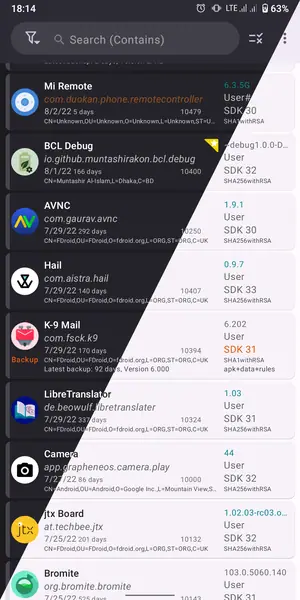
- Display as much information as possible in the main page
- List activities, broadcast receivers, services, providers, app ops, permissions, signatures, shared libraries, etc. of an application
- Launch activities and services
- Create shortcuts of activities
- Intercept activities
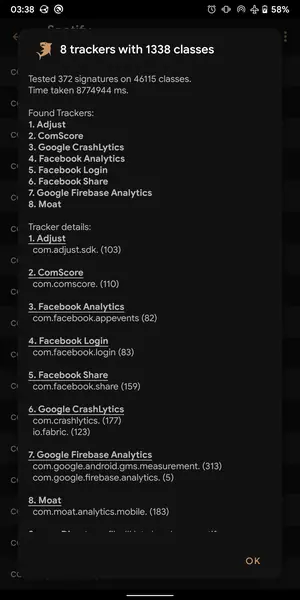
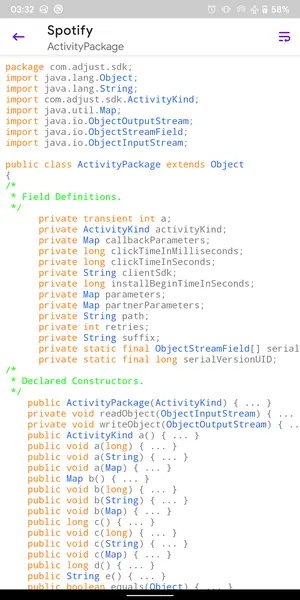
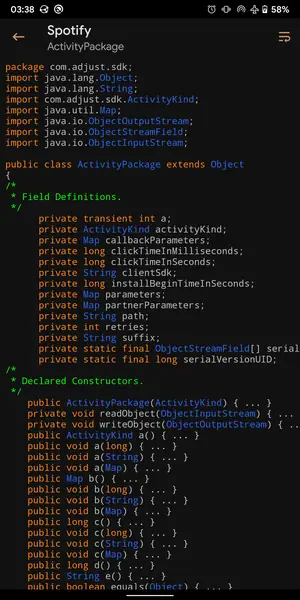
- Scan for trackers and libraries in apps and list (all or only) tracking classes (and their code dump)
- View/save the manifest of an app
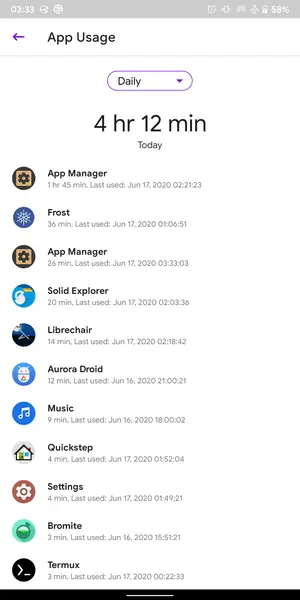
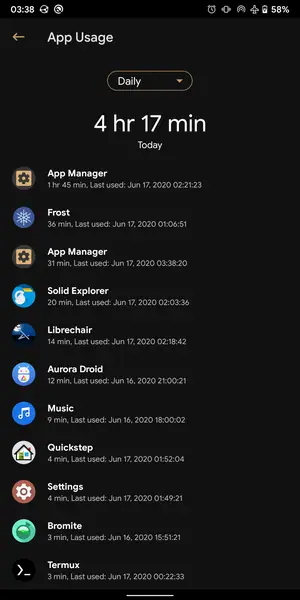
- Display app usage, data usage (mobile and Wi-Fi), and app storage info (requires “Usage Access” permission)
- Install/uninstall APK files (including APKS, APKM and XAPK with OBB files)
- Share APK files
- Back up/restore APK files
- Batch operations
- Single-click operations
- Logcat viewer, manager and exporter
- Profiles
- Debloater
- Code editor
- File manager
- Simple terminal emulator
- Open an app in Aurora Store or in your favourite F-Droid client
- Sign APK files with custom signatures before installing
- Backup encryption: OpenPGP via OpenKeychain, RSA, ECC (hybrid encryption with AES) and AES.
- Track foreground UI components
Root/ADB-only features
- Revoke runtime (AKA dangerous) and development permissions
- Change the mode of an app op
- Display/kill/force-stop running apps or processes
- Clear app data or app cache
- View/change net policy
- Control battery optimization
- Freeze/unfreeze apps
Root-only features
- Block any activities, broadcast receivers, services, or providers of an app with native import/export as well as Watt and Blocker import support
- View/edit/delete shared preferences of any app
- Back up/restore apps with data, rules and extras (such as permissions, battery optimization, SSAID, etc.)
- View system configurations including blacklisted or whitelisted apps, permissions, etc.
- View/change SSAID.
…and many more! This single app combines the features of 5 or 6 apps any tech-savvy person needs!
See the instructions page within the app for more information on how to use the app.
Novedades de la versión 4.1.1
- Added option to revoke internet permission in Android 14+
- Fixed intercepting browser URLs
- Fixed listing applications on Android 17
- Fixed title ordering in What's New dialog
- Improved installation reliability and performance
- Improved permission management and ADB connectivity
- Added support for editing .bat files
- Improved settings transitions and startup messages.
Información del archivo APK
| Nombre del paquete | io.github.muntashirakon.AppManager |
|---|---|
| Versión | 4.1.1 (código 451) |
| Android mínimo | Android 5.0 · diseñada para Android 16 |
| Arquitecturas | arm64-v8a, armeabi-v7a, x86, x86_64 |
| SHA-256 | e1f6ba10812c74016ad626e11e27a1ae450aec2c0964a11466abb9e7a9c8ef84 |
| Firma | b68e934910c0058014a06a2e144729f9aa113fc5d9e0dff529ecbf1d1f612d13 |
| Licencia | GPL-3.0-only — licencia libre copyleft: el código es público y las versiones modificadas deben seguir siendo libres |
| Código fuente | github.com/MuntashirAkon/AppManager |
| Sitio oficial | muntashirakon.github.io/AppManager/ |
Permisos solicitados
- Ver el estado de la red
- Funcionar en segundo plano
- Acceso a Internet
- Acceso a todos los archivos sensible
- Mostrar notificaciones
- Ver las apps instaladas sensible
- Leer el almacenamiento
- Estado del teléfono sensible
- Iniciarse al arrancar
- Instalar otras apps sensible
- Mostrar sobre otras apps sensible
- Impedir la suspensión
- Escribir en el almacenamiento
- Huella / biometría
- Huella dactilar
42 permiso(s) técnico(s) más
ACCESS_HIDDEN_PROFILES ADJUST_RUNTIME_PERMISSIONS_POLICY BACKUP CHANGE_COMPONENT_ENABLED_STATE CHANGE_OVERLAY_PACKAGES CLEAR_APP_CACHE CLEAR_APP_USER_DATA DELETE_CACHE_FILES DELETE_PACKAGES DEVICE_POWER DUMP ENFORCE_UPDATE_OWNERSHIP FORCE_STOP_PACKAGES GET_PACKAGE_SIZE GET_APP_OPS_STATS GET_RUNTIME_PERMISSIONS GET_TASKS GRANT_RUNTIME_PERMISSIONS INSTALL_TEST_ONLY_PACKAGE INSTALL_PACKAGES INTERACT_ACROSS_USERS INTERACT_ACROSS_USERS_FULL INTERNAL_DELETE_CACHE_FILES KILL_UID MANAGE_APP_OPS_MODES MANAGE_APPOPS MANAGE_NETWORK_POLICY MANAGE_NOTIFICATION_LISTENERS MANAGE_USERS MANAGE_SENSORS NETWORK_SETTINGS PACKAGE_USAGE_STATS READ_LOGS REAL_GET_TASKS REQUEST_DELETE_PACKAGES REVOKE_RUNTIME_PERMISSIONS START_ANY_ACTIVITY SUSPEND_APPS UPDATE_APP_OPS_STATS UPDATE_DOMAIN_VERIFICATION_USER_SELECTION UPDATE_PACKAGES_WITHOUT_USER_ACTION WRITE_SECURE_SETTINGS
Versiones anteriores
- App Manager 4.1.17 de septiembre de 2026 · 26,8 MB
- App Manager 4.1.030 de junio de 2026 · 26,8 MB
- App Manager 4.0.52 de agosto de 2025 · 25,7 MB
Cómo instalar App Manager APK
- Pulsa Descargar APK arriba y abre el archivo cuando termine la descarga.
- Si Android lo pide, permite que tu navegador instale apps desconocidas.
- Pulsa Instalar. App Manager aparecerá junto a tus otras apps.
→ Cómo instalar un archivo APK en Android (paso a paso)
→ «La aplicación no está instalada»: causas y soluciones
Preguntas frecuentes
¿App Manager es gratis?
Sí. App Manager se distribuye con licencia GPL-3.0-only: gratis, sin suscripción y con el código fuente público.
¿Es seguro este archivo APK?
El archivo es el que compila y publica el repositorio F-Droid a partir del código fuente público. Su huella SHA-256 aparece arriba para que puedas compararla tras la descarga. ¿Un APK es peligroso? Cómo verificar un archivo antes de instalarlo
¿Funciona App Manager en mi teléfono?
Necesitas como mínimo Android 5.0. La app también funciona sin los servicios de Google, así que funciona en los teléfonos Huawei recientes.