Cfait APK
Starker, schneller & eleganter TODO / Aufgaben-Manager. (CalDAV & lokal)
APK herunterladen v1.2.1 · 43,1 MB- Version1.2.1
- Größe43,1 MB
- BenötigtAndroid 9
- Aktualisiert27.10.2026
- LizenzGPL-3.0-only
- PreisKostenlos
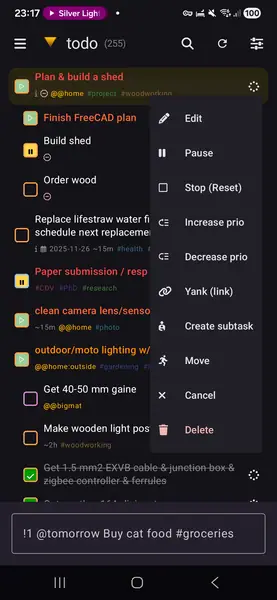
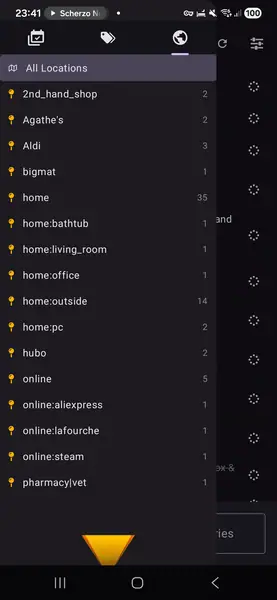
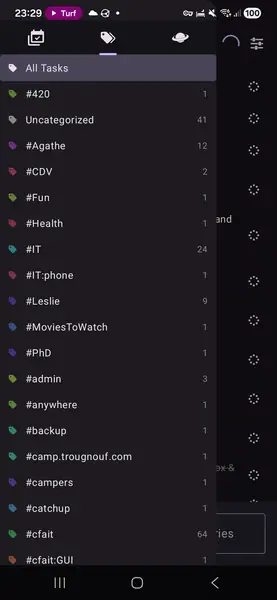
Über Cfait
Beschreibung des Entwicklers (auf Englisch).
Take control of your TODO list.
Cfait is designed for speed and stability using Rust, it puts you in control of your data with a local-first approach that syncs seamlessly across your devices.
Why Cfait?
- Open Source & Cross-Platform: Use Cfait on Android, Linux, and Windows. Your tasks adhere to open standards (CalDAV and iCalendar), not walled gardens.
- Syncs Everywhere: Fully compatible with Nextcloud, iCloud, Radicale, Xandikos, and other standard CalDAV servers.
- Offline First: Optimistic UI updates mean you never wait for a server response. Use the persistent "Local" calendar for offline tasks and migrate them to a server later.
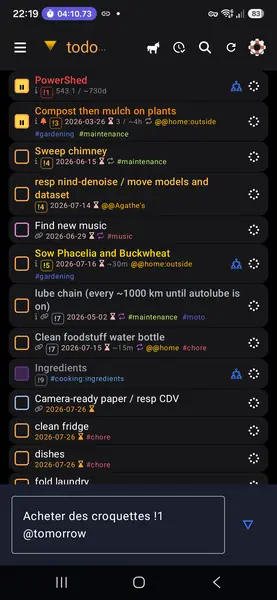
- Smart Input: Add tasks naturally. Typing "Buy cat food !1 @tomorrow @@grocery_store ~15m" automatically sets the priority, due date, location and duration.
Productivity Features
- GTD Workflow: Mark tasks as Needs Action, In Process (>), Cancelled (x), or Done.
- Hierarchy: Create sub-tasks, promote children, and organize nested lists.
- Dependencies: Link tasks using "Blocked-by" or "Child-of" logic (RFC 9253).
- Tags & Aliases: Organize with hierarchical tags (e.g., #work:backend). Create inline aliases (e.g., #shed:=#home_improvement and @home_improvement:=@@home) for rapid filing.
- Sane Sorting: Tasks are sorted by Status > Start Date > Due Date > Priority.
Smart Syntax Guide
When adding or editing a task, use these shortcuts:
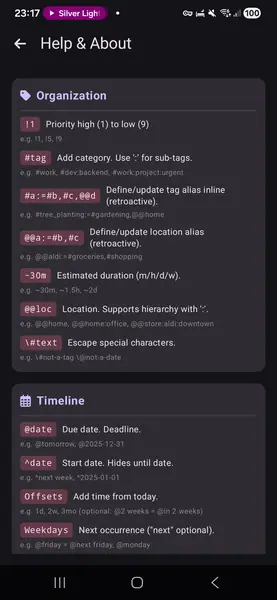
- !1 to !9: Set Priority (1 is Critical, 9 is Low).
- @date: Set Due Date (e.g., @tomorrow, @2025-12-31, @2w, @in two weeks).
- ^date: Set Start Date (hides task until date).
- ~duration: Estimate time (e.g., ~30m, ~2h).
- @every X: Set Recurrence (e.g., @daily, @every 2 weeks).
- @@loc: Set Location (e.g., @@home, @@"hardware store").
- url:http://perdu.com: Attach a URL.
Advanced Search
Find exactly what you need with powerful filters:
- is:active / is:done: Filter by status.
- ~<30m: Find tasks taking less than 30 minutes.
- !<3: Find high-priority tasks.
- @<today: Find overdue tasks.
- @@home: Find tasks at a specific location.
Support the Developer
If you enjoy using Cfait, please consider supporting its developer:
- 💳 Liberapay: https://liberapay.com/trougnouf
- 🏦₿ Other payment details are available within the app's "Help & About" screen or on the project website.
Community & Source
Cfait is developed by Benoit Brummer (Trougnouf) and released under the GPL3 License.
Source code, desktop versions, and issue tracking available at: https://git.disroot.org/trougnouf/cfait
Neu in Version 1.2.1
[1.2.1] - 2026-10-17
🚀 Features
- *(cli)* Add --edit flag to create tasks from the external editor ( https://github.com/trougnouf/cfait/issues/93 )
- *(tui)* Left-click switches pane focus and selects the clicked row ( https://github.com/trougnouf/cfait/issues/105 )
- *(release)* Add aarch64 linux builds and aarch64 to the AUR package (https://github.com/trougnouf/cfait/issues/104)
- Add is:flat/is:doc keyword for flat-document task descriptions
🐛 Bug Fixes
- *(gui)* Adapt tag col
Informationen zur APK-Datei
| Paketname | com.trougnouf.cfait |
|---|---|
| Version | 1.2.1 (Code 10201) |
| Mindestens | Android 9 · ausgelegt für Android 16 |
| Architekturen | arm64-v8a, armeabi, armeabi-v7a, mips, mips64, x86, x86_64 |
| SHA-256 | f854d44c7ce24e1d257890fe64e29a0e9815f809433370e3c417262eea035dbd |
| Signatur | 6679a06eec4933fe2933f5be32db3b3e716d42e93c7f230358e779587bab1ac0 |
| Lizenz | GPL-3.0-only — freie Copyleft-Lizenz: Der Code ist öffentlich und veränderte Versionen müssen frei bleiben |
| Quellcode | git.disroot.org/trougnouf/cfait |
Berechtigungen
- Internetzugriff
- Ungefährer Standort sensibel
- Genauer Standort (GPS) sensibel
- Benachrichtigungen anzeigen
- Beim Start ausführen
- Ruhezustand verhindern
- Netzwerkstatus sehen
- Im Hintergrund laufen
2 weitere technische Berechtigung(en)
SCHEDULE_EXACT_ALARM USE_EXACT_ALARM
Ältere Versionen
- Cfait 1.2.127. Oktober 2026 · 43,1 MB
- Cfait 1.2.015. Oktober 2026 · 43,0 MB
- Cfait 1.1.819. September 2026 · 43,0 MB
So installieren Sie Cfait APK
- Tippen Sie oben auf APK herunterladen und öffnen Sie die Datei nach dem Download.
- Wenn Android fragt, erlauben Sie Ihrem Browser, unbekannte Apps zu installieren.
- Tippen Sie auf Installieren. Cfait erscheint dann bei Ihren anderen Apps.
→ APK-Datei auf Android installieren (Schritt für Schritt)
→ „App nicht installiert“: Ursachen und Lösungen
Häufige Fragen
Ist Cfait kostenlos?
Ja. Cfait steht unter der Lizenz GPL-3.0-only: kostenlos, ohne Abo, und der Quellcode ist öffentlich.
Ist diese APK-Datei sicher?
Die Datei wurde vom F-Droid-Repository aus dem öffentlichen Quellcode erstellt und veröffentlicht. Ihr SHA-256-Fingerabdruck steht oben, Sie können ihn nach dem Download vergleichen. Ist eine APK gefährlich? So prüfen Sie eine Datei vor der Installation
Läuft Cfait auf meinem Handy?
Sie benötigen mindestens Android 9. Die App funktioniert auch ohne Google-Dienste, also auch auf aktuellen Huawei-Handys.