Cfait APK
Een krachtige, snelle, maar ook elegante takenlijst. (CalDAV en lokaal)
APK downloaden v1.2.1 · 43,1 MB- Versie1.2.1
- Grootte43,1 MB
- VereistAndroid 9
- Bijgewerkt27-10-2026
- LicentieGPL-3.0-only
- PrijsGratis
Over Cfait
Take control of your TODO list.
Cfait is designed for speed and stability using Rust, it puts you in control of your data with a local-first approach that syncs seamlessly across your devices.
Why Cfait?
- Open Source & Cross-Platform: Use Cfait on Android, Linux, and Windows. Your tasks adhere to open standards (CalDAV and iCalendar), not walled gardens.
- Syncs Everywhere: Fully compatible with Nextcloud, iCloud, Radicale, Xandikos, and other standard CalDAV servers.
- Offline First: Optimistic UI updates mean you never wait for a server response. Use the persistent "Local" calendar for offline tasks and migrate them to a server later.
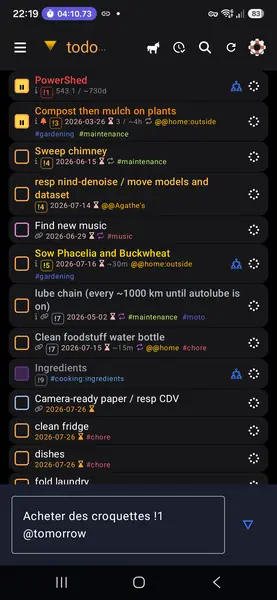
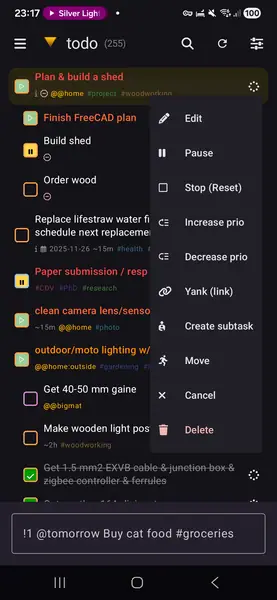
- Smart Input: Add tasks naturally. Typing "Buy cat food !1 @tomorrow @@grocery_store ~15m" automatically sets the priority, due date, location and duration.
Productivity Features
- GTD Workflow: Mark tasks as Needs Action, In Process (>), Cancelled (x), or Done.
- Hierarchy: Create sub-tasks, promote children, and organize nested lists.
- Dependencies: Link tasks using "Blocked-by" or "Child-of" logic (RFC 9253).
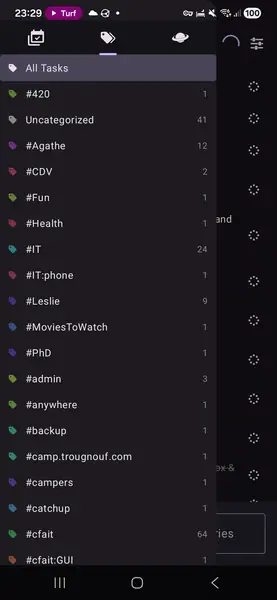
- Tags & Aliases: Organize with hierarchical tags (e.g., #work:backend). Create inline aliases (e.g., #shed:=#home_improvement and @home_improvement:=@@home) for rapid filing.
- Sane Sorting: Tasks are sorted by Status > Start Date > Due Date > Priority.
Smart Syntax Guide
When adding or editing a task, use these shortcuts:
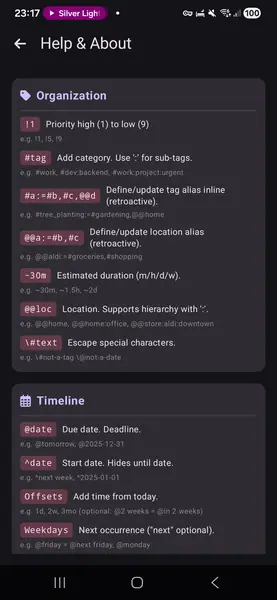
- !1 to !9: Set Priority (1 is Critical, 9 is Low).
- @date: Set Due Date (e.g., @tomorrow, @2025-12-31, @2w, @in two weeks).
- ^date: Set Start Date (hides task until date).
- ~duration: Estimate time (e.g., ~30m, ~2h).
- @every X: Set Recurrence (e.g., @daily, @every 2 weeks).
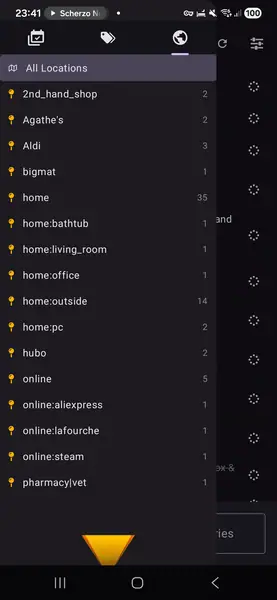
- @@loc: Set Location (e.g., @@home, @@"hardware store").
- url:http://perdu.com: Attach a URL.
Advanced Search
Find exactly what you need with powerful filters:
- is:active / is:done: Filter by status.
- ~<30m: Find tasks taking less than 30 minutes.
- !<3: Find high-priority tasks.
- @<today: Find overdue tasks.
- @@home: Find tasks at a specific location.
Support the Developer
If you enjoy using Cfait, please consider supporting its developer:
- 💳 Liberapay: https://liberapay.com/trougnouf
- 🏦₿ Other payment details are available within the app's "Help & About" screen or on the project website.
Community & Source
Cfait is developed by Benoit Brummer (Trougnouf) and released under the GPL3 License.
Source code, desktop versions, and issue tracking available at: https://git.disroot.org/trougnouf/cfait
Nieuw in versie 1.2.1
[1.2.1] - 2026-10-17
🚀 Features
- *(cli)* Add --edit flag to create tasks from the external editor ( https://github.com/trougnouf/cfait/issues/93 )
- *(tui)* Left-click switches pane focus and selects the clicked row ( https://github.com/trougnouf/cfait/issues/105 )
- *(release)* Add aarch64 linux builds and aarch64 to the AUR package (https://github.com/trougnouf/cfait/issues/104)
- Add is:flat/is:doc keyword for flat-document task descriptions
🐛 Bug Fixes
- *(gui)* Adapt tag col
Informatie over het APK-bestand
| Pakketnaam | com.trougnouf.cfait |
|---|---|
| Versie | 1.2.1 (code 10201) |
| Minimaal Android | Android 9 · bedoeld voor Android 16 |
| Architecturen | arm64-v8a, armeabi, armeabi-v7a, mips, mips64, x86, x86_64 |
| SHA-256 | f854d44c7ce24e1d257890fe64e29a0e9815f809433370e3c417262eea035dbd |
| Handtekening | 6679a06eec4933fe2933f5be32db3b3e716d42e93c7f230358e779587bab1ac0 |
| Licentie | GPL-3.0-only — vrije copyleftlicentie: de code is openbaar en aangepaste versies moeten vrij blijven |
| Broncode | git.disroot.org/trougnouf/cfait |
Machtigingen
- Internettoegang
- Geschatte locatie gevoelig
- Precieze locatie (gps) gevoelig
- Meldingen tonen
- Starten bij opstarten
- Slaapstand voorkomen
- Netwerkstatus bekijken
- Op de achtergrond draaien
2 andere technische machtiging(en)
SCHEDULE_EXACT_ALARM USE_EXACT_ALARM
Oudere versies
- Cfait 1.2.127 oktober 2026 · 43,1 MB
- Cfait 1.2.015 oktober 2026 · 43,0 MB
- Cfait 1.1.819 september 2026 · 43,0 MB
Cfait APK installeren
- Tik hierboven op APK downloaden en open het bestand als de download klaar is.
- Als Android erom vraagt, sta je browser toe om onbekende apps te installeren.
- Tik op Installeren. Cfait verschijnt dan bij je andere apps.
→ Een APK-bestand installeren op Android (stap voor stap)
→ “App niet geïnstalleerd”: oorzaken en oplossingen
Veelgestelde vragen
Is Cfait gratis?
Ja. Cfait wordt verspreid onder de licentie GPL-3.0-only: gratis, zonder abonnement en met openbare broncode.
Is dit APK-bestand veilig?
Het bestand is gebouwd en gepubliceerd door de F-Droid-repository op basis van de openbare broncode. De SHA-256-vingerafdruk staat hierboven, zodat je die na het downloaden kunt vergelijken. Is een APK gevaarlijk? Zo controleer je een bestand vóór installatie
Werkt Cfait op mijn telefoon?
Je hebt minimaal Android 9 nodig. De app werkt ook zonder Google-diensten, dus ook op recente Huawei-telefoons.