Cfait APK
Powerful, fast and elegant TODO / task manager. (CalDAV and local)
Download APK v1.2.1 · 43.1 MB- Version1.2.1
- Size43.1 MB
- RequiresAndroid 9
- Updated10/27/2026
- LicenceGPL-3.0-only
- PriceFree
About Cfait
Take control of your TODO list.
Cfait is designed for speed and stability using Rust, it puts you in control of your data with a local-first approach that syncs seamlessly across your devices.
Why Cfait?
- Open Source & Cross-Platform: Use Cfait on Android, Linux, and Windows. Your tasks adhere to open standards (CalDAV and iCalendar), not walled gardens.
- Syncs Everywhere: Fully compatible with Nextcloud, iCloud, Radicale, Xandikos, and other standard CalDAV servers.
- Offline First: Optimistic UI updates mean you never wait for a server response. Use the persistent "Local" calendar for offline tasks and migrate them to a server later.
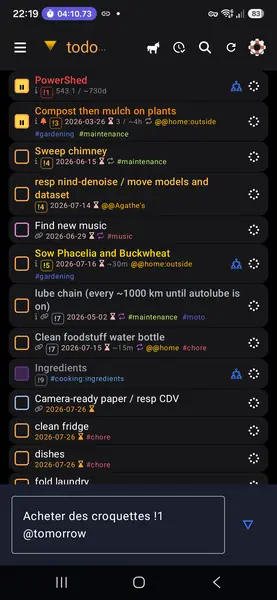
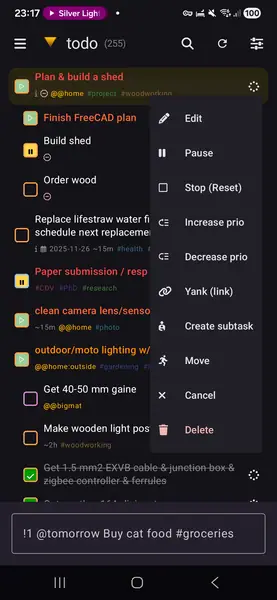
- Smart Input: Add tasks naturally. Typing "Buy cat food !1 @tomorrow @@grocery_store ~15m" automatically sets the priority, due date, location and duration.
Productivity Features
- GTD Workflow: Mark tasks as Needs Action, In Process (>), Cancelled (x), or Done.
- Hierarchy: Create sub-tasks, promote children, and organize nested lists.
- Dependencies: Link tasks using "Blocked-by" or "Child-of" logic (RFC 9253).
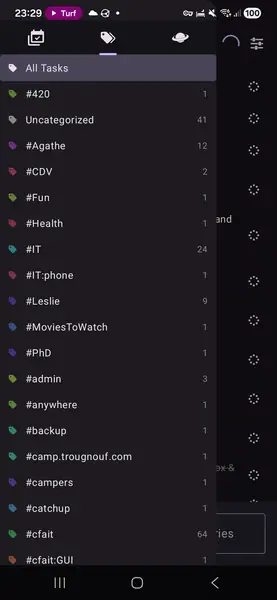
- Tags & Aliases: Organize with hierarchical tags (e.g., #work:backend). Create inline aliases (e.g., #shed:=#home_improvement and @home_improvement:=@@home) for rapid filing.
- Sane Sorting: Tasks are sorted by Status > Start Date > Due Date > Priority.
Smart Syntax Guide
When adding or editing a task, use these shortcuts:
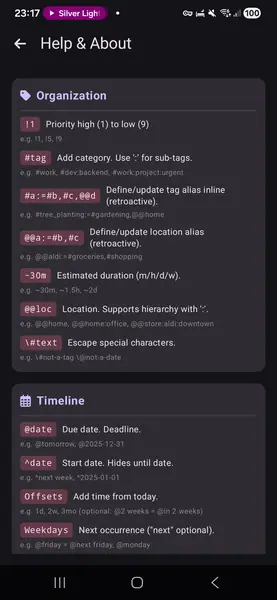
- !1 to !9: Set Priority (1 is Critical, 9 is Low).
- @date: Set Due Date (e.g., @tomorrow, @2025-12-31, @2w, @in two weeks).
- ^date: Set Start Date (hides task until date).
- ~duration: Estimate time (e.g., ~30m, ~2h).
- @every X: Set Recurrence (e.g., @daily, @every 2 weeks).
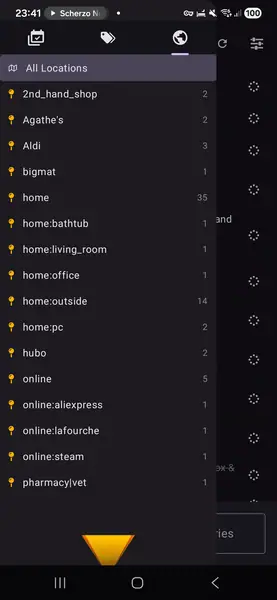
- @@loc: Set Location (e.g., @@home, @@"hardware store").
- url:http://perdu.com: Attach a URL.
Advanced Search
Find exactly what you need with powerful filters:
- is:active / is:done: Filter by status.
- ~<30m: Find tasks taking less than 30 minutes.
- !<3: Find high-priority tasks.
- @<today: Find overdue tasks.
- @@home: Find tasks at a specific location.
Support the Developer
If you enjoy using Cfait, please consider supporting its developer:
- 💳 Liberapay: https://liberapay.com/trougnouf
- 🏦₿ Other payment details are available within the app's "Help & About" screen or on the project website.
Community & Source
Cfait is developed by Benoit Brummer (Trougnouf) and released under the GPL3 License.
Source code, desktop versions, and issue tracking available at: https://git.disroot.org/trougnouf/cfait
What's new in version 1.2.1
[1.2.1] - 2026-10-17
🚀 Features
- *(cli)* Add --edit flag to create tasks from the external editor ( https://github.com/trougnouf/cfait/issues/93 )
- *(tui)* Left-click switches pane focus and selects the clicked row ( https://github.com/trougnouf/cfait/issues/105 )
- *(release)* Add aarch64 linux builds and aarch64 to the AUR package (https://github.com/trougnouf/cfait/issues/104)
- Add is:flat/is:doc keyword for flat-document task descriptions
🐛 Bug Fixes
- *(gui)* Adapt tag col
APK file information
| Package name | com.trougnouf.cfait |
|---|---|
| Version | 1.2.1 (code 10201) |
| Minimum Android | Android 9 · targets Android 16 |
| Architectures | arm64-v8a, armeabi, armeabi-v7a, mips, mips64, x86, x86_64 |
| SHA-256 | f854d44c7ce24e1d257890fe64e29a0e9815f809433370e3c417262eea035dbd |
| Signature | 6679a06eec4933fe2933f5be32db3b3e716d42e93c7f230358e779587bab1ac0 |
| Licence | GPL-3.0-only — copyleft free licence: the code is public and modified versions must stay free |
| Source code | git.disroot.org/trougnouf/cfait |
Permissions
- Internet access
- Approximate location sensitive
- Precise location (GPS) sensitive
- Show notifications
- Start at boot
- Keep the device awake
- View network status
- Run in the background
2 other technical permission(s)
SCHEDULE_EXACT_ALARM USE_EXACT_ALARM
Older versions
- Cfait 1.2.1October 27, 2026 · 43.1 MB
- Cfait 1.2.0October 15, 2026 · 43.0 MB
- Cfait 1.1.8September 19, 2026 · 43.0 MB
How to install Cfait APK
- Tap Download APK above, then open the file once the download has finished.
- If Android asks, allow your browser to install unknown apps.
- Tap Install. Cfait then appears with your other apps.
Having trouble? Read our guides how to install an APK on Android and "App not installed": how to fix it.
Frequently asked questions
Is Cfait free?
Yes. Cfait is distributed under the GPL-3.0-only licence: free, no subscription, and its source code is public.
Is this APK file safe?
The file is the one built and published by the F-Droid repository from the public source code. Its SHA-256 fingerprint is shown above, so you can compare it after downloading. How to check an APK.
Will Cfait work on my phone?
You need at least Android 9. The app also works without Google services, so it runs on recent Huawei phones too.