DroidFS APK
Store & access your files securely
APK herunterladen v2.3.3 · 10,3 MB- Version2.3.3
- Größe10,3 MB
- BenötigtAndroid 5.0
- Aktualisiert27.10.2026
- LizenzAGPL-3.0-only
- PreisKostenlos


Über DroidFS
Beschreibung des Entwicklers (auf Englisch).
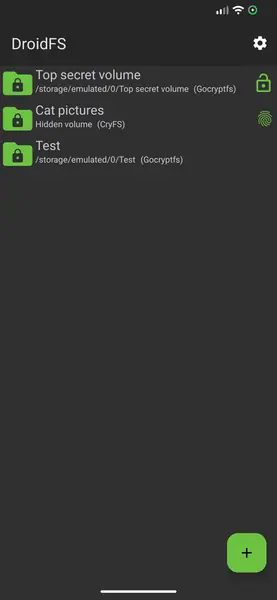
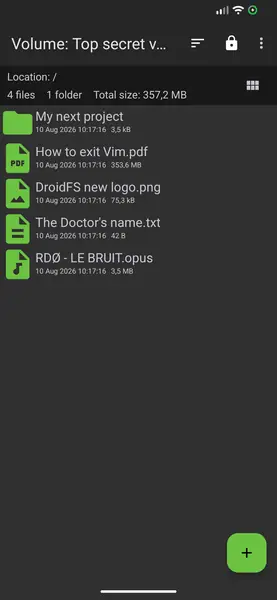
DroidFS is an alternative way to use encrypted overlay file-systems on Android that uses its own internal file explorer instead of mounting volumes. This allows you to store files in encrypted vaults that other apps can't decrypt. Currently, DroidFS supports the following encrypted containers:
- gocryptfs (https://github.com/rfjakob/gocryptfs): encrypts file contents and file names but doesn't hide directory structure or file sizes.
- CryFS (https://github.com/cryfs/cryfs): slower, but encrypts everything and obfuscates file sizes.
Features:
- Compatible with original encrypted volume implementations
- Internal support for video, audio, images, text and PDF files
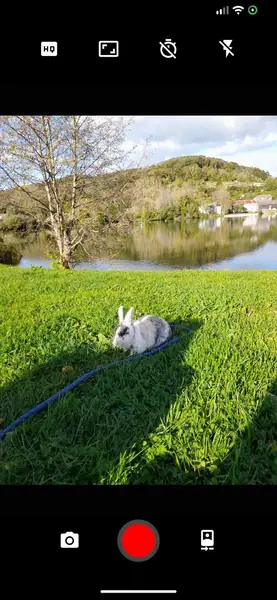
- Built-in camera to take on-the-fly encrypted photos and videos
- Ability to expose volumes to other applications
- Unlocking volumes using fingerprint authentication
- Volume auto-locking when the app goes in background
Permissions: Read & write access to shared storage: required to access volumes located on shared storage. Biometric/Fingerprint hardware: needed to encrypt/decrypt password hashes using a fingerprint protected key. Camera: required to take encrypted photos or videos directly from the app. Record audio: required if you want sound on videos recorded with DroidFS. Notifications: used to report file operations progress and notify about volumes kept open
All of these permissions can be denied if you don't want to use the corresponding feature.
DroidFS is free, open-source, and you can find the project's repository:
- on GitHub: https://github.com/hardcore-sushi/DroidFS
- on Tangled: https://tangled.org/cipherd.arkensys.dedyn.io/DroidFS
Warning ! Security is neither absolute nor definitive. DroidFS does not come with any warranty and should not be considered as an absolute safe way to store files.
Neu in Version 2.3.3
- Optional thumbnail animation
- Faster directory import
- Check mark replaced by paste icon to paste files
- Gocryptfs fixes
- UI bug fixes
- Updated Russian translation
- Dependencies update
Informationen zur APK-Datei
| Paketname | sushi.hardcore.droidfs |
|---|---|
| Version | 2.3.3 (Code 414) |
| Mindestens | Android 5.0 · ausgelegt für Android 16 |
| Architekturen | arm64-v8a |
| SHA-256 | 3e0ddc93df0cc8e9367cfdb5be9ad9b690ebb77f55cbbfb41f7e38ed90ba37bb |
| Signatur | 1b8934d493310a342b29bbe03bc205e0d3d58659d1abaf179577d947452499d6 |
| Lizenz | AGPL-3.0-only — freie Copyleft-Lizenz: Der Code ist öffentlich und veränderte Versionen müssen frei bleiben |
| Quellcode | tangled.org/cipherd.arkensys.dedyn.io/DroidFS |
Berechtigungen
- Zugriff auf alle Dateien sensibel
- Im Hintergrund laufen
- Benachrichtigungen anzeigen
- Auf Speicher schreiben
- Fingerabdruck / Biometrie
- Kamera sensibel
- Mikrofon sensibel
- Fingerabdruck
- Speicher lesen
Ältere Versionen
- DroidFS 2.3.327. Oktober 2026 · 10,3 MB
- DroidFS 2.3.327. Oktober 2026 · 9,9 MB
- DroidFS 2.3.327. Oktober 2026 · 10,6 MB
- DroidFS 2.3.215. September 2026 · 10,3 MB
- DroidFS 2.3.215. September 2026 · 9,9 MB
- DroidFS 2.3.215. September 2026 · 10,6 MB
- DroidFS 2.3.119. August 2026 · 11,4 MB
- DroidFS 2.3.119. August 2026 · 10,6 MB
- DroidFS 2.3.119. August 2026 · 11,3 MB
So installieren Sie DroidFS APK
- Tippen Sie oben auf APK herunterladen und öffnen Sie die Datei nach dem Download.
- Wenn Android fragt, erlauben Sie Ihrem Browser, unbekannte Apps zu installieren.
- Tippen Sie auf Installieren. DroidFS erscheint dann bei Ihren anderen Apps.
→ APK-Datei auf Android installieren (Schritt für Schritt)
→ „App nicht installiert“: Ursachen und Lösungen
Häufige Fragen
Ist DroidFS kostenlos?
Ja. DroidFS steht unter der Lizenz AGPL-3.0-only: kostenlos, ohne Abo, und der Quellcode ist öffentlich.
Ist diese APK-Datei sicher?
Die Datei wurde vom F-Droid-Repository aus dem öffentlichen Quellcode erstellt und veröffentlicht. Ihr SHA-256-Fingerabdruck steht oben, Sie können ihn nach dem Download vergleichen. Ist eine APK gefährlich? So prüfen Sie eine Datei vor der Installation
Läuft DroidFS auf meinem Handy?
Sie benötigen mindestens Android 5.0. Die App funktioniert auch ohne Google-Dienste, also auch auf aktuellen Huawei-Handys.





