DroidFS APK
Store & access your files securely
Scarica l'APK v2.3.3 · 10,3 MB- Versione2.3.3
- Dimensione10,3 MB
- RichiedeAndroid 5.0
- Aggiornata27/10/2026
- LicenzaAGPL-3.0-only
- PrezzoGratis


Informazioni su DroidFS
Descrizione fornita dallo sviluppatore (in inglese).
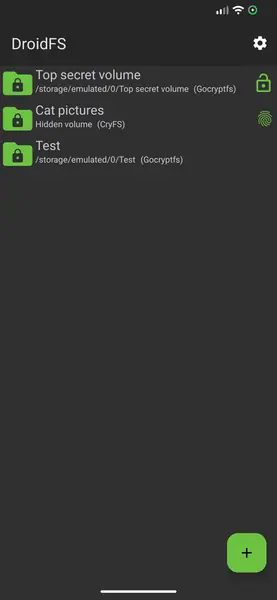
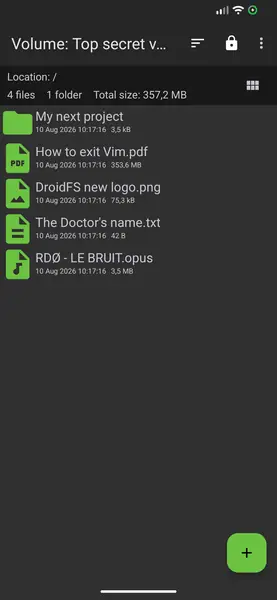
DroidFS is an alternative way to use encrypted overlay file-systems on Android that uses its own internal file explorer instead of mounting volumes. This allows you to store files in encrypted vaults that other apps can't decrypt. Currently, DroidFS supports the following encrypted containers:
- gocryptfs (https://github.com/rfjakob/gocryptfs): encrypts file contents and file names but doesn't hide directory structure or file sizes.
- CryFS (https://github.com/cryfs/cryfs): slower, but encrypts everything and obfuscates file sizes.
Features:
- Compatible with original encrypted volume implementations
- Internal support for video, audio, images, text and PDF files
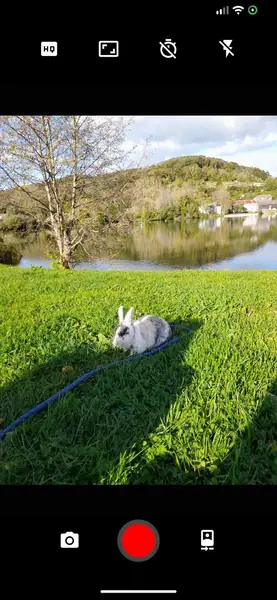
- Built-in camera to take on-the-fly encrypted photos and videos
- Ability to expose volumes to other applications
- Unlocking volumes using fingerprint authentication
- Volume auto-locking when the app goes in background
Permissions: Read & write access to shared storage: required to access volumes located on shared storage. Biometric/Fingerprint hardware: needed to encrypt/decrypt password hashes using a fingerprint protected key. Camera: required to take encrypted photos or videos directly from the app. Record audio: required if you want sound on videos recorded with DroidFS. Notifications: used to report file operations progress and notify about volumes kept open
All of these permissions can be denied if you don't want to use the corresponding feature.
DroidFS is free, open-source, and you can find the project's repository:
- on GitHub: https://github.com/hardcore-sushi/DroidFS
- on Tangled: https://tangled.org/cipherd.arkensys.dedyn.io/DroidFS
Warning ! Security is neither absolute nor definitive. DroidFS does not come with any warranty and should not be considered as an absolute safe way to store files.
Novità della versione 2.3.3
- Optional thumbnail animation
- Faster directory import
- Check mark replaced by paste icon to paste files
- Gocryptfs fixes
- UI bug fixes
- Updated Russian translation
- Dependencies update
Informazioni sul file APK
| Nome del pacchetto | sushi.hardcore.droidfs |
|---|---|
| Versione | 2.3.3 (codice 414) |
| Android minimo | Android 5.0 · pensata per Android 16 |
| Architetture | arm64-v8a |
| SHA-256 | 3e0ddc93df0cc8e9367cfdb5be9ad9b690ebb77f55cbbfb41f7e38ed90ba37bb |
| Firma | 1b8934d493310a342b29bbe03bc205e0d3d58659d1abaf179577d947452499d6 |
| Licenza | AGPL-3.0-only — licenza libera copyleft: il codice è pubblico e le versioni modificate devono restare libere |
| Codice sorgente | tangled.org/cipherd.arkensys.dedyn.io/DroidFS |
Autorizzazioni richieste
- Accesso a tutti i file sensibile
- Funzionare in background
- Mostrare notifiche
- Scrivere nell'archivio
- Impronta / biometria
- Fotocamera sensibile
- Microfono sensibile
- Impronta digitale
- Leggere l'archivio
Versioni precedenti
- DroidFS 2.3.327 ottobre 2026 · 10,3 MB
- DroidFS 2.3.327 ottobre 2026 · 9,9 MB
- DroidFS 2.3.327 ottobre 2026 · 10,6 MB
- DroidFS 2.3.215 settembre 2026 · 10,3 MB
- DroidFS 2.3.215 settembre 2026 · 9,9 MB
- DroidFS 2.3.215 settembre 2026 · 10,6 MB
- DroidFS 2.3.119 agosto 2026 · 11,4 MB
- DroidFS 2.3.119 agosto 2026 · 10,6 MB
- DroidFS 2.3.119 agosto 2026 · 11,3 MB
Come installare DroidFS APK
- Tocca Scarica l'APK qui sopra, poi apri il file al termine del download.
- Se Android lo chiede, consenti al browser di installare app sconosciute.
- Tocca Installa. DroidFS comparirà insieme alle altre app.
→ Come installare un file APK su Android (passo passo)
→ «App non installata»: cause e soluzioni
Domande frequenti
DroidFS è gratis?
Sì. DroidFS è distribuita con licenza AGPL-3.0-only: gratuita, senza abbonamento e con codice sorgente pubblico.
Questo file APK è sicuro?
Il file è quello compilato e pubblicato dal repository F-Droid a partire dal codice sorgente pubblico. L'impronta SHA-256 è indicata qui sopra: puoi confrontarla dopo il download. Un APK è pericoloso? Come verificare un file prima di installarlo
DroidFS funziona sul mio telefono?
Serve almeno Android 5.0. L'app funziona anche senza i servizi Google, quindi anche sui telefoni Huawei recenti.