DroidFS APK
Store & access your files securely
Download APK v2.3.3 · 10.3 MB- Version2.3.3
- Size10.3 MB
- RequiresAndroid 5.0
- Updated10/27/2026
- LicenceAGPL-3.0-only
- PriceFree


About DroidFS
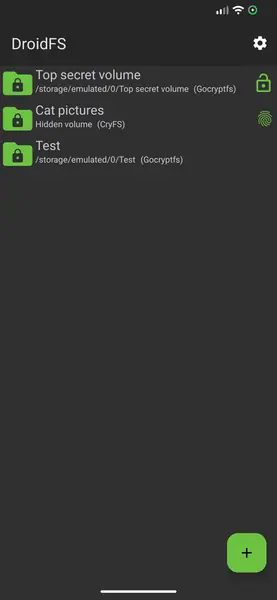
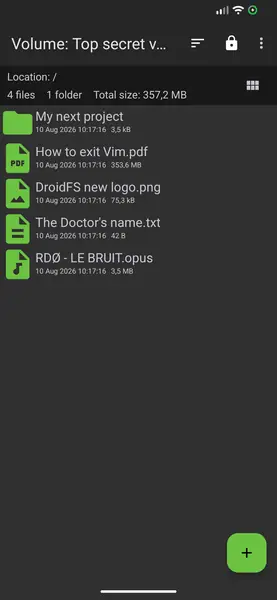
DroidFS is an alternative way to use encrypted overlay file-systems on Android that uses its own internal file explorer instead of mounting volumes. This allows you to store files in encrypted vaults that other apps can't decrypt. Currently, DroidFS supports the following encrypted containers:
- gocryptfs (https://github.com/rfjakob/gocryptfs): encrypts file contents and file names but doesn't hide directory structure or file sizes.
- CryFS (https://github.com/cryfs/cryfs): slower, but encrypts everything and obfuscates file sizes.
Features:
- Compatible with original encrypted volume implementations
- Internal support for video, audio, images, text and PDF files
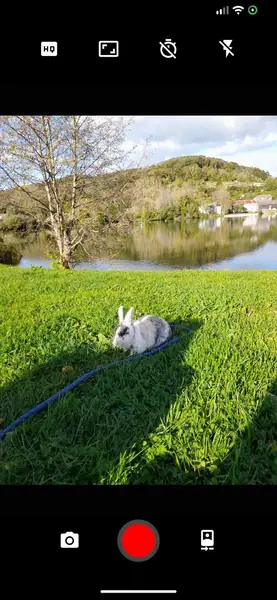
- Built-in camera to take on-the-fly encrypted photos and videos
- Ability to expose volumes to other applications
- Unlocking volumes using fingerprint authentication
- Volume auto-locking when the app goes in background
Permissions: Read & write access to shared storage: required to access volumes located on shared storage. Biometric/Fingerprint hardware: needed to encrypt/decrypt password hashes using a fingerprint protected key. Camera: required to take encrypted photos or videos directly from the app. Record audio: required if you want sound on videos recorded with DroidFS. Notifications: used to report file operations progress and notify about volumes kept open
All of these permissions can be denied if you don't want to use the corresponding feature.
DroidFS is free, open-source, and you can find the project's repository:
- on GitHub: https://github.com/hardcore-sushi/DroidFS
- on Tangled: https://tangled.org/cipherd.arkensys.dedyn.io/DroidFS
Warning ! Security is neither absolute nor definitive. DroidFS does not come with any warranty and should not be considered as an absolute safe way to store files.
What's new in version 2.3.3
- Optional thumbnail animation
- Faster directory import
- Check mark replaced by paste icon to paste files
- Gocryptfs fixes
- UI bug fixes
- Updated Russian translation
- Dependencies update
APK file information
| Package name | sushi.hardcore.droidfs |
|---|---|
| Version | 2.3.3 (code 414) |
| Minimum Android | Android 5.0 · targets Android 16 |
| Architectures | arm64-v8a |
| SHA-256 | 3e0ddc93df0cc8e9367cfdb5be9ad9b690ebb77f55cbbfb41f7e38ed90ba37bb |
| Signature | 1b8934d493310a342b29bbe03bc205e0d3d58659d1abaf179577d947452499d6 |
| Licence | AGPL-3.0-only — copyleft free licence: the code is public and modified versions must stay free |
| Source code | tangled.org/cipherd.arkensys.dedyn.io/DroidFS |
Permissions
- Access all files sensitive
- Run in the background
- Show notifications
- Write to storage
- Fingerprint / biometrics
- Camera sensitive
- Microphone sensitive
- Fingerprint
- Read storage
Older versions
- DroidFS 2.3.3October 27, 2026 · 10.3 MB
- DroidFS 2.3.3October 27, 2026 · 9.9 MB
- DroidFS 2.3.3October 27, 2026 · 10.6 MB
- DroidFS 2.3.2September 15, 2026 · 10.3 MB
- DroidFS 2.3.2September 15, 2026 · 9.9 MB
- DroidFS 2.3.2September 15, 2026 · 10.6 MB
- DroidFS 2.3.1August 19, 2026 · 11.4 MB
- DroidFS 2.3.1August 19, 2026 · 10.6 MB
- DroidFS 2.3.1August 19, 2026 · 11.3 MB
How to install DroidFS APK
- Tap Download APK above, then open the file once the download has finished.
- If Android asks, allow your browser to install unknown apps.
- Tap Install. DroidFS then appears with your other apps.
Having trouble? Read our guides how to install an APK on Android and "App not installed": how to fix it.
Frequently asked questions
Is DroidFS free?
Yes. DroidFS is distributed under the AGPL-3.0-only licence: free, no subscription, and its source code is public.
Is this APK file safe?
The file is the one built and published by the F-Droid repository from the public source code. Its SHA-256 fingerprint is shown above, so you can compare it after downloading. How to check an APK.
Will DroidFS work on my phone?
You need at least Android 5.0. The app also works without Google services, so it runs on recent Huawei phones too.





