Keryx APK
One reader. Every device. Local-first RSS reader with optional cloud sync.
APK herunterladen v0.28.0 · 19,4 MB- Version0.28.0
- Größe19,4 MB
- BenötigtAndroid 8.0
- Aktualisiert20.11.2026
- LizenzMIT
- PreisKostenlos
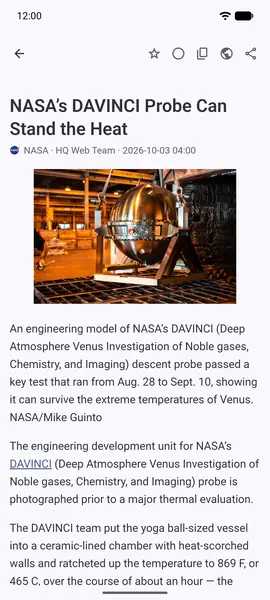
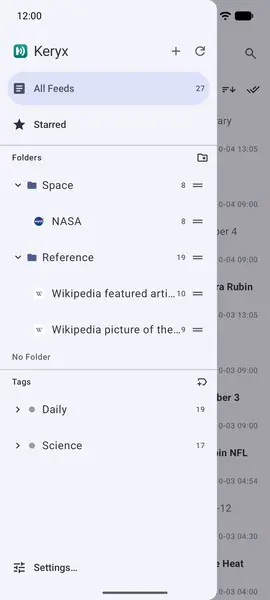
Über Keryx
Beschreibung des Entwicklers (auf Englisch).
One reader. Every device.
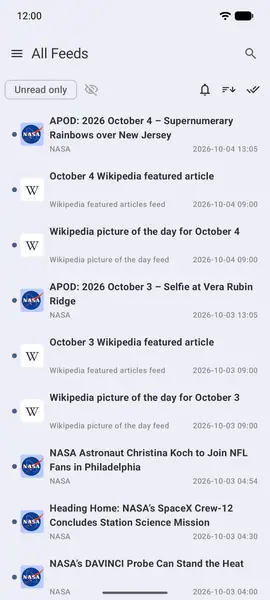
Keryx is a local-first, cross-platform RSS reader. By default, all of your data lives on your device; turn on cloud sync only if you want the same subscriptions, read/starred status, and articles to follow you between your phone and your desktop.
FEATURES
- Multi-device sync via your own cloud storage (Dropbox or OneDrive) — no account with Keryx itself, ever. (Google Drive sync, available in the Google Play and GitHub builds, is not part of the F-Droid build because it needs Google Play services.)
- Local-first: works fully offline, with no sync required
- Fast local full-text search across article titles and content
- Organize feeds with tags (cross-cutting labels) and folders (hierarchical grouping)
- RSS 2.0 and Atom 1.0 support (RSS 1.0/RDF is also loosely parsed)
- OPML import and export, for moving to or from other RSS readers and for backing up your subscriptions
- Completely free — no freemium tiers, no trial period, no ads
- Open source — the full source code is public and can be inspected or modified by anyone
PRIVACY
Keryx has no user accounts and no server operated by its developer. There is nothing to sign up for, and nothing that its developer's own infrastructure ever receives. The app includes no analytics, telemetry, crash reporting, advertising, or tracking of any kind. The F-Droid build contains no Google Play services and never checks for updates itself — F-Droid does that.
Keryx talks only to servers directly relevant to what you're doing: the feeds you subscribe to (and their favicons) and — only if you connect one — Dropbox or OneDrive for sync. Nothing else.
Learn more, including the full privacy policy, at https://keryx.merc.works
Informationen zur APK-Datei
| Paketname | works.merc.keryx |
|---|---|
| Version | 0.28.0 (Code 280099) |
| Mindestens | Android 8.0 · ausgelegt für API 37 |
| Architekturen | arm64-v8a, armeabi-v7a, x86, x86_64 |
| SHA-256 | dce8ff57f638bab9f64162bfaf72c1353d04e486734f88b8b6fa139346aaa6e0 |
| Signatur | 536f7155021d73419135cb67dd3c7c3e316cfdc607735208dfd45d971e426d20 |
| Lizenz | MIT — freie, freizügige Lizenz: Der Quellcode ist öffentlich und wiederverwendbar |
| Quellcode | github.com/shimataro/keryx |
| Offizielle Website | keryx.merc.works |
Berechtigungen
- Internetzugriff
- Netzwerkstatus sehen
- Benachrichtigungen anzeigen
- Ruhezustand verhindern
- Beim Start ausführen
- Im Hintergrund laufen
Ältere Versionen
- Keryx 0.28.020. November 2026 · 19,4 MB
- Keryx 0.27.09. November 2026 · 19,4 MB
- Keryx 0.26.022. Oktober 2026 · 19,3 MB
So installieren Sie Keryx APK
- Tippen Sie oben auf APK herunterladen und öffnen Sie die Datei nach dem Download.
- Wenn Android fragt, erlauben Sie Ihrem Browser, unbekannte Apps zu installieren.
- Tippen Sie auf Installieren. Keryx erscheint dann bei Ihren anderen Apps.
→ APK-Datei auf Android installieren (Schritt für Schritt)
→ „App nicht installiert“: Ursachen und Lösungen
Häufige Fragen
Ist Keryx kostenlos?
Ja. Keryx steht unter der Lizenz MIT: kostenlos, ohne Abo, und der Quellcode ist öffentlich.
Ist diese APK-Datei sicher?
Die Datei wurde vom F-Droid-Repository aus dem öffentlichen Quellcode erstellt und veröffentlicht. Ihr SHA-256-Fingerabdruck steht oben, Sie können ihn nach dem Download vergleichen. Ist eine APK gefährlich? So prüfen Sie eine Datei vor der Installation
Läuft Keryx auf meinem Handy?
Sie benötigen mindestens Android 8.0. Die App funktioniert auch ohne Google-Dienste, also auch auf aktuellen Huawei-Handys.