Keryx APK
One reader. Every device. Local-first RSS reader with optional cloud sync.
Scarica l'APK v0.28.0 · 19,4 MB- Versione0.28.0
- Dimensione19,4 MB
- RichiedeAndroid 8.0
- Aggiornata20/11/2026
- LicenzaMIT
- PrezzoGratis
Informazioni su Keryx
Descrizione fornita dallo sviluppatore (in inglese).
One reader. Every device.
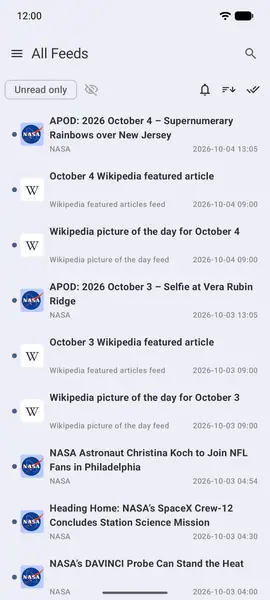
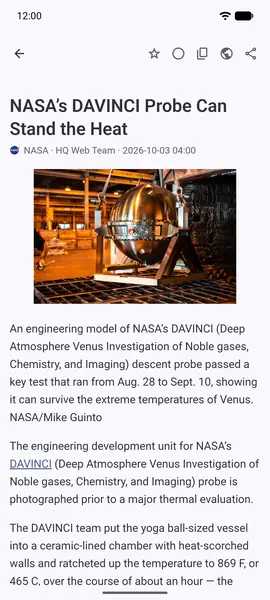
Keryx is a local-first, cross-platform RSS reader. By default, all of your data lives on your device; turn on cloud sync only if you want the same subscriptions, read/starred status, and articles to follow you between your phone and your desktop.
FEATURES
- Multi-device sync via your own cloud storage (Dropbox or OneDrive) — no account with Keryx itself, ever. (Google Drive sync, available in the Google Play and GitHub builds, is not part of the F-Droid build because it needs Google Play services.)
- Local-first: works fully offline, with no sync required
- Fast local full-text search across article titles and content
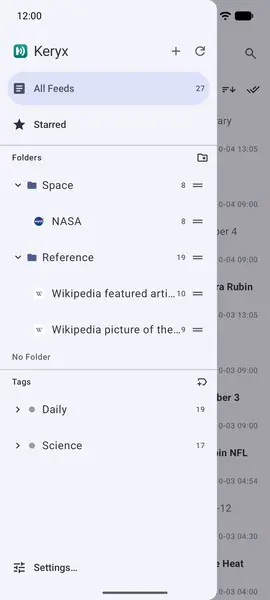
- Organize feeds with tags (cross-cutting labels) and folders (hierarchical grouping)
- RSS 2.0 and Atom 1.0 support (RSS 1.0/RDF is also loosely parsed)
- OPML import and export, for moving to or from other RSS readers and for backing up your subscriptions
- Completely free — no freemium tiers, no trial period, no ads
- Open source — the full source code is public and can be inspected or modified by anyone
PRIVACY
Keryx has no user accounts and no server operated by its developer. There is nothing to sign up for, and nothing that its developer's own infrastructure ever receives. The app includes no analytics, telemetry, crash reporting, advertising, or tracking of any kind. The F-Droid build contains no Google Play services and never checks for updates itself — F-Droid does that.
Keryx talks only to servers directly relevant to what you're doing: the feeds you subscribe to (and their favicons) and — only if you connect one — Dropbox or OneDrive for sync. Nothing else.
Learn more, including the full privacy policy, at https://keryx.merc.works
Informazioni sul file APK
| Nome del pacchetto | works.merc.keryx |
|---|---|
| Versione | 0.28.0 (codice 280099) |
| Android minimo | Android 8.0 · pensata per API 37 |
| Architetture | arm64-v8a, armeabi-v7a, x86, x86_64 |
| SHA-256 | dce8ff57f638bab9f64162bfaf72c1353d04e486734f88b8b6fa139346aaa6e0 |
| Firma | 536f7155021d73419135cb67dd3c7c3e316cfdc607735208dfd45d971e426d20 |
| Licenza | MIT — licenza libera permissiva: il codice sorgente è pubblico e riutilizzabile |
| Codice sorgente | github.com/shimataro/keryx |
| Sito ufficiale | keryx.merc.works |
Autorizzazioni richieste
- Accesso a Internet
- Vedere lo stato della rete
- Mostrare notifiche
- Impedire lo standby
- Avviarsi all'accensione
- Funzionare in background
Versioni precedenti
- Keryx 0.28.020 novembre 2026 · 19,4 MB
- Keryx 0.27.09 novembre 2026 · 19,4 MB
- Keryx 0.26.022 ottobre 2026 · 19,3 MB
Come installare Keryx APK
- Tocca Scarica l'APK qui sopra, poi apri il file al termine del download.
- Se Android lo chiede, consenti al browser di installare app sconosciute.
- Tocca Installa. Keryx comparirà insieme alle altre app.
→ Come installare un file APK su Android (passo passo)
→ «App non installata»: cause e soluzioni
Domande frequenti
Keryx è gratis?
Sì. Keryx è distribuita con licenza MIT: gratuita, senza abbonamento e con codice sorgente pubblico.
Questo file APK è sicuro?
Il file è quello compilato e pubblicato dal repository F-Droid a partire dal codice sorgente pubblico. L'impronta SHA-256 è indicata qui sopra: puoi confrontarla dopo il download. Un APK è pericoloso? Come verificare un file prima di installarlo
Keryx funziona sul mio telefono?
Serve almeno Android 8.0. L'app funziona anche senza i servizi Google, quindi anche sui telefoni Huawei recenti.