Keryx APK
One reader. Every device. Local-first RSS reader with optional cloud sync.
Descargar APK v0.28.0 · 19,4 MB- Versión0.28.0
- Tamaño19,4 MB
- RequiereAndroid 8.0
- Actualizada20/11/2026
- LicenciaMIT
- PrecioGratis
Acerca de Keryx
Descripción del desarrollador (en inglés).
One reader. Every device.
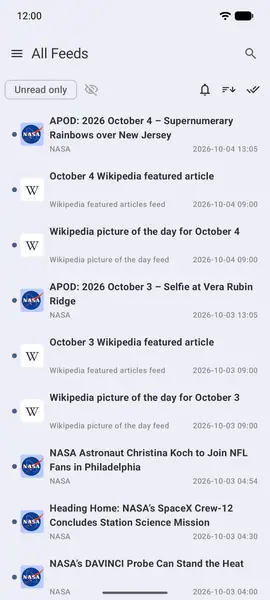
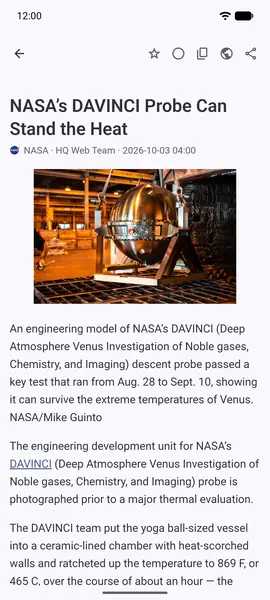
Keryx is a local-first, cross-platform RSS reader. By default, all of your data lives on your device; turn on cloud sync only if you want the same subscriptions, read/starred status, and articles to follow you between your phone and your desktop.
FEATURES
- Multi-device sync via your own cloud storage (Dropbox or OneDrive) — no account with Keryx itself, ever. (Google Drive sync, available in the Google Play and GitHub builds, is not part of the F-Droid build because it needs Google Play services.)
- Local-first: works fully offline, with no sync required
- Fast local full-text search across article titles and content
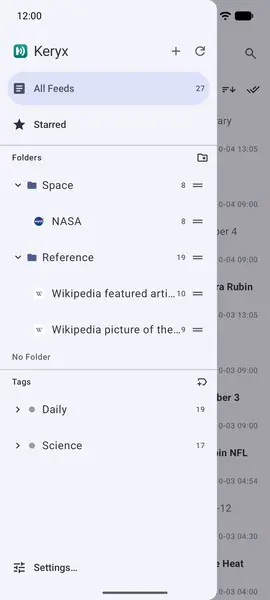
- Organize feeds with tags (cross-cutting labels) and folders (hierarchical grouping)
- RSS 2.0 and Atom 1.0 support (RSS 1.0/RDF is also loosely parsed)
- OPML import and export, for moving to or from other RSS readers and for backing up your subscriptions
- Completely free — no freemium tiers, no trial period, no ads
- Open source — the full source code is public and can be inspected or modified by anyone
PRIVACY
Keryx has no user accounts and no server operated by its developer. There is nothing to sign up for, and nothing that its developer's own infrastructure ever receives. The app includes no analytics, telemetry, crash reporting, advertising, or tracking of any kind. The F-Droid build contains no Google Play services and never checks for updates itself — F-Droid does that.
Keryx talks only to servers directly relevant to what you're doing: the feeds you subscribe to (and their favicons) and — only if you connect one — Dropbox or OneDrive for sync. Nothing else.
Learn more, including the full privacy policy, at https://keryx.merc.works
Información del archivo APK
| Nombre del paquete | works.merc.keryx |
|---|---|
| Versión | 0.28.0 (código 280099) |
| Android mínimo | Android 8.0 · diseñada para API 37 |
| Arquitecturas | arm64-v8a, armeabi-v7a, x86, x86_64 |
| SHA-256 | dce8ff57f638bab9f64162bfaf72c1353d04e486734f88b8b6fa139346aaa6e0 |
| Firma | 536f7155021d73419135cb67dd3c7c3e316cfdc607735208dfd45d971e426d20 |
| Licencia | MIT — licencia libre permisiva: el código fuente es público y reutilizable |
| Código fuente | github.com/shimataro/keryx |
| Sitio oficial | keryx.merc.works |
Permisos solicitados
- Acceso a Internet
- Ver el estado de la red
- Mostrar notificaciones
- Impedir la suspensión
- Iniciarse al arrancar
- Funcionar en segundo plano
Versiones anteriores
- Keryx 0.28.020 de noviembre de 2026 · 19,4 MB
- Keryx 0.27.09 de noviembre de 2026 · 19,4 MB
- Keryx 0.26.022 de octubre de 2026 · 19,3 MB
Cómo instalar Keryx APK
- Pulsa Descargar APK arriba y abre el archivo cuando termine la descarga.
- Si Android lo pide, permite que tu navegador instale apps desconocidas.
- Pulsa Instalar. Keryx aparecerá junto a tus otras apps.
→ Cómo instalar un archivo APK en Android (paso a paso)
→ «La aplicación no está instalada»: causas y soluciones
Preguntas frecuentes
¿Keryx es gratis?
Sí. Keryx se distribuye con licencia MIT: gratis, sin suscripción y con el código fuente público.
¿Es seguro este archivo APK?
El archivo es el que compila y publica el repositorio F-Droid a partir del código fuente público. Su huella SHA-256 aparece arriba para que puedas compararla tras la descarga. ¿Un APK es peligroso? Cómo verificar un archivo antes de instalarlo
¿Funciona Keryx en mi teléfono?
Necesitas como mínimo Android 8.0. La app también funciona sin los servicios de Google, así que funciona en los teléfonos Huawei recientes.