
My Location APK
Know your geo coordinates using on-device GPS and Network location providers
APK herunterladen vv1.08-foss · 1,9 MB- Versionv1.08-foss
- Größe1,9 MB
- BenötigtAndroid 5.0
- Aktualisiert27.12.2025
- LizenzAGPL-3.0-or-later
- PreisKostenlos
Über My Location
Beschreibung des Entwicklers (auf Englisch).
Features:
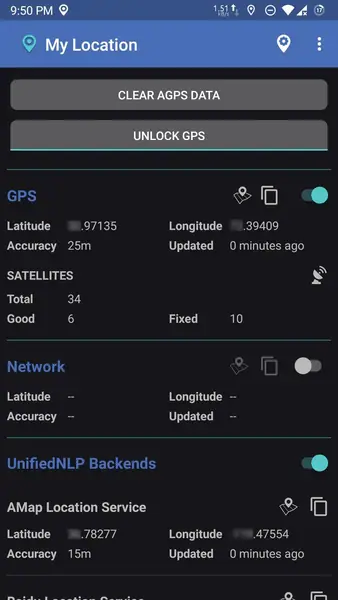
My Location finds your device's location in the following ways:
- GPS is usually the most accurate method. But a position fix may take some time or may not work at all due to signal loss. Lock GPS feature runs a persistent service to keep connected with the satellites.
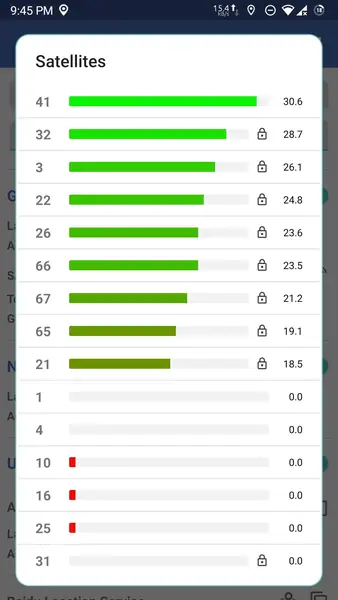
You can also see the list of visible satellites with their PRNs (unique identifiers) and SNR (signal quality).
- Network Location Provider uses Wi-Fi or Cellular ids to estimate the location. On the devices with Google Play Services installed, NLP usually uses Google Location Service at backend.
- UnifiedNLP is an open source API which has been used to develop multiple NLP backends (https://github.com/microg/UnifiedNlp/wiki/Backends).
Furthermore:
- Location coordinates can be copied to clipboard or opened in a maps app, if installed.
- Clearing A-GPS aiding data is also supported.
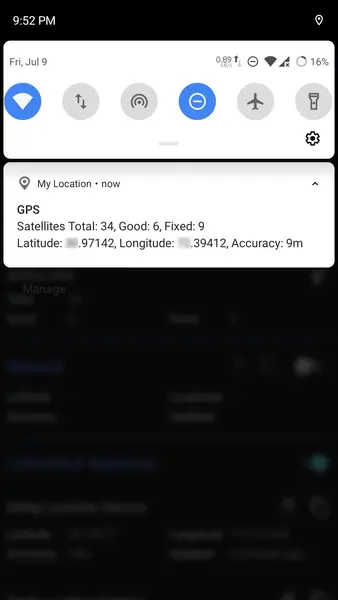
Note that My Location is not a location provider like UnifiedNLP (or microG GmsCore). It just shows the location information received from AOSP location providers (GPS and Network) or directly from UnifiedNLP Backends (whichever are available on the device).
Informationen zur APK-Datei
| Paketname | com.mirfatif.mylocation |
|---|---|
| Version | v1.08-foss (Code 108) |
| Mindestens | Android 5.0 · ausgelegt für Android 16 |
| Architekturen | Alle (universell) |
| SHA-256 | 3b5661bd619593dab0736f7715b6de41be5ad3d530888aaca38d039e83172d7d |
| Signatur | 96462afe182962d12d3a8cac899c224a92c38a0557c210fb883ff5ca7c6f0a2d |
| Lizenz | AGPL-3.0-or-later — freie Copyleft-Lizenz: Der Code ist öffentlich und veränderte Versionen müssen frei bleiben |
| Quellcode | github.com/mirfatif/MyLocation |
Berechtigungen
- Genauer Standort (GPS) sensibel
- Ungefährer Standort sensibel
- Ruhezustand verhindern
- Im Hintergrund laufen
- Benachrichtigungen anzeigen
1 weitere technische Berechtigung(en)
ACCESS_LOCATION_EXTRA_COMMANDS
Ältere Versionen
- My Location v1.08-foss27. Dezember 2025 · 1,9 MB
- My Location v1.06-fd9. August 2024 · 2,4 MB
- My Location v1.05-fd2. Juni 2024 · 2,4 MB
So installieren Sie My Location APK
- Tippen Sie oben auf APK herunterladen und öffnen Sie die Datei nach dem Download.
- Wenn Android fragt, erlauben Sie Ihrem Browser, unbekannte Apps zu installieren.
- Tippen Sie auf Installieren. My Location erscheint dann bei Ihren anderen Apps.
→ APK-Datei auf Android installieren (Schritt für Schritt)
→ „App nicht installiert“: Ursachen und Lösungen
Häufige Fragen
Ist My Location kostenlos?
Ja. My Location steht unter der Lizenz AGPL-3.0-or-later: kostenlos, ohne Abo, und der Quellcode ist öffentlich.
Ist diese APK-Datei sicher?
Die Datei wurde vom F-Droid-Repository aus dem öffentlichen Quellcode erstellt und veröffentlicht. Ihr SHA-256-Fingerabdruck steht oben, Sie können ihn nach dem Download vergleichen. Ist eine APK gefährlich? So prüfen Sie eine Datei vor der Installation
Läuft My Location auf meinem Handy?
Sie benötigen mindestens Android 5.0. Die App funktioniert auch ohne Google-Dienste, also auch auf aktuellen Huawei-Handys.





