
My Location APK
Know your geo coordinates using on-device GPS and Network location providers
Scarica l'APK vv1.08-foss · 1,9 MB- Versionev1.08-foss
- Dimensione1,9 MB
- RichiedeAndroid 5.0
- Aggiornata27/12/2025
- LicenzaAGPL-3.0-or-later
- PrezzoGratis
Informazioni su My Location
Descrizione fornita dallo sviluppatore (in inglese).
Features:
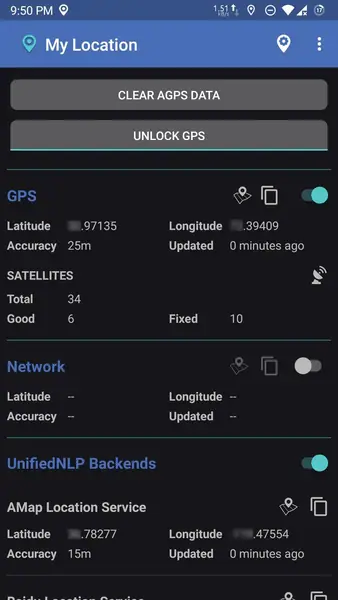
My Location finds your device's location in the following ways:
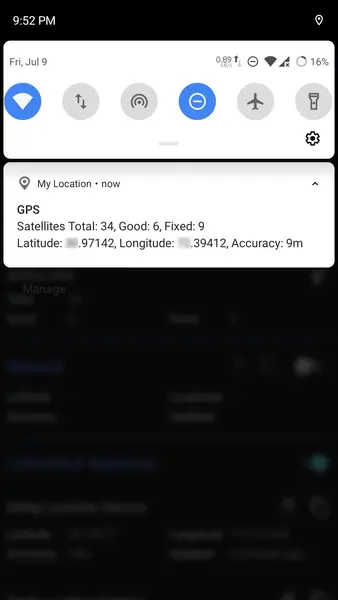
- GPS is usually the most accurate method. But a position fix may take some time or may not work at all due to signal loss. Lock GPS feature runs a persistent service to keep connected with the satellites.
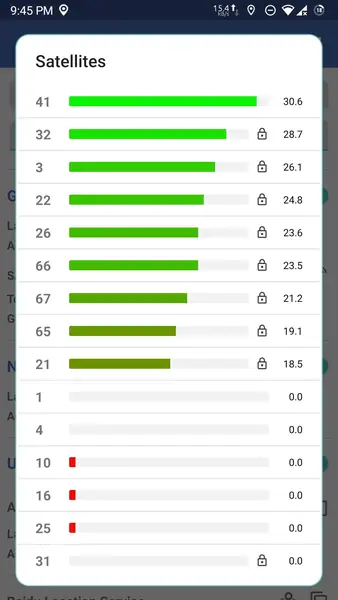
You can also see the list of visible satellites with their PRNs (unique identifiers) and SNR (signal quality).
- Network Location Provider uses Wi-Fi or Cellular ids to estimate the location. On the devices with Google Play Services installed, NLP usually uses Google Location Service at backend.
- UnifiedNLP is an open source API which has been used to develop multiple NLP backends (https://github.com/microg/UnifiedNlp/wiki/Backends).
Furthermore:
- Location coordinates can be copied to clipboard or opened in a maps app, if installed.
- Clearing A-GPS aiding data is also supported.
Note that My Location is not a location provider like UnifiedNLP (or microG GmsCore). It just shows the location information received from AOSP location providers (GPS and Network) or directly from UnifiedNLP Backends (whichever are available on the device).
Informazioni sul file APK
| Nome del pacchetto | com.mirfatif.mylocation |
|---|---|
| Versione | v1.08-foss (codice 108) |
| Android minimo | Android 5.0 · pensata per Android 16 |
| Architetture | Tutte (universale) |
| SHA-256 | 3b5661bd619593dab0736f7715b6de41be5ad3d530888aaca38d039e83172d7d |
| Firma | 96462afe182962d12d3a8cac899c224a92c38a0557c210fb883ff5ca7c6f0a2d |
| Licenza | AGPL-3.0-or-later — licenza libera copyleft: il codice è pubblico e le versioni modificate devono restare libere |
| Codice sorgente | github.com/mirfatif/MyLocation |
Autorizzazioni richieste
- Posizione precisa (GPS) sensibile
- Posizione approssimativa sensibile
- Impedire lo standby
- Funzionare in background
- Mostrare notifiche
Altre 1 autorizzazioni tecniche
ACCESS_LOCATION_EXTRA_COMMANDS
Versioni precedenti
- My Location v1.08-foss27 dicembre 2025 · 1,9 MB
- My Location v1.06-fd9 agosto 2024 · 2,4 MB
- My Location v1.05-fd2 giugno 2024 · 2,4 MB
Come installare My Location APK
- Tocca Scarica l'APK qui sopra, poi apri il file al termine del download.
- Se Android lo chiede, consenti al browser di installare app sconosciute.
- Tocca Installa. My Location comparirà insieme alle altre app.
→ Come installare un file APK su Android (passo passo)
→ «App non installata»: cause e soluzioni
Domande frequenti
My Location è gratis?
Sì. My Location è distribuita con licenza AGPL-3.0-or-later: gratuita, senza abbonamento e con codice sorgente pubblico.
Questo file APK è sicuro?
Il file è quello compilato e pubblicato dal repository F-Droid a partire dal codice sorgente pubblico. L'impronta SHA-256 è indicata qui sopra: puoi confrontarla dopo il download. Un APK è pericoloso? Come verificare un file prima di installarlo
My Location funziona sul mio telefono?
Serve almeno Android 5.0. L'app funziona anche senza i servizi Google, quindi anche sui telefoni Huawei recenti.





