
PC HW Monitor APK
Real-time Windows PC hardware stats (CPU, GPU, RAM) on your phone over Wi-Fi
APK herunterladen v1.6.3 · 2,6 MB- Version1.6.3
- Größe2,6 MB
- BenötigtAndroid 7.0
- Aktualisiert9.11.2026
- LizenzAGPL-3.0-or-later
- PreisKostenlos
Über PC HW Monitor
Beschreibung des Entwicklers (auf Englisch).
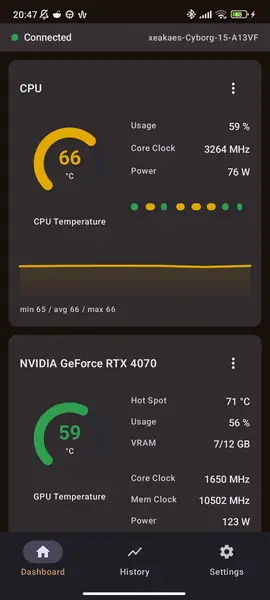
PC HW Monitor shows your PC's real-time hardware statistics on your phone — over local Wi-Fi, or anywhere via an optional Cloudflare Tunnel.
Features
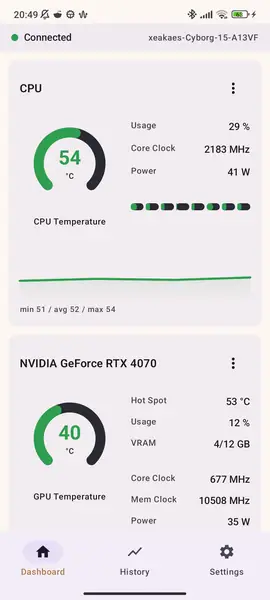
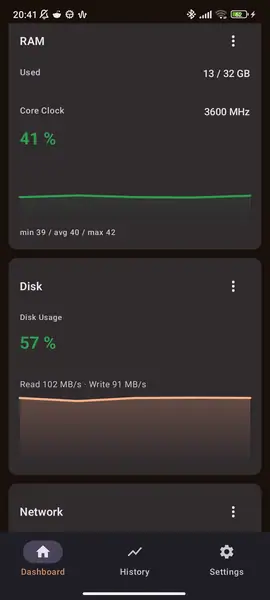
- CPU, GPU, iGPU and RAM cards with temperatures, usage, clock speeds, power, VRAM/RAM and per-core loads
- Disk, network, fan and FPS cards (FPS via embedded PresentMon)
- Live charts and 1-hour history (stored locally on the device)
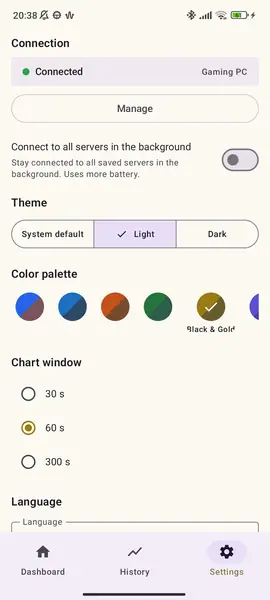
- 9 color palettes with light and dark variants, dashboard edit mode, landscape mode
- Multi-PC support: connect to several PCs and switch via dashboard tabs
- Optional TLS/SSL (wss://) and Cloudflare Tunnel for secure remote access
- QR quick connect, network scan, persistent notification with live stats
- 14 languages, selectable in Settings
How it works
Run the bundled single-file Windows server (no installation needed) on your PC. It reads hardware data from LibreHardwareMonitor and streams it over WebSocket to the app once per second. By default the app only talks to the server over your local Wi-Fi; no data leaves your network unless you enable the optional Cloudflare Tunnel.
No PC hardware available? Start the server with --simulate to generate realistic fake data.
License
AGPL-3.0. The Windows server bundles LibreHardwareMonitor (AGPL-3.0), cloudflared (Apache-2.0) and PresentMon (MIT).
If this app is useful to you, consider supporting development on Patreon: Patreon.
Informationen zur APK-Datei
| Paketname | com.Obscrum.pchwmonitor |
|---|---|
| Version | 1.6.3 (Code 11) |
| Mindestens | Android 7.0 · ausgelegt für API 37 |
| Architekturen | arm64-v8a, armeabi-v7a, x86, x86_64 |
| SHA-256 | c5d8e42453dd0aad5f0f758d9e7b88ea1a6466e3ed2f27577f9b7a93b4847ba8 |
| Signatur | 1cf24a4ed8cb8f57671c06a154ac3a28ea07546149b27e34be6cd29762a14f23 |
| Lizenz | AGPL-3.0-or-later — freie Copyleft-Lizenz: Der Code ist öffentlich und veränderte Versionen müssen frei bleiben |
| Quellcode | github.com/Xeakaes/PcHWmonitor |
Berechtigungen
- Internetzugriff
- Netzwerkstatus sehen
- Im Hintergrund laufen
- Benachrichtigungen anzeigen
- Kamera sensibel
1 weitere technische Berechtigung(en)
CHANGE_WIFI_MULTICAST_STATE
So installieren Sie PC HW Monitor APK
- Tippen Sie oben auf APK herunterladen und öffnen Sie die Datei nach dem Download.
- Wenn Android fragt, erlauben Sie Ihrem Browser, unbekannte Apps zu installieren.
- Tippen Sie auf Installieren. PC HW Monitor erscheint dann bei Ihren anderen Apps.
→ APK-Datei auf Android installieren (Schritt für Schritt)
→ „App nicht installiert“: Ursachen und Lösungen
Häufige Fragen
Ist PC HW Monitor kostenlos?
Ja. PC HW Monitor steht unter der Lizenz AGPL-3.0-or-later: kostenlos, ohne Abo, und der Quellcode ist öffentlich.
Ist diese APK-Datei sicher?
Die Datei wurde vom F-Droid-Repository aus dem öffentlichen Quellcode erstellt und veröffentlicht. Ihr SHA-256-Fingerabdruck steht oben, Sie können ihn nach dem Download vergleichen. Ist eine APK gefährlich? So prüfen Sie eine Datei vor der Installation
Läuft PC HW Monitor auf meinem Handy?
Sie benötigen mindestens Android 7.0. Die App funktioniert auch ohne Google-Dienste, also auch auf aktuellen Huawei-Handys.





