
PC HW Monitor APK
Real-time Windows PC hardware stats (CPU, GPU, RAM) on your phone over Wi-Fi
Download APK v1.6.3 · 2.6 MB- Version1.6.3
- Size2.6 MB
- RequiresAndroid 7.0
- Updated11/9/2026
- LicenceAGPL-3.0-or-later
- PriceFree
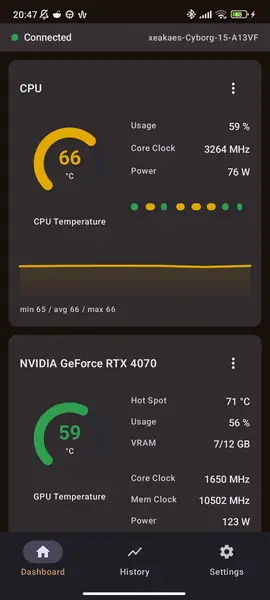
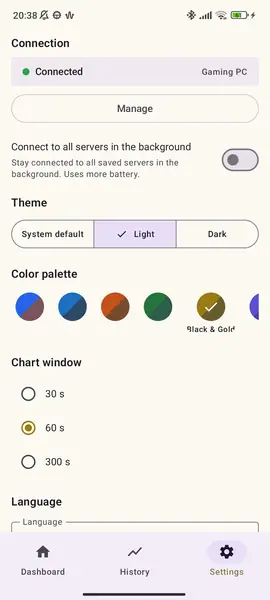
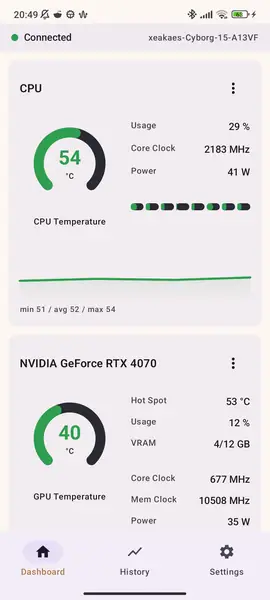
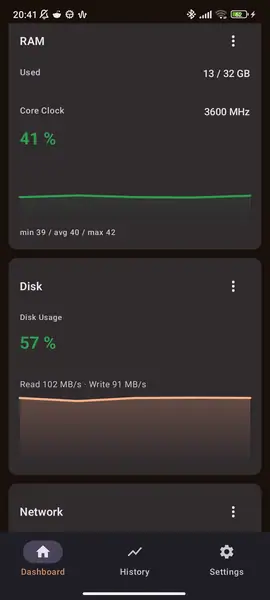
About PC HW Monitor
PC HW Monitor shows your PC's real-time hardware statistics on your phone — over local Wi-Fi, or anywhere via an optional Cloudflare Tunnel.
Features
- CPU, GPU, iGPU and RAM cards with temperatures, usage, clock speeds, power, VRAM/RAM and per-core loads
- Disk, network, fan and FPS cards (FPS via embedded PresentMon)
- Live charts and 1-hour history (stored locally on the device)
- 9 color palettes with light and dark variants, dashboard edit mode, landscape mode
- Multi-PC support: connect to several PCs and switch via dashboard tabs
- Optional TLS/SSL (wss://) and Cloudflare Tunnel for secure remote access
- QR quick connect, network scan, persistent notification with live stats
- 14 languages, selectable in Settings
How it works
Run the bundled single-file Windows server (no installation needed) on your PC. It reads hardware data from LibreHardwareMonitor and streams it over WebSocket to the app once per second. By default the app only talks to the server over your local Wi-Fi; no data leaves your network unless you enable the optional Cloudflare Tunnel.
No PC hardware available? Start the server with --simulate to generate realistic fake data.
License
AGPL-3.0. The Windows server bundles LibreHardwareMonitor (AGPL-3.0), cloudflared (Apache-2.0) and PresentMon (MIT).
If this app is useful to you, consider supporting development on Patreon: Patreon.
APK file information
| Package name | com.Obscrum.pchwmonitor |
|---|---|
| Version | 1.6.3 (code 11) |
| Minimum Android | Android 7.0 · targets API 37 |
| Architectures | arm64-v8a, armeabi-v7a, x86, x86_64 |
| SHA-256 | c5d8e42453dd0aad5f0f758d9e7b88ea1a6466e3ed2f27577f9b7a93b4847ba8 |
| Signature | 1cf24a4ed8cb8f57671c06a154ac3a28ea07546149b27e34be6cd29762a14f23 |
| Licence | AGPL-3.0-or-later — copyleft free licence: the code is public and modified versions must stay free |
| Source code | github.com/Xeakaes/PcHWmonitor |
Permissions
- Internet access
- View network status
- Run in the background
- Show notifications
- Camera sensitive
1 other technical permission(s)
CHANGE_WIFI_MULTICAST_STATE
How to install PC HW Monitor APK
- Tap Download APK above, then open the file once the download has finished.
- If Android asks, allow your browser to install unknown apps.
- Tap Install. PC HW Monitor then appears with your other apps.
Having trouble? Read our guides how to install an APK on Android and "App not installed": how to fix it.
Frequently asked questions
Is PC HW Monitor free?
Yes. PC HW Monitor is distributed under the AGPL-3.0-or-later licence: free, no subscription, and its source code is public.
Is this APK file safe?
The file is the one built and published by the F-Droid repository from the public source code. Its SHA-256 fingerprint is shown above, so you can compare it after downloading. How to check an APK.
Will PC HW Monitor work on my phone?
You need at least Android 7.0. The app also works without Google services, so it runs on recent Huawei phones too.





