
PC HW Monitor APK
Real-time Windows PC hardware stats (CPU, GPU, RAM) on your phone over Wi-Fi
Scarica l'APK v1.6.3 · 2,6 MB- Versione1.6.3
- Dimensione2,6 MB
- RichiedeAndroid 7.0
- Aggiornata09/11/2026
- LicenzaAGPL-3.0-or-later
- PrezzoGratis
Informazioni su PC HW Monitor
Descrizione fornita dallo sviluppatore (in inglese).
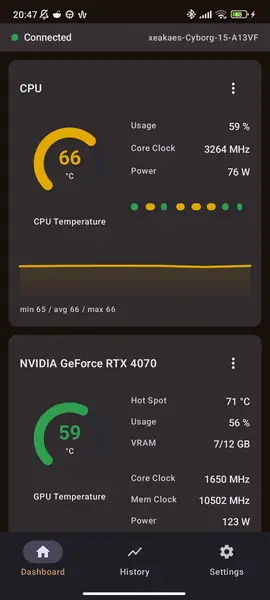
PC HW Monitor shows your PC's real-time hardware statistics on your phone — over local Wi-Fi, or anywhere via an optional Cloudflare Tunnel.
Features
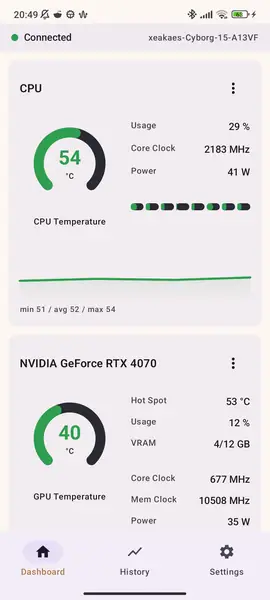
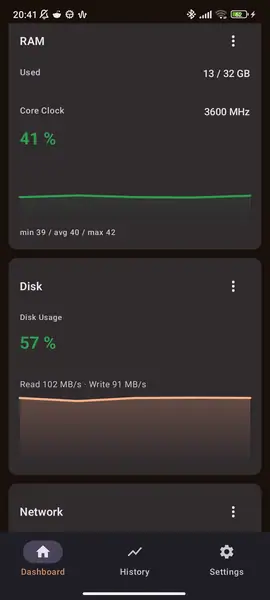
- CPU, GPU, iGPU and RAM cards with temperatures, usage, clock speeds, power, VRAM/RAM and per-core loads
- Disk, network, fan and FPS cards (FPS via embedded PresentMon)
- Live charts and 1-hour history (stored locally on the device)
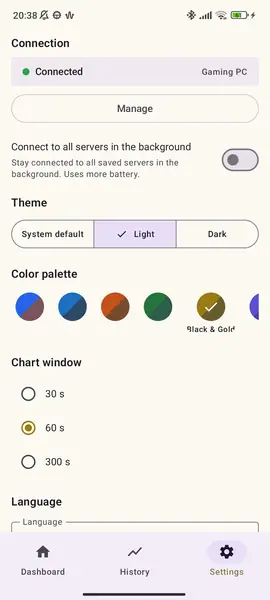
- 9 color palettes with light and dark variants, dashboard edit mode, landscape mode
- Multi-PC support: connect to several PCs and switch via dashboard tabs
- Optional TLS/SSL (wss://) and Cloudflare Tunnel for secure remote access
- QR quick connect, network scan, persistent notification with live stats
- 14 languages, selectable in Settings
How it works
Run the bundled single-file Windows server (no installation needed) on your PC. It reads hardware data from LibreHardwareMonitor and streams it over WebSocket to the app once per second. By default the app only talks to the server over your local Wi-Fi; no data leaves your network unless you enable the optional Cloudflare Tunnel.
No PC hardware available? Start the server with --simulate to generate realistic fake data.
License
AGPL-3.0. The Windows server bundles LibreHardwareMonitor (AGPL-3.0), cloudflared (Apache-2.0) and PresentMon (MIT).
If this app is useful to you, consider supporting development on Patreon: Patreon.
Informazioni sul file APK
| Nome del pacchetto | com.Obscrum.pchwmonitor |
|---|---|
| Versione | 1.6.3 (codice 11) |
| Android minimo | Android 7.0 · pensata per API 37 |
| Architetture | arm64-v8a, armeabi-v7a, x86, x86_64 |
| SHA-256 | c5d8e42453dd0aad5f0f758d9e7b88ea1a6466e3ed2f27577f9b7a93b4847ba8 |
| Firma | 1cf24a4ed8cb8f57671c06a154ac3a28ea07546149b27e34be6cd29762a14f23 |
| Licenza | AGPL-3.0-or-later — licenza libera copyleft: il codice è pubblico e le versioni modificate devono restare libere |
| Codice sorgente | github.com/Xeakaes/PcHWmonitor |
Autorizzazioni richieste
- Accesso a Internet
- Vedere lo stato della rete
- Funzionare in background
- Mostrare notifiche
- Fotocamera sensibile
Altre 1 autorizzazioni tecniche
CHANGE_WIFI_MULTICAST_STATE
Come installare PC HW Monitor APK
- Tocca Scarica l'APK qui sopra, poi apri il file al termine del download.
- Se Android lo chiede, consenti al browser di installare app sconosciute.
- Tocca Installa. PC HW Monitor comparirà insieme alle altre app.
→ Come installare un file APK su Android (passo passo)
→ «App non installata»: cause e soluzioni
Domande frequenti
PC HW Monitor è gratis?
Sì. PC HW Monitor è distribuita con licenza AGPL-3.0-or-later: gratuita, senza abbonamento e con codice sorgente pubblico.
Questo file APK è sicuro?
Il file è quello compilato e pubblicato dal repository F-Droid a partire dal codice sorgente pubblico. L'impronta SHA-256 è indicata qui sopra: puoi confrontarla dopo il download. Un APK è pericoloso? Come verificare un file prima di installarlo
PC HW Monitor funziona sul mio telefono?
Serve almeno Android 7.0. L'app funziona anche senza i servizi Google, quindi anche sui telefoni Huawei recenti.





