PdfCraft APK
Read, comment, fill, sign and edit PDFs on your phone, all on the device
APK herunterladen v0.0.7-beta · 45,5 MB- Version0.0.7-beta
- Größe45,5 MB
- BenötigtAndroid 10
- Aktualisiert6.11.2026
- LizenzMIT
- PreisKostenlos
Über PdfCraft
Beschreibung des Entwicklers (auf Englisch).
An Android native open-source PDF reader and editor written in Rust.
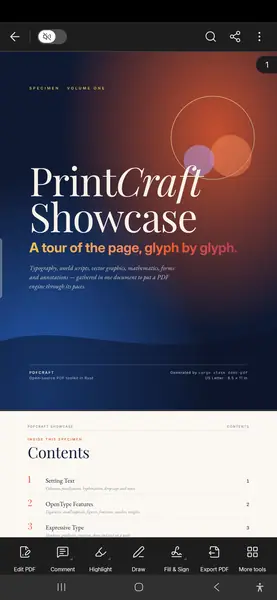
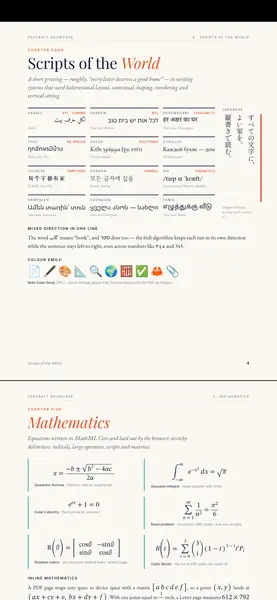
PdfCraft is a PDF reader and editor for Android, built on the PdfCraft engine. It follows the layout and the tools of Acrobat Reader for phones, and everything stays on your phone: no account, no cloud.
Read
- Continuous or single page, Reading Mode (text reflowed to the screen), Night Mode
- Find, text selection, links, bookmarks and the table of contents, attachments
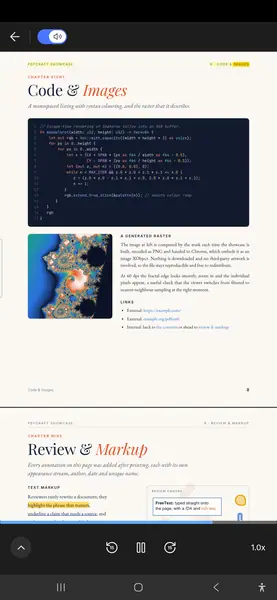
- Read aloud with the phone's voice, the words marked as they're read
Comment
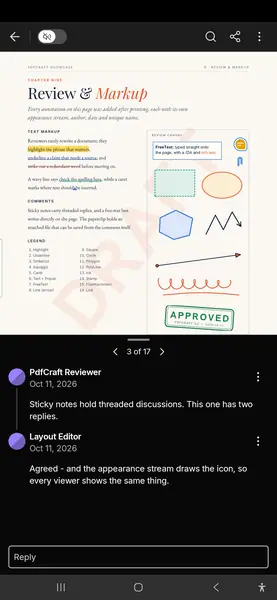
- Notes and voice comments, highlight, underline, strikethrough, drawing (snap to shape) and text
- The Comment List, threads and replies
Fill and sign
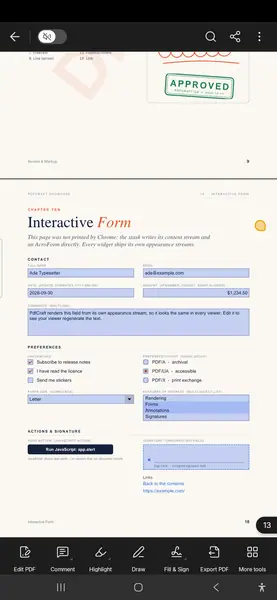
- Fill in form fields, or use Fill & Sign: text, marks and a drawn or imported signature
Edit
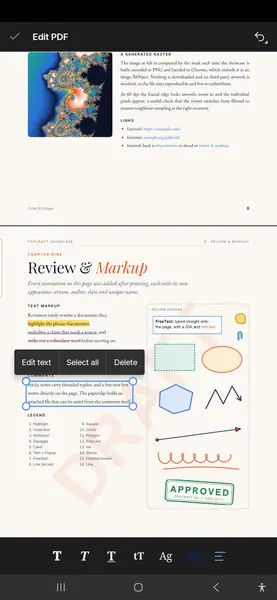
- Edit text, add text and images, move, resize and turn pictures
- Organize pages: move, turn, insert, extract and delete; crop pages
Make new files
- Compress, combine, set a password, create PDFs from images, text or office documents, scan
- Export to Word, RTF, Excel, PowerPoint, JPEG or PNG
- Recognize text on scanned pages
Changes are saved back into the file you opened. Works upright and sideways, in the light and dark themes. PdfCraft is in beta.
PdfCraft is not affiliated with or endorsed by Adobe. Acrobat is a trademark of Adobe Inc.
Neu in Version 0.0.7-beta
- German, French, Italian, Brazilian Portuguese and Arabic translations
- A newer PDF engine (0.14.0)
- Mouse support: the wheel scrolls and zooms, a drag selects text
- Read aloud starts from a tapped word or the selection
- A scan keeps its photos when Android closes the app behind the camera
- A placed signature takes the colour you pick
- Closing a PDF another app opened goes back to that app
- PdfCraft no longer keeps a copy of every PDF it opens
Informationen zur APK-Datei
| Paketname | io.github.artcraftandroid.pdfcraft |
|---|---|
| Version | 0.0.7-beta (Code 7012) |
| Mindestens | Android 10 · ausgelegt für Android 16 |
| Architekturen | arm64-v8a |
| SHA-256 | ba9c3486b5359829e1265f099806e78eb5b8597944a817caee2f0ec9e5570b6b |
| Signatur | 7356d58ae3446b3e6cc457d0b9901700376c787310c9dba14e9c11866588eeb5 |
| Lizenz | MIT — freie, freizügige Lizenz: Der Quellcode ist öffentlich und wiederverwendbar |
| Quellcode | github.com/artcraft-android/pdfcraft-android |
Berechtigungen
- Mikrofon sensibel
- Im Hintergrund laufen
Ältere Versionen
- PdfCraft 0.0.7-beta6. November 2026 · 45,5 MB
- PdfCraft 0.0.7-beta6. November 2026 · 37,3 MB
- PdfCraft 0.0.6-beta31. Oktober 2026 · 44,9 MB
- PdfCraft 0.0.6-beta31. Oktober 2026 · 36,8 MB
- PdfCraft 0.0.5-beta27. Oktober 2026 · 42,7 MB
- PdfCraft 0.0.5-beta27. Oktober 2026 · 35,1 MB
So installieren Sie PdfCraft APK
- Tippen Sie oben auf APK herunterladen und öffnen Sie die Datei nach dem Download.
- Wenn Android fragt, erlauben Sie Ihrem Browser, unbekannte Apps zu installieren.
- Tippen Sie auf Installieren. PdfCraft erscheint dann bei Ihren anderen Apps.
→ APK-Datei auf Android installieren (Schritt für Schritt)
→ „App nicht installiert“: Ursachen und Lösungen
Häufige Fragen
Ist PdfCraft kostenlos?
Ja. PdfCraft steht unter der Lizenz MIT: kostenlos, ohne Abo, und der Quellcode ist öffentlich.
Ist diese APK-Datei sicher?
Die Datei wurde vom F-Droid-Repository aus dem öffentlichen Quellcode erstellt und veröffentlicht. Ihr SHA-256-Fingerabdruck steht oben, Sie können ihn nach dem Download vergleichen. Ist eine APK gefährlich? So prüfen Sie eine Datei vor der Installation
Läuft PdfCraft auf meinem Handy?
Sie benötigen mindestens Android 10. Die App funktioniert auch ohne Google-Dienste, also auch auf aktuellen Huawei-Handys.





