
Saber APK
The notes app built for handwriting
APK herunterladen v1.37.1 · 40,1 MB- Version1.37.1
- Größe40,1 MB
- BenötigtAndroid 7.0
- Aktualisiert31.10.2026
- LizenzGPL-3.0-only
- PreisKostenlos
Über Saber
Beschreibung des Entwicklers (auf Englisch).
Saber is the notes app built for handwriting.
It's designed to be as simple and intuitive as possible, while still delivering unique features that you'll actually use. Additionally, Saber is available across all your devices, large and small, and syncs between them seamlessly.
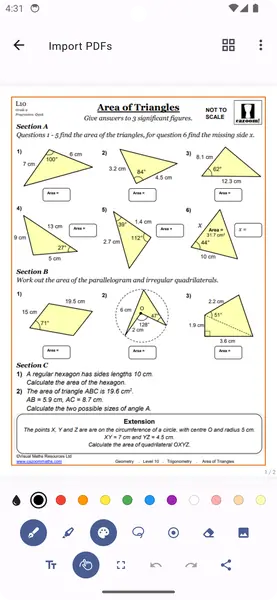
Notably, it can invert your notes when you're in dark mode. This allows you to write with white ink on a black background, which is much easier on the eyes in low-light environments like when the teacher turns off the lights in class. Images and PDFs are also inverted, so you can still use a digital printout or a textbook without the fuss.
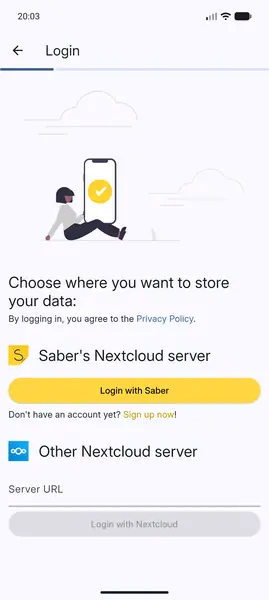
Saber uses a dual-password system to protect your notes from anyone but you, even if they have complete control over the server. You can safely store your notes on the official Saber server, another server, or even host your own!
The app is completely open-source so that anyone can view the source code and see exactly what it's doing and how it handles your data. Many other note-taking apps are closed-source and proprietary, meaning that their inner workings are a mystery to the public.
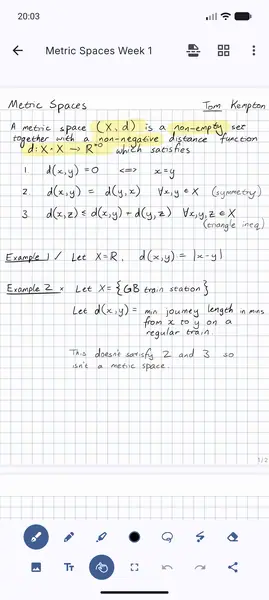
As someone who studies maths, highlighting multi-line equations was always a hassle with other apps, where the highlighter would change color when it overlapped with itself. Another problem I had was that in some apps, the highlighter would render on top of the text, fading it out and making it hard to read. Saber's highlighter has no such issues. It utilizes canvas compositing to render the highlighter in a way that is consistent with/better than traditional paper, where it handles overlaps and maintains color consistency.
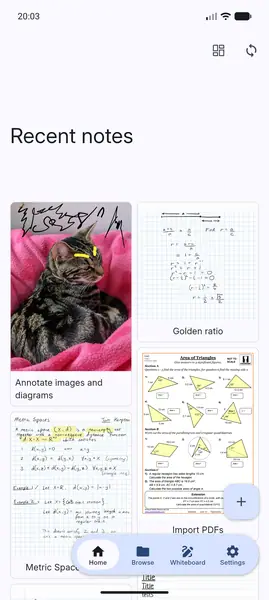
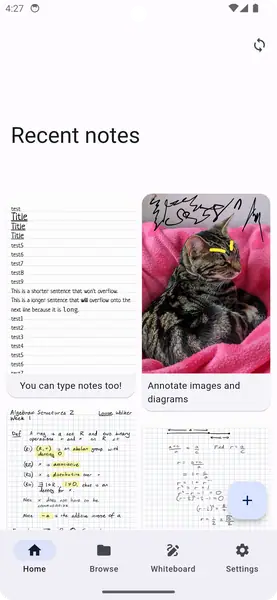
Saber has everything you need to keep your notes organized. Create folders inside folders inside folders to your heart's content with no limit on the number of nested folders. And even though a note may be buried deep within a nested folder, you can still access it easily with your most recent notes always available on the home screen.
Discover a whole new way to capture and organize your thoughts with Saber. Whether you're a student, professional, or creative mind, Saber is your trusted companion for digital handwriting. Download now and let your ideas flow freely!
Neu in Version 1.37.1
- Einige Geräte wurden behoben, die es Ihnen erlaubten, eine PDF zu importieren, wenn Saber ein Bild erwartet.
- Eine Umgehung wurde hinzugefügt, um das Problem zu beheben, dass bereits als Bild importierte PDFs unlesbar machen.
- Beheben des Problems, dass der Radiergummi keine rechteckige Form außer in der Nähe ihrer Ecken löschen konnte.
- Erhöhte Speichereffizienz beim Einfügen eines Bildes aus dem Zwischenspeicher.
Informationen zur APK-Datei
| Paketname | com.adilhanney.saber |
|---|---|
| Version | 1.37.1 (Code 1370103) |
| Mindestens | Android 7.0 · ausgelegt für Android 16 |
| Architekturen | x86_64 |
| SHA-256 | bfda6d5a75d54418b2fce0c7124dcacaaa0241f9fae862c81f5e574a806f8745 |
| Signatur | 07cbce38536206e629fecb4ef14fc66861ca0965556878ad6b636d77a6ab895a |
| Lizenz | GPL-3.0-only — freie Copyleft-Lizenz: Der Code ist öffentlich und veränderte Versionen müssen frei bleiben |
| Quellcode | github.com/saber-notes/saber |
Berechtigungen
- Internetzugriff
- Auf Speicher schreiben
- Speicher lesen
- Netzwerkstatus sehen
- Benachrichtigungen anzeigen
- Im Hintergrund laufen
- Ruhezustand verhindern
- Beim Start ausführen
Ältere Versionen
- Saber 1.37.131. Oktober 2026 · 40,1 MB
- Saber 1.37.131. Oktober 2026 · 38,4 MB
- Saber 1.37.131. Oktober 2026 · 34,8 MB
- Saber 1.36.427. Oktober 2026 · 40,1 MB
- Saber 1.36.427. Oktober 2026 · 38,4 MB
- Saber 1.36.427. Oktober 2026 · 34,7 MB
- Saber 1.36.325. Oktober 2026 · 40,5 MB
- Saber 1.36.325. Oktober 2026 · 38,9 MB
- Saber 1.36.325. Oktober 2026 · 35,2 MB
So installieren Sie Saber APK
- Tippen Sie oben auf APK herunterladen und öffnen Sie die Datei nach dem Download.
- Wenn Android fragt, erlauben Sie Ihrem Browser, unbekannte Apps zu installieren.
- Tippen Sie auf Installieren. Saber erscheint dann bei Ihren anderen Apps.
→ APK-Datei auf Android installieren (Schritt für Schritt)
→ „App nicht installiert“: Ursachen und Lösungen
Häufige Fragen
Ist Saber kostenlos?
Ja. Saber steht unter der Lizenz GPL-3.0-only: kostenlos, ohne Abo, und der Quellcode ist öffentlich.
Ist diese APK-Datei sicher?
Die Datei wurde vom F-Droid-Repository aus dem öffentlichen Quellcode erstellt und veröffentlicht. Ihr SHA-256-Fingerabdruck steht oben, Sie können ihn nach dem Download vergleichen. Ist eine APK gefährlich? So prüfen Sie eine Datei vor der Installation
Läuft Saber auf meinem Handy?
Sie benötigen mindestens Android 7.0. Die App funktioniert auch ohne Google-Dienste, also auch auf aktuellen Huawei-Handys.





