
CAPod APK
CAPod - Companion for AirPods
CAPod is a companion app for AirPods on Android.
Download APK v5.7.0-rc0 · 9.0 MB- Version5.7.0-rc0
- Size9.0 MB
- RequiresAndroid 8.0
- Updated11/23/2026
- LicenceGPL-3.0-only
- PriceFree


About CAPod
CAPod is a companion app for AirPods.
Features:
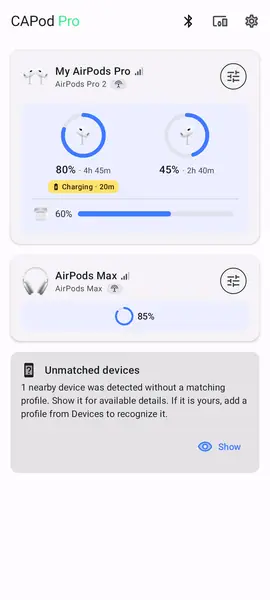
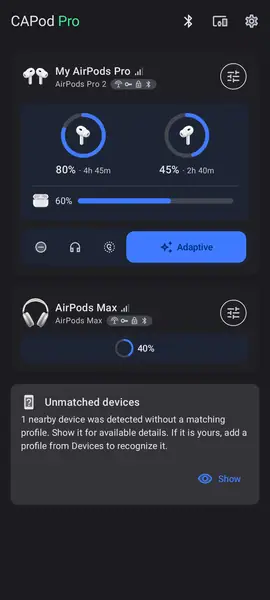
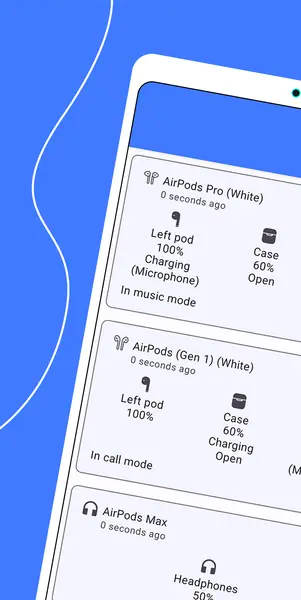
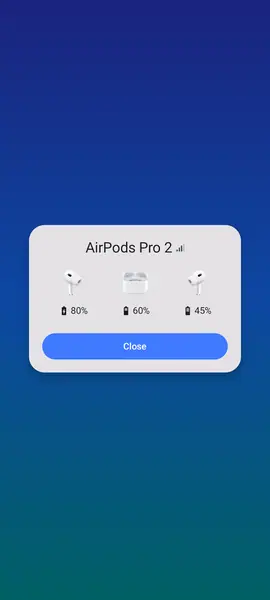
- Battery level for pods and cases.
- Charging status for pods and case.
- Additional infos about connection, microphone and case.
- Can receive and show all nearby devices.
- Ear detection with automatic play/pause.
- Automatically connect device and AirPods.
- Show popup when case is opened.
CAPod is ad-free. Some features require an in-app purchase.
Most popular AirPods and Beats devices are supported. If your device is similar to AirPods but not yet supported, send me a short mail.
Got a cool idea for a new feature? Reach out!
What's new in version 5.7.0-rc0
Bug fixes and small improvements, so your AirPods keep showing the right battery levels on your phone.
What changed in this version: capod.darken.eu/changelog
Something broke or behaves oddly after updating? Tell me via Settings > Support. It's a one-person project, so replies can take a little while, but every report gets read.
APK file information
| Package name | eu.darken.capod |
|---|---|
| Version | 5.7.0-rc0 (code 50700000) |
| Minimum Android | Android 8.0 · targets Android 16 |
| Architectures | arm64-v8a, armeabi-v7a, x86, x86_64 |
| SHA-256 | e19896b4e74642b8de05f91231466a16758dc12d1d0ba12f8d1cd109684971a7 |
| Signature | 6729f9de72b4fca99615b22f984400ad1f3daa2411d8b1e09f321b038fac85ed |
| Licence | GPL-3.0-only — copyleft free licence: the code is public and modified versions must stay free |
| Source code | github.com/d4rken-org/capod |
Permissions
- Show notifications
- Draw over other apps sensitive
- Start at boot
- Run in the background
- Background location sensitive
- Bluetooth
- Approximate location sensitive
- Precise location (GPS) sensitive
- Connect via Bluetooth
- Scan for Bluetooth devices
- Keep the device awake
- View network status
1 other technical permission(s)
BLUETOOTH_ADMIN
Older versions
- CAPod 5.7.0-rc0November 23, 2026 · 9.0 MB
- CAPod 5.6.0-rc0November 1, 2026 · 9.0 MB
- CAPod 5.5.0-rc0October 12, 2026 · 8.9 MB
How to install CAPod APK
- Tap Download APK above, then open the file once the download has finished.
- If Android asks, allow your browser to install unknown apps.
- Tap Install. CAPod then appears with your other apps.
Having trouble? Read our guides how to install an APK on Android and "App not installed": how to fix it.
Frequently asked questions
Is CAPod free?
Yes. CAPod is distributed under the GPL-3.0-only licence: free, no subscription, and its source code is public.
Is this APK file safe?
The file is the one built and published by the F-Droid repository from the public source code. Its SHA-256 fingerprint is shown above, so you can compare it after downloading. How to check an APK.
Will CAPod work on my phone?
You need at least Android 8.0. The app also works without Google services, so it runs on recent Huawei phones too.




