
Chrono APK
Modern and powerful clock, alarms, timer and stopwatch.
Download APK v0.6.0 · 16.9 MB- Version0.6.0
- Size16.9 MB
- RequiresAndroid 5.0
- Updated1/10/2025
- LicenceGPL-3.0-or-later
- PriceFree
About Chrono
Features
- Modern and easy to use interface
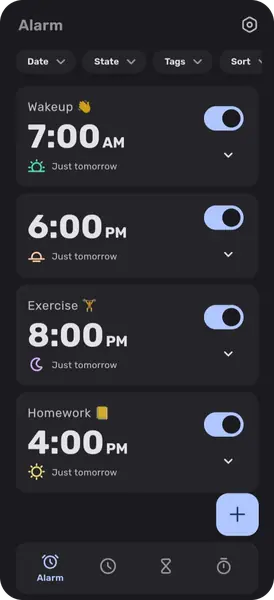
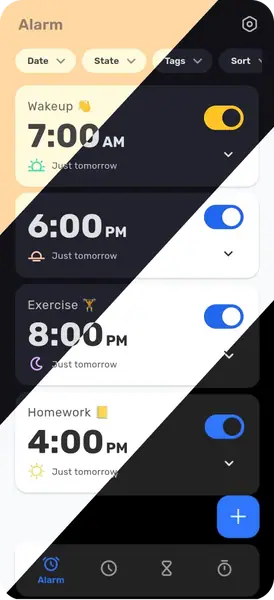
Alarms
- Customizable schedules (daily, weekly, specific week days, specific dates, date range)
- Configure melody, rising volume and vibrations
- Configure snooze length and max snoozes
- Alarm tasks (math problems, retype text, sequence, more to come)
- Filter alarms (all, today, tomorrow, snoozed, disabled, completed)
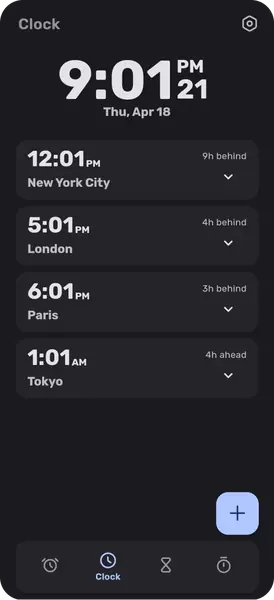
Clock
- Customizable clock display
- World clocks with relative time difference
- Search and add cities
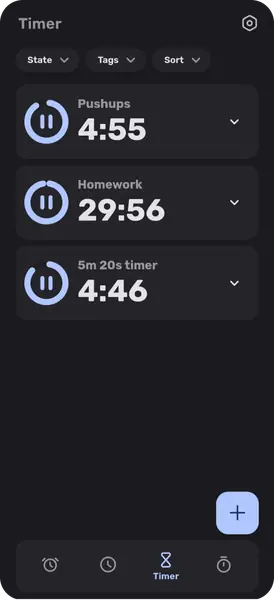
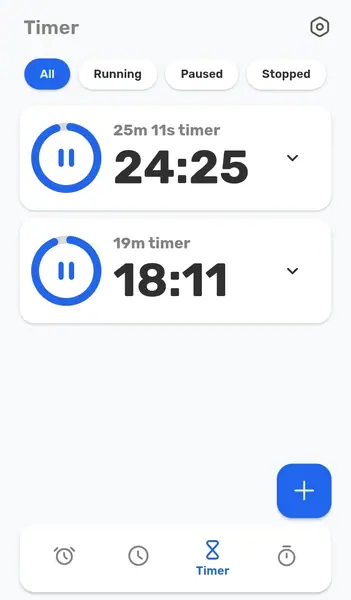
Timer
- Configure melody, rising volume and vibrations
- Timer presets
- Filter timers (all, running, paused, stopped)
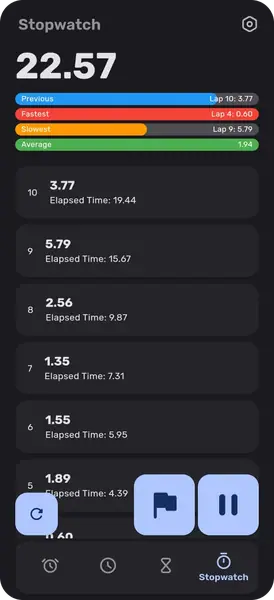
Stopwatch
- Lap history with lap times and elapsed times
- Lap comparisons
Appearance
- Material You themes
- Highly customizable color themes
- Highly customizable style themes
What's new in version 0.6.0
Changes since 0.5.1
🚀 Features
- Added option to select directory for ringtones (random ringtone will be selected from the directory each time)
- Added multiselect for lists
- Added option to shuffle alarm ringtone
- Added backup and restore for alarms, timers, themes etc.
- Added numpad input for timers
- Added option to reduce volume while solving alarm tasks
- Added quick home screen actions for alarms and timers
- Added option to start ringtone at random position
- Added background service
APK file information
| Package name | com.vicolo.chrono |
|---|---|
| Version | 0.6.0 (code 283) |
| Minimum Android | Android 5.0 · targets Android 14 |
| Architectures | x86_64 |
| SHA-256 | afca7f22c2ea0338e4c359d2eb816f02c7651a12aafe2cbfcc6738c997337d55 |
| Signature | 67ee2965dffd6b509ed274a3c18d39f0e5d55ebba4a95dfc1e34879f437e7581 |
| Licence | GPL-3.0-or-later — copyleft free licence: the code is public and modified versions must stay free |
| Source code | github.com/vicolo-dev/chrono |
Permissions
- Start at boot
- Keep the device awake
- Vibrate
- Run in the background
- Read storage
- Read music
- Show notifications
- View network status
7 other technical permission(s)
USE_FULL_SCREEN_INTENT REQUEST_IGNORE_BATTERY_OPTIMIZATIONS SCHEDULE_EXACT_ALARM USE_EXACT_ALARM BROADCAST_CLOSE_SYSTEM_DIALOGS BIND_NOTIFICATION_LISTENER_SERVICE READ_APP_BADGE
Older versions
- Chrono 0.6.0January 10, 2025 · 16.9 MB
- Chrono 0.6.0January 10, 2025 · 16.7 MB
- Chrono 0.6.0January 10, 2025 · 17.5 MB
- Chrono 0.6.0-beta1September 25, 2024 · 16.8 MB
- Chrono 0.6.0-beta1September 27, 2024 · 16.6 MB
- Chrono 0.6.0-beta1September 27, 2024 · 17.4 MB
- Chrono 0.5.1May 30, 2024 · 16.6 MB
- Chrono 0.5.1May 30, 2024 · 16.5 MB
- Chrono 0.5.1May 30, 2024 · 17.3 MB
How to install Chrono APK
- Tap Download APK above, then open the file once the download has finished.
- If Android asks, allow your browser to install unknown apps.
- Tap Install. Chrono then appears with your other apps.
Having trouble? Read our guides how to install an APK on Android and "App not installed": how to fix it.
Frequently asked questions
Is Chrono free?
Yes. Chrono is distributed under the GPL-3.0-or-later licence: free, no subscription, and its source code is public.
Is this APK file safe?
The file is the one built and published by the F-Droid repository from the public source code. Its SHA-256 fingerprint is shown above, so you can compare it after downloading. How to check an APK.
Will Chrono work on my phone?
You need at least Android 5.0. The app also works without Google services, so it runs on recent Huawei phones too.




