
Forkgram Classic APK
A Telegram fork preserving the classic UI from before the Liquid Glass era.
Download APK v13.1.6.0 · 38.1 MB- Version13.1.6.0
- Size38.1 MB
- RequiresAndroid 6.0
- Updated11/11/2026
- LicenceGPL-2.0-or-later
- PriceFree
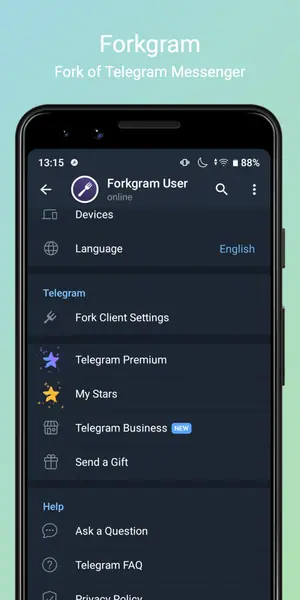
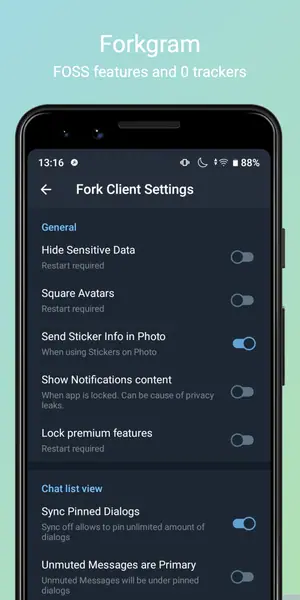
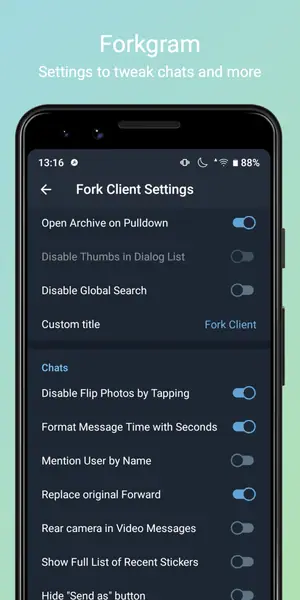
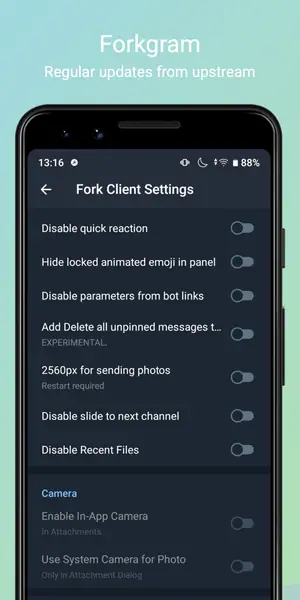
About Forkgram Classic
Forkgram Classic is a fork of Telegram for Android with a single purpose: to preserve the classic interface — the era before "Liquid Glass".
It is based on Forkgram and inherits its quality-of-life tweaks, with no telemetry, no analytics and no third-party endpoints — all traffic goes only to Telegram's official servers.
APK file information
| Package name | org.forkgram.classic |
|---|---|
| Version | 13.1.6.0 (code 724308) |
| Minimum Android | Android 6.0 · targets Android 16 |
| Architectures | arm64-v8a |
| SHA-256 | c88ab5b7071a8cb764e0c556da6c9225120ad0f65bf5778d620453e5e6b7c71e |
| Signature | 4c021012e78b7d504667e00e7d87e2199ed35b856e5b7773135f4e7d9b792a2c |
| Licence | GPL-2.0-or-later — copyleft free licence: the code is public and modified versions must stay free |
| Source code | github.com/forkgram/forkgram-classic |
Permissions
- Approximate location sensitive
- Precise location (GPS) sensitive
- Make calls sensitive
- Run in the background
- Call log sensitive
- Connect via Bluetooth
- Internet access
- Microphone sensitive
- View network status
- View Wi-Fi status
- Keep the device awake
- Read storage
- Read photos
- Read videos
- Read music
- Read contacts sensitive
- Edit contacts sensitive
- Vibrate
- Draw over other apps sensitive
- Phone status sensitive
- Start at boot
- Fingerprint
- Fingerprint / biometrics
- Camera sensitive
- Bluetooth
- Install other apps sensitive
- Show notifications
- Write to storage
- Background location sensitive
15 other technical permission(s)
ACCESS_MEDIA_LOCATION USE_FULL_SCREEN_INTENT READ_CLIPBOARD MODIFY_AUDIO_SETTINGS GET_ACCOUNTS MANAGE_ACCOUNTS READ_PROFILE WRITE_SYNC_SETTINGS READ_SYNC_SETTINGS AUTHENTICATE_ACCOUNTS CREDENTIAL_MANAGER_SET_ORIGIN INSTALL_SHORTCUT MANAGE_OWN_CALLS READ_PHONE_NUMBERS READ_APP_BADGE
Older versions
- Forkgram Classic 13.1.6.0November 11, 2026 · 38.1 MB
- Forkgram Classic 13.1.6.0November 11, 2026 · 37.1 MB
- Forkgram Classic 13.1.4.0November 9, 2026 · 38.1 MB
- Forkgram Classic 13.1.4.0November 9, 2026 · 37.1 MB
- Forkgram Classic 13.1.2.0November 6, 2026 · 38.1 MB
- Forkgram Classic 13.1.2.0November 6, 2026 · 37.1 MB
How to install Forkgram Classic APK
- Tap Download APK above, then open the file once the download has finished.
- If Android asks, allow your browser to install unknown apps.
- Tap Install. Forkgram Classic then appears with your other apps.
Having trouble? Read our guides how to install an APK on Android and "App not installed": how to fix it.
Frequently asked questions
Is Forkgram Classic free?
Yes. Forkgram Classic is distributed under the GPL-2.0-or-later licence: free, no subscription, and its source code is public.
Is this APK file safe?
The file is the one built and published by the F-Droid repository from the public source code. Its SHA-256 fingerprint is shown above, so you can compare it after downloading. How to check an APK.
Will Forkgram Classic work on my phone?
You need at least Android 6.0. The app also works without Google services, so it runs on recent Huawei phones too.





