GitSync APK
Git client for syncing a repository between remote and a local directory
Download APK v1.8.66 · 22.2 MB- Version1.8.66
- Size22.2 MB
- RequiresAndroid 7.0
- Updated11/23/2026
- LicenceGPL-3.0-only
- PriceFree
About GitSync
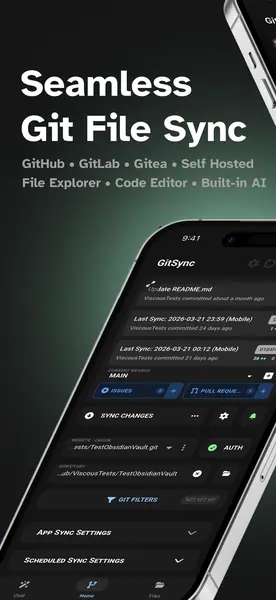
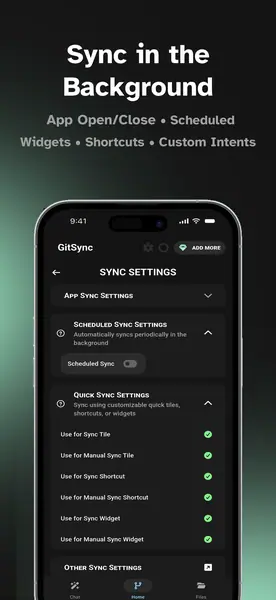
GitSync is an Android git client that aims to simplify the process of syncing a folder between a git remote and a local directory. It works in the background to keep your files synced with a simple one-time setup and a range of options for activating manual syncs.
- Supports Android 5+
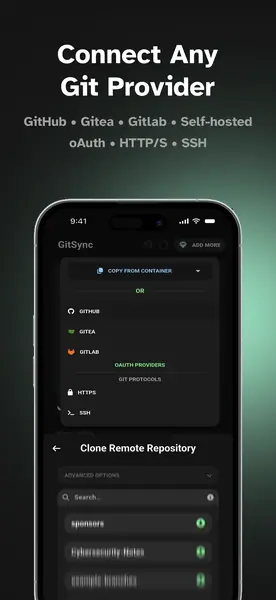
- Authenticate with
- HTTP/S
- SSH
- OAuth (GitHub, GitLab, Gitea)
- Clone a remote repository
- Sync repository
- Fetch, pull, stage, commit, push
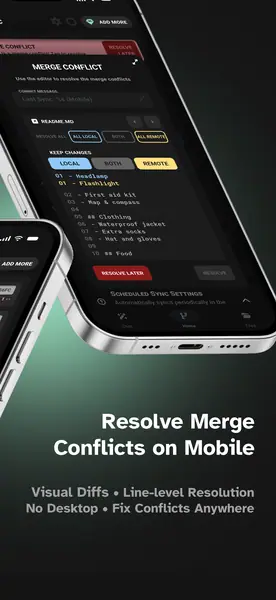
- Resolve merge conflicts
- Retry automatically when the network returns
- Sync mechanisms
- When an app is opened or closed
- On a recurring schedule
- From a Quick Settings tile
- From a home screen widget
- From a custom intent (advanced)
- Browse and edit in-app
- File explorer with code editor and image viewer
- Recent commits, plus file, line and commit diffs
- Branch management
- Multiple remotes
- GitHub and GitLab integration (when signed in via OAuth)
- View, comment on and create issues
- View, comment on and create pull requests
- View workflow runs (GitHub Actions)
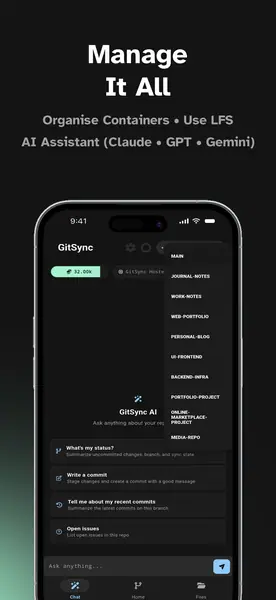
- AI features
- Chat about your repository
- Wand auto-complete on text fields like commit messages
- Agent that can run repo actions for you
- A global toggle to hide all AI features
- Manage multiple repositories with containers
- Repository settings
- Signed commits
- Customisable sync commit messages
- Author details
- Edit .gitignore & .git/info/exclude
- Disable SSL verification per repo
Accessibility Service Disclosure
To enhance your experience, GitSync uses Android's Accessibility Service to detect when apps are opened or closed. This helps us provide tailored features without storing or sharing any data.
Key Points:
- Purpose: We use this service solely to improve your app experience.
- Privacy: No data is stored or sent elsewhere.
- Control: You can disable these permissions at any time in your device settings.
APK file information
| Package name | com.viscouspot.gitsync |
|---|---|
| Version | 1.8.66 (code 18663) |
| Minimum Android | Android 7.0 · targets Android 16 |
| Architectures | x86_64 |
| SHA-256 | f0cca161d02152047a45ecbb4d1eea98fc7f6d96de82be672eedd34ac72ee3f1 |
| Signature | f5cd024f134ce7d5d7c41ef27f0a9f02e3b1ad14760257811bab2959945130d9 |
| Licence | GPL-3.0-only — copyleft free licence: the code is public and modified versions must stay free |
| Source code | github.com/ViscousPot/GitSync |
| Official website | gitsync.viscouspotenti.al |
Permissions
- Internet access
- Write to storage
- Read storage
- Access all files sensitive
- Show notifications
- Run in the background
- Start at boot
- Keep the device awake
- Vibrate
- View network status
1 other technical permission(s)
GET_TASKS
Older versions
- GitSync 1.8.66November 23, 2026 · 22.2 MB
- GitSync 1.8.66November 23, 2026 · 22.2 MB
- GitSync 1.8.66November 23, 2026 · 21.4 MB
- GitSync 1.8.65September 14, 2026 · 22.1 MB
- GitSync 1.8.65September 14, 2026 · 22.1 MB
- GitSync 1.8.65September 14, 2026 · 21.3 MB
- GitSync 1.8.63August 23, 2026 · 22.1 MB
- GitSync 1.8.63August 23, 2026 · 22.1 MB
- GitSync 1.8.63August 23, 2026 · 21.3 MB
How to install GitSync APK
- Tap Download APK above, then open the file once the download has finished.
- If Android asks, allow your browser to install unknown apps.
- Tap Install. GitSync then appears with your other apps.
Having trouble? Read our guides how to install an APK on Android and "App not installed": how to fix it.
Frequently asked questions
Is GitSync free?
Yes. GitSync is distributed under the GPL-3.0-only licence: free, no subscription, and its source code is public.
Is this APK file safe?
The file is the one built and published by the F-Droid repository from the public source code. Its SHA-256 fingerprint is shown above, so you can compare it after downloading. How to check an APK.
Will GitSync work on my phone?
You need at least Android 7.0. The app also works without Google services, so it runs on recent Huawei phones too.