GitSync APK
Git client for syncing a repository between remote and a local directory
Baixar APK v1.8.66 · 22,2 MB- Versão1.8.66
- Tamanho22,2 MB
- RequerAndroid 7.0
- Atualizado23/11/2026
- LicençaGPL-3.0-only
- PreçoGrátis
Sobre o GitSync
Descrição fornecida pelo desenvolvedor (em inglês).
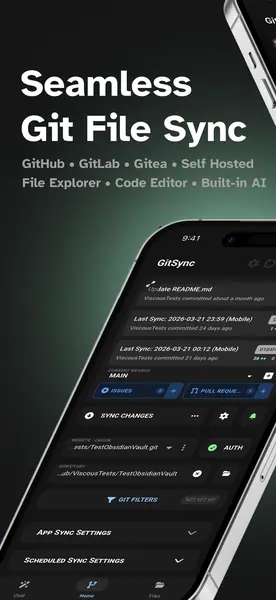
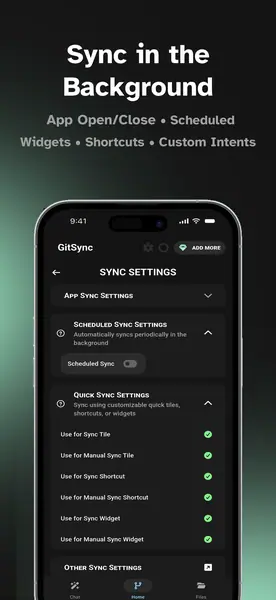
GitSync is an Android git client that aims to simplify the process of syncing a folder between a git remote and a local directory. It works in the background to keep your files synced with a simple one-time setup and a range of options for activating manual syncs.
- Supports Android 5+
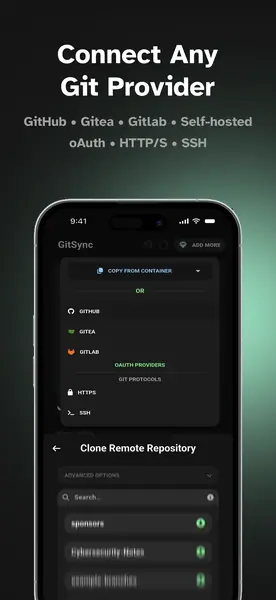
- Authenticate with
- HTTP/S
- SSH
- OAuth (GitHub, GitLab, Gitea)
- Clone a remote repository
- Sync repository
- Fetch, pull, stage, commit, push
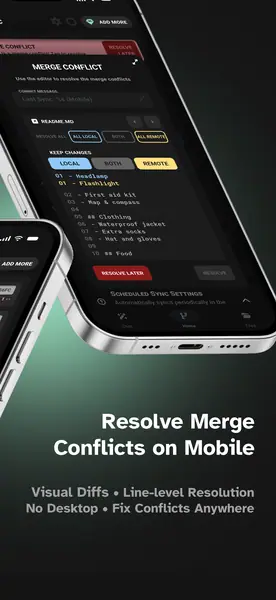
- Resolve merge conflicts
- Retry automatically when the network returns
- Sync mechanisms
- When an app is opened or closed
- On a recurring schedule
- From a Quick Settings tile
- From a home screen widget
- From a custom intent (advanced)
- Browse and edit in-app
- File explorer with code editor and image viewer
- Recent commits, plus file, line and commit diffs
- Branch management
- Multiple remotes
- GitHub and GitLab integration (when signed in via OAuth)
- View, comment on and create issues
- View, comment on and create pull requests
- View workflow runs (GitHub Actions)
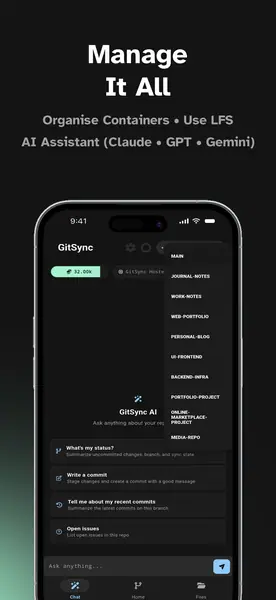
- AI features
- Chat about your repository
- Wand auto-complete on text fields like commit messages
- Agent that can run repo actions for you
- A global toggle to hide all AI features
- Manage multiple repositories with containers
- Repository settings
- Signed commits
- Customisable sync commit messages
- Author details
- Edit .gitignore & .git/info/exclude
- Disable SSL verification per repo
Accessibility Service Disclosure
To enhance your experience, GitSync uses Android's Accessibility Service to detect when apps are opened or closed. This helps us provide tailored features without storing or sharing any data.
Key Points:
- Purpose: We use this service solely to improve your app experience.
- Privacy: No data is stored or sent elsewhere.
- Control: You can disable these permissions at any time in your device settings.
Informações do arquivo APK
| Nome do pacote | com.viscouspot.gitsync |
|---|---|
| Versão | 1.8.66 (código 18663) |
| Android mínimo | Android 7.0 · feito para Android 16 |
| Arquiteturas | x86_64 |
| SHA-256 | f0cca161d02152047a45ecbb4d1eea98fc7f6d96de82be672eedd34ac72ee3f1 |
| Assinatura | f5cd024f134ce7d5d7c41ef27f0a9f02e3b1ad14760257811bab2959945130d9 |
| Licença | GPL-3.0-only — licença livre copyleft: o código é público e versões modificadas devem continuar livres |
| Código-fonte | github.com/ViscousPot/GitSync |
| Site oficial | gitsync.viscouspotenti.al |
Permissões solicitadas
- Acesso à internet
- Gravar no armazenamento
- Ler o armazenamento
- Acesso a todos os arquivos sensível
- Mostrar notificações
- Funcionar em segundo plano
- Iniciar com o sistema
- Impedir o modo de espera
- Vibrar
- Ver o estado da rede
Mais 1 permissão(ões) técnica(s)
GET_TASKS
Versões anteriores
- GitSync 1.8.6623 de novembro de 2026 · 22,2 MB
- GitSync 1.8.6623 de novembro de 2026 · 22,2 MB
- GitSync 1.8.6623 de novembro de 2026 · 21,4 MB
- GitSync 1.8.6514 de setembro de 2026 · 22,1 MB
- GitSync 1.8.6514 de setembro de 2026 · 22,1 MB
- GitSync 1.8.6514 de setembro de 2026 · 21,3 MB
- GitSync 1.8.6323 de agosto de 2026 · 22,1 MB
- GitSync 1.8.6323 de agosto de 2026 · 22,1 MB
- GitSync 1.8.6323 de agosto de 2026 · 21,3 MB
Como instalar o GitSync APK
- Toque em Baixar APK acima e abra o arquivo quando o download terminar.
- Se o Android pedir, permita que o navegador instale apps desconhecidos.
- Toque em Instalar. O GitSync aparecerá junto aos seus outros apps.
→ Como instalar um arquivo APK no Android (passo a passo)
→ "App não instalado": causas e soluções
Perguntas frequentes
O GitSync é grátis?
Sim. O GitSync é distribuído sob a licença GPL-3.0-only: grátis, sem assinatura e com código-fonte público.
Este arquivo APK é seguro?
O arquivo é o compilado e publicado pelo repositório F-Droid a partir do código-fonte público. A impressão digital SHA-256 aparece acima para você comparar depois do download. APK é perigoso? Como verificar um arquivo antes de instalar
O GitSync funciona no meu celular?
É preciso ter pelo menos Android 7.0. O app também funciona sem os serviços do Google, inclusive em celulares Huawei recentes.