LeanType APK
Private, customizable open-source keyboard with smart productivity tools
Download APK v4.3.5 · 12.7 MB- Version4.3.5
- Size12.7 MB
- RequiresAndroid 6.0
- Updated11/23/2026
- LicenceGPL-3.0-only
- PriceFree
About LeanType
LeanType is a fast, privacy-focused, and highly customizable open-source keyboard for Android, built on the solid foundations of AOSP and HeliBoard. Designed for smooth typing, rich ergonomics, and modular productivity, LeanType gives you complete control over your keyboard experience with zero data tracking.
🛡️ Privacy & Offline First:
- 100% Open Source: No telemetry, no ads, and no background tracking.
- Strict Data Privacy: Your keystrokes and data remain entirely on your device.
- Zero Sensitive Permissions: Operates without contacts, location, or intrusive permissions.
⌨️ Ergonomics & Fluid Typing:
- Gesture Typing: Smooth swipe typing with adjustable sensitivity and preview.
- Multilingual Support: Multi-language typing with auto-correction, suggestions, and Gboard dictionary import.
- Trackpad Cursor & Text Editing: Swipe across the spacebar or use the dedicated DPAD text editing panel for precision cursor movement and selection.
- Floating Keyboard: Native, draggable, and resizable floating window for comfortable multitasking without overlay permissions.
- One-Handed & Split Modes: Optimized layouts for phones, foldables, and tablets.
- Hardware Keyboard Support: Full candidate selection and auto-correction for external Bluetooth/USB keyboards.
🎨 Deep Customization & Sound Packs:
- Material You & Themes: Dynamic system color matching, dark/light themes, and custom background wallpaper with blur.
- Key Ergonomics: Independent corner radius controls for normal, function, and action keys, plus adjustable key gaps and padding scales.
- Tactile Key Audio: Built-in low-latency sound engine featuring Cherry MX, Vintage Typewriter, Retro CRT, Soft Velvet, and custom sound pack import.
⚡ Clipboard & Productivity:
- Smart Clipboard Manager: Search clips in real-time, edit text directly in the toolbar, pin favorites, and 5-second undo for deletions.
- Inline Math Solver: Type equations directly (e.g., 25*4= or 150-20%=) for instant calculation in the suggestion strip.
- Dynamic Text Expander: Expand text shortcuts with dynamic variables like date, time, and clipboard content.
- Screenshot Suggestions: Instant 1-tap sharing and text extraction for recently captured screenshots.
- Modular Backup & Restore: Selectively export and import your layouts, themes, dictionaries, and clipboard history.
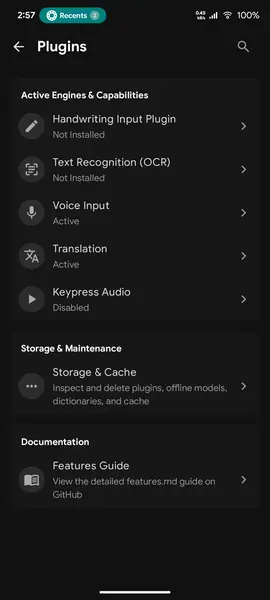
🧩 Modular Input & Plugins:
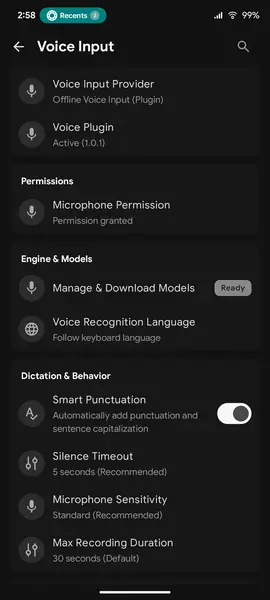
- Voice Typing: Accurate on-device speech-to-text powered by Whisper models.
- Handwriting Recognition: Draw characters and symbols directly on an in-keyboard canvas.
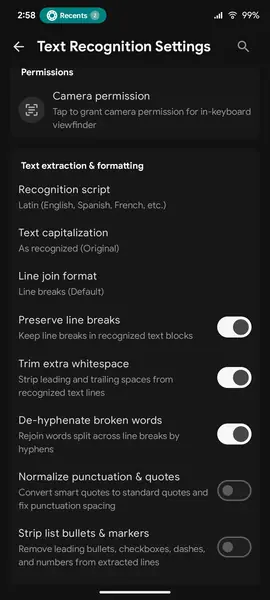
- Camera & Screenshot OCR: Extract text from real-world documents or screenshots with an in-keyboard viewfinder.
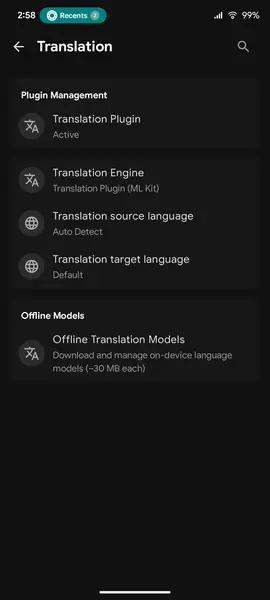
- In-Keyboard Translation: Translate text instantly via offline models or cloud translation.
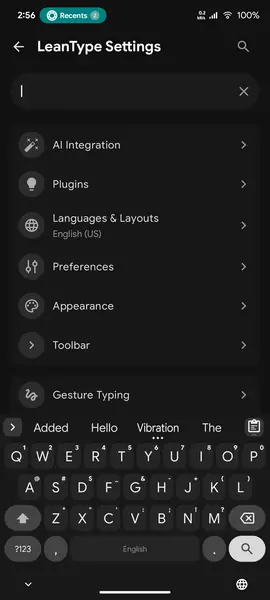
🤖 Smart AI Tools (Completely Optional):
- On-Demand Proofreading: Fix grammar, adjust tone, or rephrase text when you choose to use it.
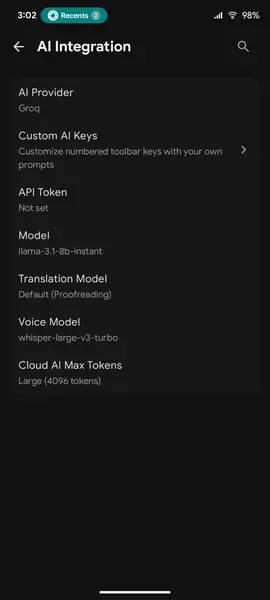
- Flexible Providers: Connect to Google Gemini, Groq, OpenAI, or self-hosted local LLMs (Ollama, LM Studio, LocalAI).
- Custom AI Keys: Program quick toolbar buttons with custom prompt instructions.
- Fully Opt-in: Network access is only used if you provide an API key and explicitly trigger an AI request.
Built with ❤️ by LeanBitLab.
What's new in version 4.3.5
- Japanese on physical keyboards no longer falls back to Chinese (#842).
- Removing a suggestion no longer blocks dictionary words like "I'm".
- New swipe action: swipe left on the keyboard to delete, right for space.
- Khipro Blinder mode: backslash types plain Latin until ";".
- GIF packs show as tiles, with optional animated previews (Android 9+).
- Fixes for one-handed mode, the floating toolbar, hex layouts and clipped emojis.
- AI Integration settings open faster.
APK file information
| Package name | com.leanbitlab.leantype |
|---|---|
| Version | 4.3.5 (code 4350) |
| Minimum Android | Android 6.0 · targets Android 15 |
| Architectures | arm64-v8a, armeabi-v7a |
| SHA-256 | b69b7a837bdb1898bd17ad83a698cfb314903ba47ff5e071e98771297c87b0a8 |
| Signature | ac7360ae311a36f2cc1caf1dad4848e18e191c55aaf128838fc34c92c6838016 |
| Licence | GPL-3.0-only — copyleft free licence: the code is public and modified versions must stay free |
| Source code | github.com/LeanBitLab/LeanType |
Permissions
- Internet access
- View network status
- Start at boot
- Vibrate
- Read storage
- Read photos
- Microphone sensitive
- Camera sensitive
- Keep the device awake
- Run in the background
3 other technical permission(s)
READ_USER_DICTIONARY WRITE_USER_DICTIONARY MODIFY_AUDIO_SETTINGS
Older versions
- LeanType 4.3.5November 23, 2026 · 12.7 MB
- LeanType 4.3.4November 20, 2026 · 12.7 MB
- LeanType 4.3.2November 17, 2026 · 12.8 MB
How to install LeanType APK
- Tap Download APK above, then open the file once the download has finished.
- If Android asks, allow your browser to install unknown apps.
- Tap Install. LeanType then appears with your other apps.
Having trouble? Read our guides how to install an APK on Android and "App not installed": how to fix it.
Frequently asked questions
Is LeanType free?
Yes. LeanType is distributed under the GPL-3.0-only licence: free, no subscription, and its source code is public.
Is this APK file safe?
The file is the one built and published by the F-Droid repository from the public source code. Its SHA-256 fingerprint is shown above, so you can compare it after downloading. How to check an APK.
Will LeanType work on my phone?
You need at least Android 6.0. The app also works without Google services, so it runs on recent Huawei phones too.