
LiveTempo APK
Manage song playlists with BPM references for live performances
Download APK v1.1.4 · 3.1 MB- Version1.1.4
- Size3.1 MB
- RequiresAndroid 6.0
- Updated10/15/2026
- LicenceMIT
- PriceFree
About LiveTempo
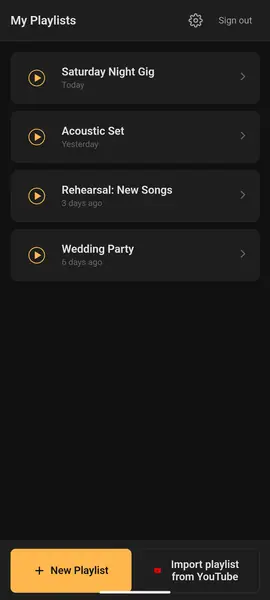
LiveTempo helps musicians manage song playlists with reference BPMs for live performances. Before each song starts, check the BPM to set the correct tempo right from your phone.
Features:
- Sign up with email and password to save your playlists in the cloud
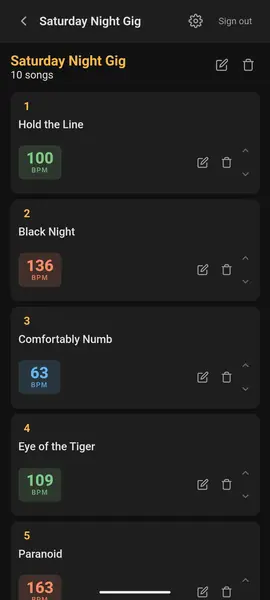
- Create and manage song playlists
- Set a reference BPM for each song
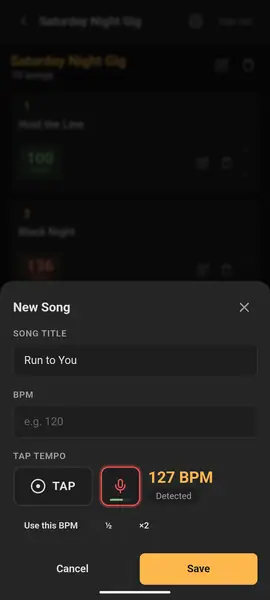
- Tap Tempo: tap to calculate BPM from any rhythm
- Automatic BPM detection from the microphone: let the app listen to the music and it finds the tempo (audio is analyzed on the device and never leaves it)
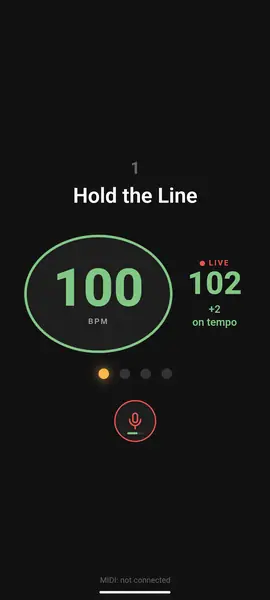
- Live tempo check: during the gig, see the tempo the band is actually playing next to the song's set BPM, with a hint to speed up or slow down
- Visual metronome pulse at the song's exact tempo
- Full-screen tempo view with large BPM display, readable from meters away
- Import playlists directly from YouTube
- Drag-and-drop and button reorder for playlist management
- Color-coded BPM badges (slow/medium/fast)
- Dark theme optimized for stage environments
- Customizable fonts and sizes for list and tempo views
- MIDI Bluetooth controller support for hands-free song navigation
- Multi-language: Italian and English
APK file information
| Package name | it.livetempo.app |
|---|---|
| Version | 1.1.4 (code 13) |
| Minimum Android | Android 6.0 · targets Android 15 |
| Architectures | All (universal) |
| SHA-256 | 4a285ebb2c8607c5fbeccf2edf532c66d961996d6183cbdf573924012ad291b9 |
| Signature | 072c84d73f2492380c42cf4a96d51e0f1cf874779a929dc0bfbc679828549e09 |
| Licence | MIT — permissive free licence: the source code is public and reusable |
| Source code | github.com/danmigdev/live_tempo |
Permissions
- Internet access
- Microphone sensitive
1 other technical permission(s)
MODIFY_AUDIO_SETTINGS
Older versions
- LiveTempo 1.1.4October 15, 2026 · 3.1 MB
- LiveTempo 1.1.3October 12, 2026 · 3.1 MB
How to install LiveTempo APK
- Tap Download APK above, then open the file once the download has finished.
- If Android asks, allow your browser to install unknown apps.
- Tap Install. LiveTempo then appears with your other apps.
Having trouble? Read our guides how to install an APK on Android and "App not installed": how to fix it.
Frequently asked questions
Is LiveTempo free?
Yes. LiveTempo is distributed under the MIT licence: free, no subscription, and its source code is public.
Is this APK file safe?
The file is the one built and published by the F-Droid repository from the public source code. Its SHA-256 fingerprint is shown above, so you can compare it after downloading. How to check an APK.
Will LiveTempo work on my phone?
You need at least Android 6.0. The app also works without Google services, so it runs on recent Huawei phones too.